Getting started with Kernel in the Cloud
Replace on-device EMV kernels with a cloud-managed service with Kernel in the Cloud
Things to Know
As a partner service provider interested in getting started with Kernel in the Cloud, it’s important that you have done the following key steps prior to moving forward.
If you are not already an entity that works directly with Visa and has an existing Master Services Agreement (MSA) in place, you will need to be onboarded by Visa’s Sourcing team and undergo a risk assessment prior to moving forward. This may require someone from your company completing a form on key financial information. To begin this process, reach out to your Visa account representative.
Second, in order to get started with KiC, you will need to review some of Visa’s technical specifications documents. Ensure that you have signed and completed a Technical Review Agreement (TRA) with your Visa account representative.
What you need to get started with Kernel in the Cloud
- Partner PSP, Processor or Acquirer
- Merchant-Facing UI / UX Application
- Acceptance Hardware / Device (i.e. mobile phone, MPOS, terminal)
- Merchants for which you will be enabling Kernel in the Cloud to accept payments
Step 1: Select your partner PSP, Processor or Acquirer
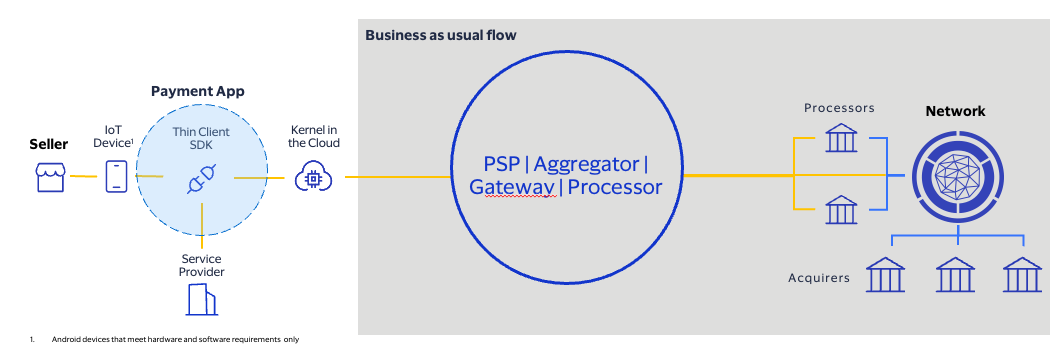
In order to onboard with Kernel in the Cloud via Visa Developer Platform, you will need to have a partner acquirer processor or a payment service provider (PSP) to process your payments. This entity could also be your own company if you are choosing to route transactions back to yourself via Kernel in the Cloud. Your integration with Kernel in the Cloud and the configurations that you establish on Visa Developer Platform will depend on the requirements of your processor.
Step 2: Ensure you have a Merchant-Facing UI/UX Application
If you do not have a Merchant-facing UI/UX (i.e. POS Register application) for accepting payments, you will need to have this in order to work with Kernel in the Cloud. Note that this does NOT need to include card-network kernels, as these are hosted in the Kernel in the Cloud. Visa will be providing technical specification documents as well as an SDK in order to enable your Merchant-facing UI/UX application to send transactions to Kernel in the Cloud and process payments. Furthermore, your Merchant-facing application will need to call some of the Kernel in the Cloud APIs in order to onboard your merchants.
Step 3: Select your Acceptance Hardware
Prior to getting started with Kernel in the Cloud, you will need to decide what type of acceptance hardware you will be enabling with Kernel in the Cloud for your merchants. If you are choosing to use a mobile device only as your acceptance solution, with no additional hardware, then you can get started quickly with Kernel in the Cloud. If you are instead choosing to use external acceptance hardware, you must ensure that the external acceptance hardware does not currently have any L2 processing kernels on it. The hardware must act strictly in passthrough mode, and meet Visa requirements for latency in both contact and contactless. To get more information on available hardware devices that are pre-configured to work with Kernel in the Cloud, reach out to your Visa account representative.
Step 4: Determine the Merchants that you will enable with Kernel in the Cloud
As the service provider, you will need to onboard your selected batch of merchants with Kernel in the Cloud. Depending on your preferences and requirements with your partner processor or Acquirer, your merchants may have different kernel and terminal configurations that will need to be set up as profiles on Kernel in the Cloud.
What Visa will provide
- Kernel in the Cloud Thin Client SDK and Documentation
- Kernel in the Cloud API Documentation
- Kernel in the Cloud Acquirer Integration Specifications
- Integration + Onboarding Support
Other important information
- Security and Encryption: If you are acting as the processor that will receive the payload from Kernel in the Cloud, you will need to be able to support EMV-level encryption requirements. If this is not something that you have traditionally supported in the past, you will need to ensure that your security protocols meet Visa’s requirements.