How to use Visa Alias Directory Service
Resolve recipients Alias Directory Service to send funds without exposing account numbers.
Quick Start
A quick introduction for creating and resolving your first Alias.
Step 1
Create an account on Visa Developer and add Alias Directory to your project. Click this link for an example of creating a project and adding APIs.
Step 2
Connect to the Create Alias API in the Sandbox. Use the below code in your Create Alias API request body. Please fill the alias Value prior to submitting the request.
{
  "aliasValue": "{CREATE YOUR OWN VALUE HERE}",
  "aliasType": "PHONE",
  "profile": {
    "firstName": "John",
    "lastName": "D"
  },
  "consent": {
    "presenter": "Bank A",
    "validFromDateTime": "2022-03-30T04:43:22.043Z",
    "expiryDateTime": "2022-06-20T10:00:00Z",
    "version": "1.0"
  },
  "paymentCredentials": [
    {
      "type": "CARD",
      "preferredFor": [
        {
          "type": "RECEIVE"
        }
      ],
      "nameOnCard": "John Doe",
      "accountNumber": "4000000000000000",
      "expirationDate": "2030-01",
      "billingAddress": {
        "addressLine1": "100 Main Street",
        "addressLine2": "Suite 101",
        "city": "San Francisco",
        "postalCode": "94105",
        "state": "CA",
        "country": "USA"
      }
    }
  ]
}You should receive a successful response like the below. The phone number and card are now linked.
{
  "id": "df844b33-0712-4783-9f84-55d5d90eb2df",
  "paymentCredentials": [
    {
      "type": "CARD",
      "id": "752c1fc5-b13b-4903-a725-090601d26f22"
    }
  ]
}Step 3
Now use the Resolve API to retrieve the Payment Credential. Use the below code in the Resolve API request body.
{
  "aliasValue": "{USE PHONE NUMBER FROM PREVIOUS STEP}",
  "aliasType": "PHONE"
}You should now be able to see the details associated with the Alias in the response.
{
  "identification": {},
  "profile": {
    "firstName": "John",
    "lastName": "D"
  },
  "paymentCredentials": [
    {
      "type": "CARD",
      "accountNumber": "4000000000000000",
      "preferredOn": "2022-10-24T19:35:34.654487Z",
      "nameOnCard": "John Doe",
      "expirationDate": "2030-01",
      "billingAddress": {
        "city": "San Francisco",
        "country": "USA",
        "addressLine1": "100 Main Street",
        "state": "CA",
        "postalCode": "94105",
        "addressLine2": "Suite 101"
      }
    }
  ],
  "directoryName": "STANDARD_91D614C3"
}Step 4
Create an additional Alias for the one created in step 2. The previously created Alias will be the primary Alias, and the one created below will be the secondary Alias. An additional Alias is generated by passing the Alias ID of the primary Alias in the path parameters (752c1fc5-b13b-4903-a725-090601d26f22 in the above example)
{

"type": "EMAIL",

"value": "[email protected]"

}Resolving the alias '[email protected]' should return similar details like those in step 3
Alias Lifecycle Management
Alias Directory allows clients to create Aliases and manage their lifecycle, e.g., update and delete.
Key Terms
| Key Terms | Definitions |
|---|---|
| Participants |
|
| Alias |
|
| Profile |
|
| Payment Credential |
|
| Program |
|
Data Schema Overview
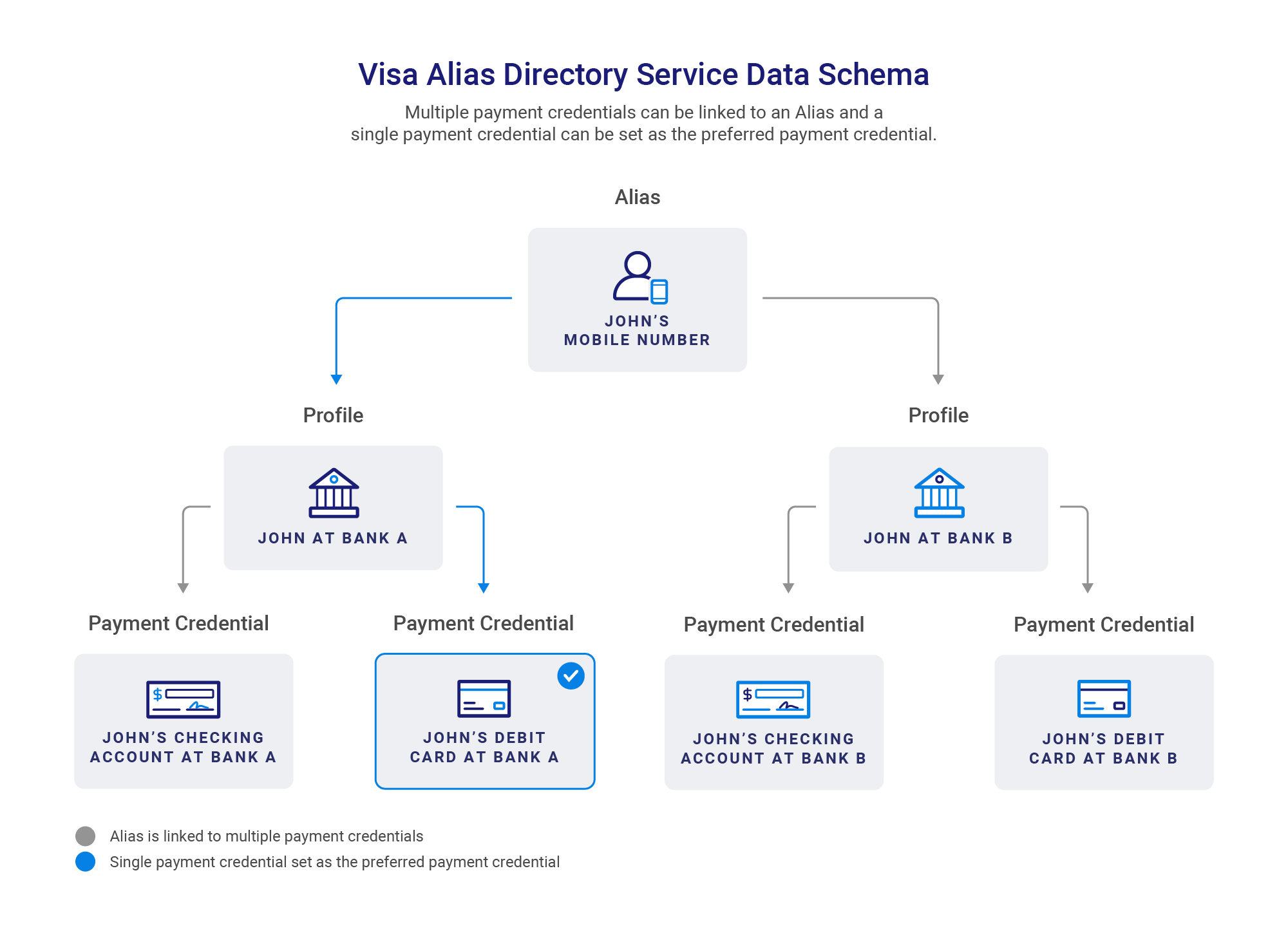
The below diagram is a simple visual of how this data is mapped in Alias Directory. In the below example
- A customer named John has a phone number.
- John is a customer of two banks: Bank A and Bank B. Both banks are participating in Alias Directory. John has provided consent to register his information in Alias Directory.
- In the Alias Directory database, John has two profiles - one for each bank.
- John has a checking account and debit card in each bank and registers them in Alias Directory. In the Alias Directory database, each checking account and debit card is mapped to the respective profile.
- John selected his debit card at Bank A as his preferred Payment Credential.
Alias Lifecycle Management APIs Overview
|
API |
Description |
|---|---|
Create Alias |
Phone number should be provided in accordance with ITU-T E.164 (2010) number structure. Please note that in the E.164 format, the "+" sign is not included. Below are some examples of phone numbers with different country codes: United States (country code = 1): 1650xxxxxxx Ukraine (country code = 380): 38067xxxxxxx United Kingdom (country code = 44): 4478xxxxxxxx Visa payname format: “+personalidentifier.domain" [must be min 4 and max 49 characters] Prefix '+' : Consumers of Alias Directory APIs must send all paynames with the ‘+’ sign as the first position of the field. Personal Identifier : Can be defined by the Consumer or suggested by the Participant. Delimiter '.' : Separates the personal identifier from the domain. Domain : Participant on the receive side selects the domain during the enrollment process. Allowed characters: Accented: é - accent acute, è - accent grave, ê – circumflex, ë - umlaut or diaerisis, ç – cedilla, ñ – tilde, ø – streg, ð - eth (capital form Ð), å – bolle, æ – ligature, œ – ligature, ē – macron, č – háček, ŭ – crescent Special characters: Dot / period, Comma, Hyphen, Apostrophes (of the N and the ’ variety), Spaces, Underscore |
Create Additional Alias |
|
Update Alias |
|
Delete Alias |
|
Create Payment Credential |
|
Get All Payment Credentials |
|
Get Payment Credential |
|
Update Payment Credential |
|
Delete Payment Credential |
|
Alias and Payment Credential Status
Possible Alias statuses:
|
Status |
Comments |
|---|---|
Active |
|
Deleted |
|
Blocked |
|
Disabled |
|
| Expired |
|
Possible Payment Credential statuses:
|
Status |
Comments |
|---|---|
Active |
|
Deleted |
|
| Blocked |
|
| Disabled |
|
| Expired |
|
External ID
Overview
Alias Directory offers clients a number of options for managing their Alias records. Clients may already have an existing id used for their consumer's Alias data and can reuse that id as an externalId.
In the Create Alias call, an id; is returned for the Alias (Line 2) and for each Payment Credential (Line 6 & 12). Each id is internally generated by Alias Directory and used for identifying each record. Clients can provide an externalId during the Create Alias API and each externalId will be associated with an internal id
In the below example, the externalId is returned in Lines 3,8, and 13.
{
    "id": "0ddaa171-5247-424a-a562-40788940c5cf",
    "externalId": "ec66fd21-a328-4943-bb0d-c011b27553b5",
    "paymentCredentials": [
        {
            "type": "CARD",
            "id": "6ef14e04-6d0d-4ec7-b14b-335a46ae45e4",
            "externalId": "0e1d1bdf-11a6-4fa9-bd8d-687c465f7bec"
        },
        {
            "type": "BANK",
            "id": "e6782b9b-0dc8-4669-a5f4-394519e49986",
            "externalId": "4f8b8823-230b-4ffb-b57b-72300ceec150"
        }
    ]
}Retrieving Internal IDs using External IDs
To perform lifecycle management, clients must use the internal id. If the client is only storing the externalId, the clients must first retrieve the internal id by calling the Get By External ID API and including externalId in the request. See below request example:
{
"type":"ALIAS",
"externalId":"ec66fd21-a328-4943-bb0d-c011b27553b5"
}The response returns the internal id, which can then be used for lifecycle management. See below response example.
Retrieving Internal IDs using Alias
Clients can also retrieve the internal id of an Alias using the Alias value itself. This can be done via the Get Alias Id From Value API. See below a sample request:
{
  "aliasValue": "6886217206"
}The response will include the id of the Alias.
{
    "id": "0ddaa171-5247-424a-a562-40788940c5cf"
}Alias Resolution
Overview
There are three APIs within the Alias Resolution bundle
Alias Resolution - Retrieve information about an Alias and the Payment Credential(s) associated with the Alias.
Alias Inquiry - Enables clients to check if an Alias or list of Aliases is available for Alias resolution. The response will indicate the Aliases that are available for Alias resolution.
Alias Confirm - Enables clients to confirm the identity of the owner of an Alias without exposing sensitive Payment Credential information. The response returns a limited set of information from the Alias profile and the Payment Credential(s) associated with the Alias (e.g. first name, first character of last name, name of bank or wallet where the Payment Credential resides).
Search Options
Alias Types
Alias Directory currently supports the following Alias types: Phone, Email, Directory_AliasID, and Payname.
Directory_AliasIDis a unique identifier which is associated with an Alias. This is used by some wallets in certain markets. For example, in the Peru market, the Directory_AliasID is derived from a QR code, which is associated with an Alias in a particular wallet.Paynameis a unique and personalized handle or username that is linked to a specific financial institution. In the example above, a customer of Bank A and Bank B with the name John Doe may have a "+johndoe.banka" payname at Bank A and/or a "+jdoe.bankb" payname at Bank B.
Filters
Alias Directory supports a number of filters which can be applied to the Alias Resolution request.
Directory_Name- Send Alias Resolution to only this directory
Excluded_Directory_Name- Exclude this directory in the Alias Resolution
Entity_ID- The entity Id is used to identify the specific participant that created an Alias record. In the local directory, the entity ID is the participant who created the Alias record in the local directory. For remote directories, the entity Id is used by some remote directories to identify the entities within their directory. For example, a remote directory may have multiple banks within its directory. The Alias Resolution request can be sent to a specific bank within that remote directory by using that bank’s entity ID.
Additional details on Entity IDs for Local Directory
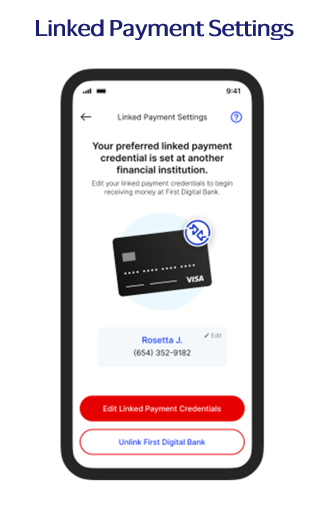
- In the user experience screen below, clients have an option to identify if a user’s Alias is registered as preferred at another financial institution. To use Inquiry API for this experience, a client must first identify its own participant ID. This can be done by first creating an Alias and then using Alias Inquiry API to query that Alias. The id in the “entities” field in the Inquiry API response will be the participant id of the client.
{
    "summary": {
        "aliasesTotal": 1,
        "aliasesFound": 1,
        "aliasesNotFound": 0,
        "aliasesRepeated": 0
    },
    "details": [{
        "directoriesName": ["STANDARD_VISA"],
        "directories": [{
            "directoryName": "STANDARD_VISA",
            "entities": [{
                "id": "593f1c3b-73f8-4379-9a82-94f8af407173",
                "preferredFor": [{
                    "type": "RECEIVE",
                    "date": "2024-08-13T05:23:47.985Z"
                }]
            }]
        }],
        "aliasValue": "411223344555",
        "aliasType": "PHONE"
    }]
}- Clients can then use Inquiry API during the user enrollment flow. If an Alias is found to be preferred at an entity different from the client’s own participant ID, then this means the user has a Payment Credential linked as preferred at another financial institution. This can now be used to render the screen below.
- The list of Entity IDs within the Remote Directory can be provided as part of Remote Directory onboarding. The Entity ID format will vary by market. Please speak with your implementation manager for more information.
- If a participant originates an Alias Resolution request with an Entity Id that was not included in the Remote Directory onboarding, an error will be returned indicating the Entity was not found. The Remote Directory will also not receive any Alias Resolution request.
- If a Remote Directory decides to use the Entity Id functionality, the Remote Directory’s Alias Inquiry API response must indicate the Entity ID(s) associated with the Aliases. The Entity ID(s) returned in the response must have the same format as the Entity IDs registered during the onboarding process.
- The Entity ID is an optional field. Remote Directories must be able to respond to an Alias Resolution or Alias Inquiry request where Entity ID is not present.
Transaction Details
- This object provides additional information to the recipient of the Alias Resolution request to help provide the appropriate Payment Credential.
currencyCode- Allows a client to specify the currency of the Payment Credential returned in the Alias Resolution response. Some clients have different Payment Credentials for different currencies. By providing the currencyCode, a client can specify currency of the Payment Credential needed in the Alias Resolution response.- The responsibility of verifying the currency matches falls on the Financial Institutions (FI). The Alias Directory Service will exclusively use the information provided by the FI to conduct the currency resolution.
User Details
- This object allows the client initiating an Alias Inquiry or Alias Resolution call to provide more information about the consumer requesting the information.
- This consumer information can be provided in the userName field and should use an identifier that represents the end user who is requesting an Alias Resolution. This field must not contain any PII information.
- This information will be used for risk analysis purposes by Directory Network Manager. In addition, this information will be passed to remote directories for risk analysis purposes.
Setting a Preferred Payment Credential
- Alias Directory allows a Payment Credential to be marked as “Preferred”.
- Alias Directory supports associating multiple Payment Credentials at multiple banks with a single Alias and allows selecting a preferred Payment Credential for receiving payments. In the example above, John has four Payment Credentials associated with his Alias. He has selected “John's Debit Card at Bank A” as the preferred Payment Credential so that any payment sent using his Alias will be received into this account.
- For a given Alias, only one Payment Credential of each Payment Credential type may be marked as preferred. For example, the same Alias can have one card and one bank credential both marked as preferred.
- Please note that the above is the recommended configuration. However, certain programs may decide to allow more than one preferred credential.
- If Bank A has marked a Payment Credential as preferred, but a second client marks another Payment Credential as preferred for the same Alias, then the second client's Payment Credential will be marked as preferred and will be returned in Resolve API.
- Please note that the above behavior does not apply if the second client marks another Payment Credential as preferred for the same Alias using the batch processing. In that scenario, Bank A will maintain preference, meaning its Payment Credential will still be marked as preferred and will be returned in Resolve API.
Duplicate Resolution
- A common scenario that occurs is that a consumer may use the same Alias (e.g., phone) and register that Alias with multiple participants (e.g., the same phone number is registered at Bank A and Bank B)
- During an Alias Resolution, Alias Directory Service applies a number of business rules to return a single Payment Credential to the requestor. A sample of some of those rules are below:
|
Rule Name |
Description |
|---|---|
Preferred Payment Credential |
|
Preferred Payment Credential Timestamp |
|
In the below example, the same consumer has registered the same Alias with 3 banks:
| Phone | Participant | Marked as Preferred | Preferred Timestamp |
|---|---|---|---|
| 6505001234 | Bank A (Local Directory) | Yes | 1:00 pm, June 1, 2023 |
| 6505001234 | Bank B (Remote Directory) | Yes | 4:00 pm, June 10, 2023 |
| 6505001234 | Bank C (Local Directory) | No |
Given the above example, Alias Resolution would return Bank B’s Payment Credential.
Tokenization
Integration with Cybersource Token Management Service
Alias Directory Service supports tokenization for Payment Credentials through an integration with Cybersource Token Management Service. Token Management Service (TMS) creates a network token, which Alias Directory stores and associates with an Alias. The token protects sensitive customer payment data stored in secure Visa data centers and can be used in place of a PAN in an OCT.
Alias Directory currently uses TMS for tokenizing Visa Payment Credentials.
Please visit this link to learn more about Cybersource Token Management Service https://developer.cybersource.com/docs/cybs/en-us/tms/developer/ctv/rest/tms/tms-overview.html
Local Directory Tokenization
- Tokenization can be enabled at the country level for all participants or at the bank level for individual participants.
- If a client is configured for tokenization, Alias Directory Service will provision a network token during Create Alias and Create Payment Credential and store the token associated with the Alias
- The token will be returned in Alias Resolve, Get Payment Credential by ID, and Get Payment Credential by Alias.
- Alias Directory Service will throttle provision attempts to limit traffic to clients.
- When a token is returned in Resolve, a field containing the last four digits of the PAN will be available to support recipient verification UX flows.
- The accountNumberType field denotes if the account number is a token or a PAN.
Remote Directory Tokenization
This section details the case where a Remote Directory is providing a Payment Credential to Alias Directory Service for use in Alias Resolve.
- If the Remote Directory provides a PAN to Alias Directory, the PAN will be returned in Alias Resolve and a token will be provisioned offline for subsequent resolutions for this Alias and Payment Credential.
- Alias Directory will temporarily store the PAN in this scenario, but once the token is created, the PAN will be deleted.
Non-PCI Compliance and Tokenization
Clients who are configured as non-PCI compliant are now supported through the use of tokenization.
- If a token is available, the PAN will be replaced with the token in the accountNumber field during Alias Resolve.
- If no token is available, PCI information will be removed from the Alias Resolve.
On Behalf Of Processing
Overview
On-Behalf-Of processing allows processors, or technical service providers (TSPs) to enable the Visa Alias Directory Service for multiple clients using a single project on Visa Developer Center.
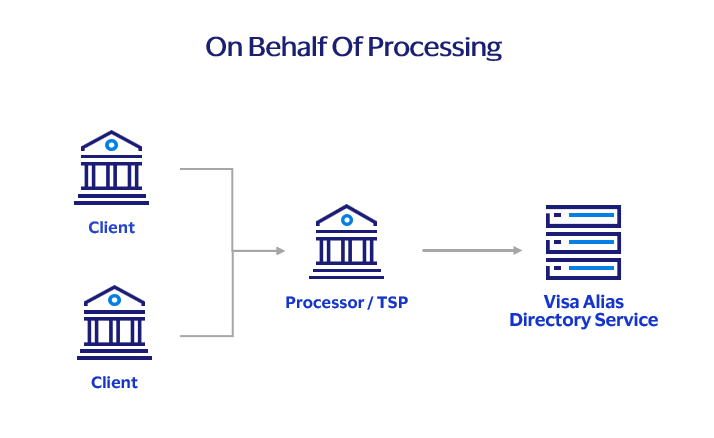
How to use On Behalf Of processing
- Integrate to Visa Alias Directory Service: The procedure for integrating with the Visa Alias Directory Service remains unchanged. This involves setting up the project, incorporating Visa Alias Directory Service APIs, and collaborating with Visa for testing and onboarding completion.
- Request the client profile is created: Upon readiness, the necessary information should be provided to Visa for the creation of the client profile. Visa will then configure the client profile and issue the participant ID. The information required by Visa includes:
- Visa Developer Center (VDC) project name
- The TSP participant ID and BID
- Clients name, country and BID
- Include the On-Behalf-Of header: Once the participant ID is received, it should be incorporated into the On-Behalf-Of header as per the API specification. The API call will then be processed as though it were submitted by the client themselves.
What does the On-Behalf-Of header do?
When Visa Alias Directory receives an API call with the On-Behalf-Of header, it will process the API call as if received from the client identified by that header.
It is important to include the correct participant ID in the On-Behalf-Of header as this ensures Visa Alias Directory processes the request correctly:
- API calls that include an On-Behalf-Of header with an invalid participant ID, or a participant ID not associated to the TSP, will be rejected.
- API calls that do not include an On-Behalf-Of header will create aliases associated to the TSP rather than a client.
OCT Testing
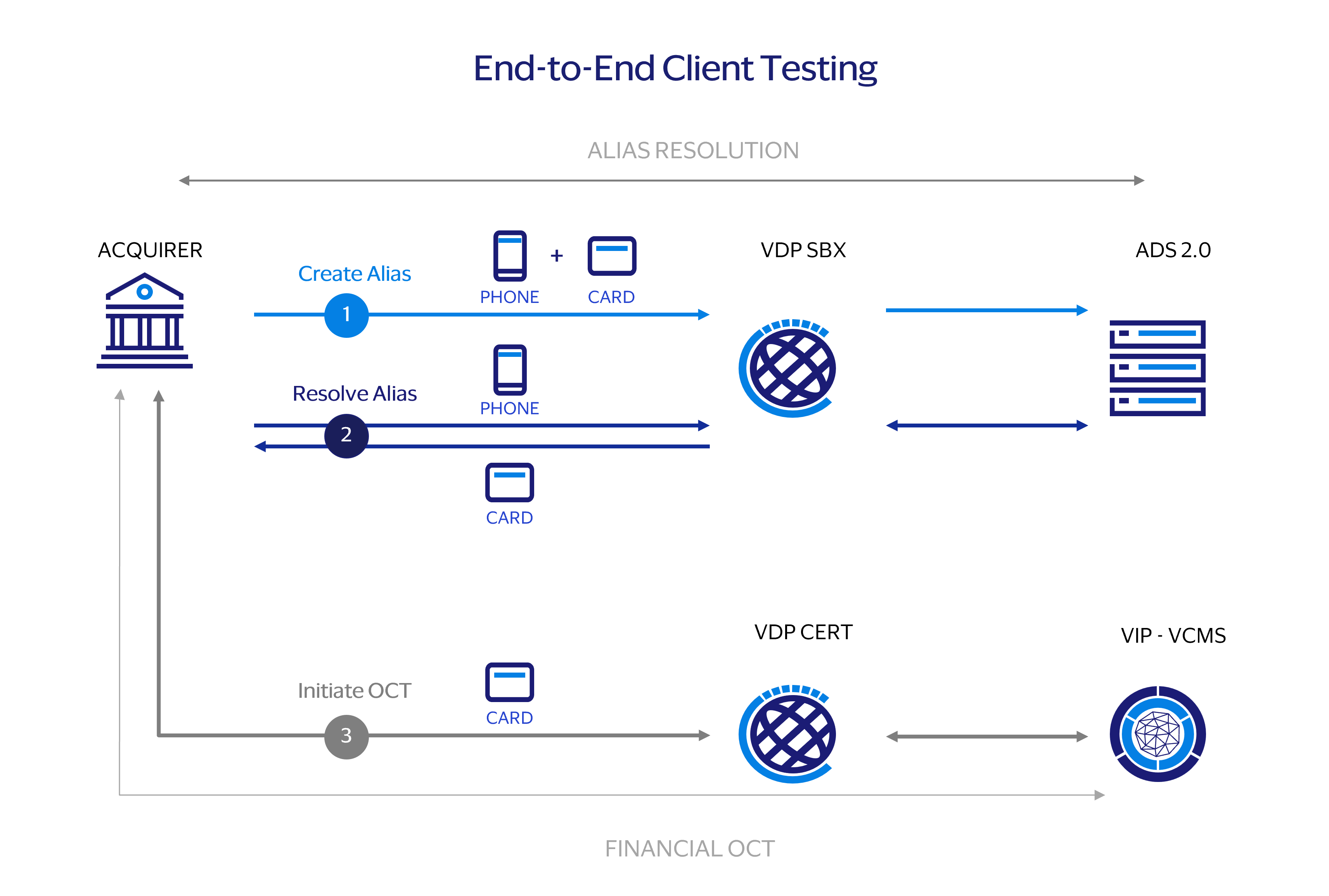
This section provided detailed instruction for testing OCTs in VCMS with Alias Directory. Please follow the following steps for end-to-end testing:
- Step 1. Alias Creation: Clients use the VDP Sandbox (SBX) environment for the creation of Aliases. If issues arise during this process, the implementation manager is available to provide assistance. This could include providing an Alias that has been previously linked with Visa test cards.
- Step 2. Alias Resolution: Clients use the Resolve API in the VDP Sandbox to resolve an Alias. This process retrieves the associated test Primary Account Number (PAN).
- Step 3. Initiating Original Credit Transaction (OCT): Clients use the test PAN obtained from the Resolve API to insert into the OCT message. This message is then sent to the Visa Certification Management Service.
Reporting
Alias Directory Service provides APIs for requesting and downloading reports. The available endpoints are listed below

Client
Create a report request

Visa
Return report ID

Client
Check report status

Client
Download completed report
|
Step |
Endpoint |
Description |
Additional Details |
|---|---|---|---|
Create Report |
/reports (POST) |
Create a report, specify the report type and define the parameters.
|
The field type specifies the type of report to be generated
The field filters defines the parameters used to create the report (e.g., startDate, endDate) Alias Directory will create the report offline and clients can download in the subsequent steps. |
Get Report |
/reports/{reportId} (GET) |
Retrieves information about a specific Create Report request. |
Clients can use this endpoint to check the status of a Create Report request. For example, the create report request may be “completed” or “in-progress” The response of this will also include the field "fileIds". The fileId will be used to download the report. Please note some reports may have multiple files due to the size of the report.
|
Download Report |
/reports/{reportId}/file/{fileId} (GET) |
Retrieves a file from a previously requested report with COMPLETED status. |
This endpoint returns the requested data in JSON format, as described in the API spec, as part of the MLE encrypted response payload. |
Resolution Reconciliation Report
Report Description:
- Includes a detailed view of the Alias Resolutions requests of a participant. For example, if participant has made ten Alias Resolution requests, this report details the status and results of each request.
- The following filters are applicable for this report: startDate, endDate
Report Fields:
Field Name: originationDateTime
Description: The date and time of the Alias Resolution request
Example: 2021-01-01T10:52:46.000Z
Field Name: programId
Description: The guid of the program that the participant belongs in
Example: a5d0bd35-16f5-4e98-86f5-b1a464215a63
Field Name: originatorActorId
Description: Participant id of the entity which sent the request
Example: 6ac54662-84da-401d-aab5-b86bac9a02a0
Field Name: onBehalfOf
Description: Participant id which the original_actor_id sent the request on behalf of. This is only applicable in certain cases.
Example: 1ff54662-84da-401d-aab5-b86bac9a02a2
Field Name: resolvedAlias
Description: The Alias value provided in the Alias Resolution request
Example: 123456789
Field Name: resolvedPaymentCredentialType
Description: The type of Payment Credential returned in the Alias Resolution response
Example: CARD
Field Name: statusCode
Description: The status code returned in the API response
Example: 200
Field Name: resolvedDirectory
Description: The name of the directory which returned the Payment Credential
Example: Directory A
Report Sample
[
    {
        "originationDateTime": "2023-07-31T20:15:18.679Z",
        "programId": "baf85624-3cf6-4c52-b91f-b8f3493e7330",
        "originatorActorId": "012af73f-44d8-4c9c-bbee-628b07faae1c",
        "statusCode": 200
    },
    {
        "originationDateTime": "2023-07-31T20:23:49.618Z",
        "programId": "baf85624-3cf6-4c52-b91f-b8f3493e7330",
        "originatorActorId": "012af73f-44d8-4c9c-bbee-628b07faae1c",
        "statusCode": 200
    }
]
Directory Status Report
Report Description:
- Includes the cumulative number of Aliases and Payment Credentials stored in the Alias Directory.
- The following filters are applicable for this report: startDate, endDate, aliasType
Report Fields:
Field Name: programId
Description: The guid of the program that the participant belongs in
Example: a5d0bd35-16f5-4e98-86f5-b1a464215a63
Field Name: ownerParticipantId
Description: The participant id which owns this Alias and Payment Credential information
Example: 6ac54662-84da-401d-aab5-b86bac9a02a0
Field Name: objectType
Description: The type of this object
Possible values: ALIAS, PAYMENT_CREDENTIAL
Field Name: objectSubType
Description: The sub_type of this object
Possible values:
For Object_Type = ALIAS, then possible subtypes are: PHONE, EMAIL
For Object_Type = PAYMENT_CREDENTIAL, then possible subtypes are: CARD, BANK
Field Name: status
Description: The status of this object
Possible values: ACTIVE, DISABLED, BLOCKED, DELETED
Field Name: objectCount
Description: The number of types this object is in the Alias Directory
Example: 1200
Report Sample
[
    {
        "programId": "c0af8887-eac3-4b89-ad35-73c66e22088e",
        "ownerParticipantId": "d1ebd0da-54e5-493a-9ba3-4ccc21a183cc",
        "objectType": "ALIAS",
        "objectSubType": "PHONE",
        "status": "ACTIVE",
        "objectCount": 763739
    },
	{
        "programId": "c0af8887-eac3-4b89-ad35-73c66e22088e",
        "ownerParticipantId": "d1ebd0da-54e5-493a-9ba3-4ccc21a183cc",
        "objectType": "ALIAS",
        "objectSubType": "BANK",
        "status": "ACTIVE",
        "objectCount": 8772470
    }
]
Payment Credential Details
Report Description:
- Provides a detailed view of the Payment Credentials stored in the Alias Directory. Each row is a Payment Credential.
- The following filters are applicable for this report: startDate, endDate, aliasType, aliasStatuses
- The startDate and endDate parameters will provide results based on when the Payment Credential was created.
Report Fields:
Field Name: paymentCredentialCreatedDateTime
Description: The time the Payment Credential was created
Example: 2021-01-01T10:52:46.000Z
Field Name: programId
Description: The guid of the program that the participant belongs in
Example: a5d0bd35-16f5-4e98-86f5-b1a464215a63
Field Name: ownerParticipantId
Description: Participant id which created the Payment Credential
Example: 9ed54662-84da-401d-aab5-b86bac9a02a0
Field Name: paymentCredentialId
Description: The internal ID of the Payment Credential
Example: 40f26d01-28b8-4261-8d9d-638e2bade69c
Field Name: paymentCredentialType
Description: The type of the Payment Credential
Example: CARD
Field Name: accountNumberLast4
Description: The last four digits of the account
Example: 3456
Field Name: paymentCredentialStatus
Description: The status of the Payment Credential
Example: ACTIVE
Field Name: aliasId
Description: The internal ID of the Alias associated with this Payment Credential
Example: daa3ceaa-c3d5-4b3c-b03e-9bc1eed60b78
Field Name: aliasValue
Description: The value of the Alias associated with this Payment Credential
Example: 51991512051
Field Name: aliasType
Description: The type of Alias
Example: Phone
Report Sample
[
    {
        "paymentCredentialCreatedDateTime": "2023-07-31T20:06:01.654426Z",
        "programId": "baf85624-3cf6-4c52-b91f-b8f3493e7330",
        "ownerParticipantId": "012af73f-44d8-4c9c-bbee-628b07faae1c",
        "paymentCredentialId": "06eeb39a-696a-4c6a-84f8-f3b2ad27ca11",
        "paymentCredentialType": "BANK",
        "accountNumberLast4": "1140",
        "paymentCredentialStatus": "ACTIVE",
        "aliasId": "967a3033-5cd3-4fe1-b09f-b6e4f1da5855",
        "aliasValue": "7568893885",
        "aliasType": "PHONE"
    },
    {
        "paymentCredentialCreatedDateTime": "2023-07-31T20:10:43.339798Z",
        "programId": "baf85624-3cf6-4c52-b91f-b8f3493e7330",
        "ownerParticipantId": "012af73f-44d8-4c9c-bbee-628b07faae1c",
        "paymentCredentialId": "1693aa4c-cb16-42ca-afa5-f0b6d6f75aeb",
        "paymentCredentialType": "BANK",
        "accountNumberLast4": "1140",
        "paymentCredentialStatus": "ACTIVE",
        "aliasId": "9564fb2a-c19c-4082-a973-c5233e5b0f24",
        "aliasValue": "9049748451",
        "aliasType": "PHONE"
    }
]
Platform Requests Report
Report Description:
- Provides a view of the cumulative number of requests received in the Alias Directory.
- The following filters are applicable for this report: startDate, endDate, billingEventTypes
- Please note that if no billingEventTypes is specified, then all request types will be returned
Report Fields:
Field Name: programId
Description: The guid of the program that the participant belongs in
Example: a5d0bd35-16f5-4e98-86f5-b1a464215a63
Field Name: originatorActorId
Description: Participant id of the entity which sent the request
Example: 6ac54662-84da-401d-aab5-b86bac9a02a0
Field Name: onBehalfOf
Description: Participant id which the original_actor_id sent the request on behalf of. This is only applicable in certain cases.
Example: 1ff54662-84da-401d-aab5-b86bac9a02a2
Field Name: operationType
Description: The type of operation the report must include.
Possible values:
aliasInquiry
createAlias
createBatch
createPaymentCredential
createReport
deleteAlias
deletePaymentCredential
getAlias
getAliasId
getAliasOnlineReport
getBatch
getBatchKeys
getBatchResult
getByExternalId
getPaymentCredential
getPaymentCredentials
getReport
getReportFile
resolveAlias
updateAlias
updateAliasStatus
updateBankPaymentCredential
Field Name: statusCode
Description: The status code returned in the API response
Example: 200
Field Name: operationsCount
Description: The aggregated amount of the number of requests
Example: 99
Report Sample
[
    {
        "programId": "baf85624-3cf6-4c52-b91f-b8f3493e7330",
        "originatorActorId": "012af73f-44d8-4c9c-bbee-628b07faae1c",
        "operationType": "resolveAlias",
        "statusCode": 200,
        "operationsCount": 18
    },
    {
        "programId": "baf85624-3cf6-4c52-b91f-b8f3493e7330",
        "originatorActorId": "012af73f-44d8-4c9c-bbee-628b07faae1c",
        "operationType": "resolveAlias",
        "statusCode": 422,
        "operationsCount": 4
    }
]
Resolution Directory Activity Report
Report Description:
- Includes a detailed view of the Alias Resolutions requests received by a directory. This report is from the perspective of the directory itself and includes both local and remote directories. For example, a directory has received ten Alias Resolution requests, this report details the cumulative view of the requests by program and participant and its status.
- The following filters are applicable for this report: startDate, endDate
Report Fields:
Field Name: resolveDirectory
Description: The directory which received the Alias Resolution requests.
Example: Directory A
Field Name: programId
Description: The guid of the program that the participant belongs in
Example: a5d0bd35-16f5-4e98-86f5-b1a464215a63
Field Name: originatorActorId
Description: Participant id of the entity which sent the request
Example: 6ac54662-84da-401d-aab5-b86bac9a02a0
Field Name: onBehalfOf
Description: Participant id which the original_actor_id sent the request on behalf of. This is only applicable in certain cases.
Example: 1ff54662-84da-401d-aab5-b86bac9a02a2
Field Name: operationType
Description: The type of operation the report must include.
Possible values:
resolve_Alias
Field Name: statusCode
Description: The status code returned in the API response
Example: 200
Field Name: requestCount
Description: Total number of Alias Resolution requests
Example: 1200
Report Sample
[
    {
        "resolveDirectory": "STANDARD_5EF147CC",
        "programId": "baf85624-3cf6-4c52-b91f-b8f3493e7330",
        "originatorActorId": "012af73f-44d8-4c9c-bbee-628b07faae1c",
        "operationType": "resolve_alias",
        "statusCode": 422,
        "requestCount": 0
    },
    {
        "resolveDirectory": "STANDARD_GTB094FB",
        "programId": "baf85624-3cf6-4c52-b91f-b8f3493e7330",
        "originatorActorId": "012af73f-44d8-4c9c-bbee-628b07faae1c",
        "operationType": "resolve_alias",
        "statusCode": 200,
        "requestCount": 0
    }
]