Learn how Visa APIs work

Get pricing details and an overview of the flow between your app, Visa Developer, and Visa APIs.

Overview

Visa APIs let you securely connect your app to payment, identity, and data services. This page explains how requests move between your app, Visa Developer, and Visa APIs, how environments and authentication work, and what to expect when you move from no‑cost Sandbox testing to paid usage in Certification and Production.

Ready to start a project? Follow the quick start.

Learn the basic flow

Every Visa API integration follows the same pattern:

basic API integration flow Zoom

Here’s what happens:

  • Your app sends an HTTPS request.
  • Visa Developer verifies your credentials and routes the call.
  • Visa APIs process the request and return a response.

This flow stays the same in Sandbox, Certification, and Production environments.

How a request moves through Visa Developer

Use the diagram below to understand how a request moves from your application to Visa and back. Each layer represents a distinct part of the integration and highlights where configuration, authentication, API calls, and processing occur.
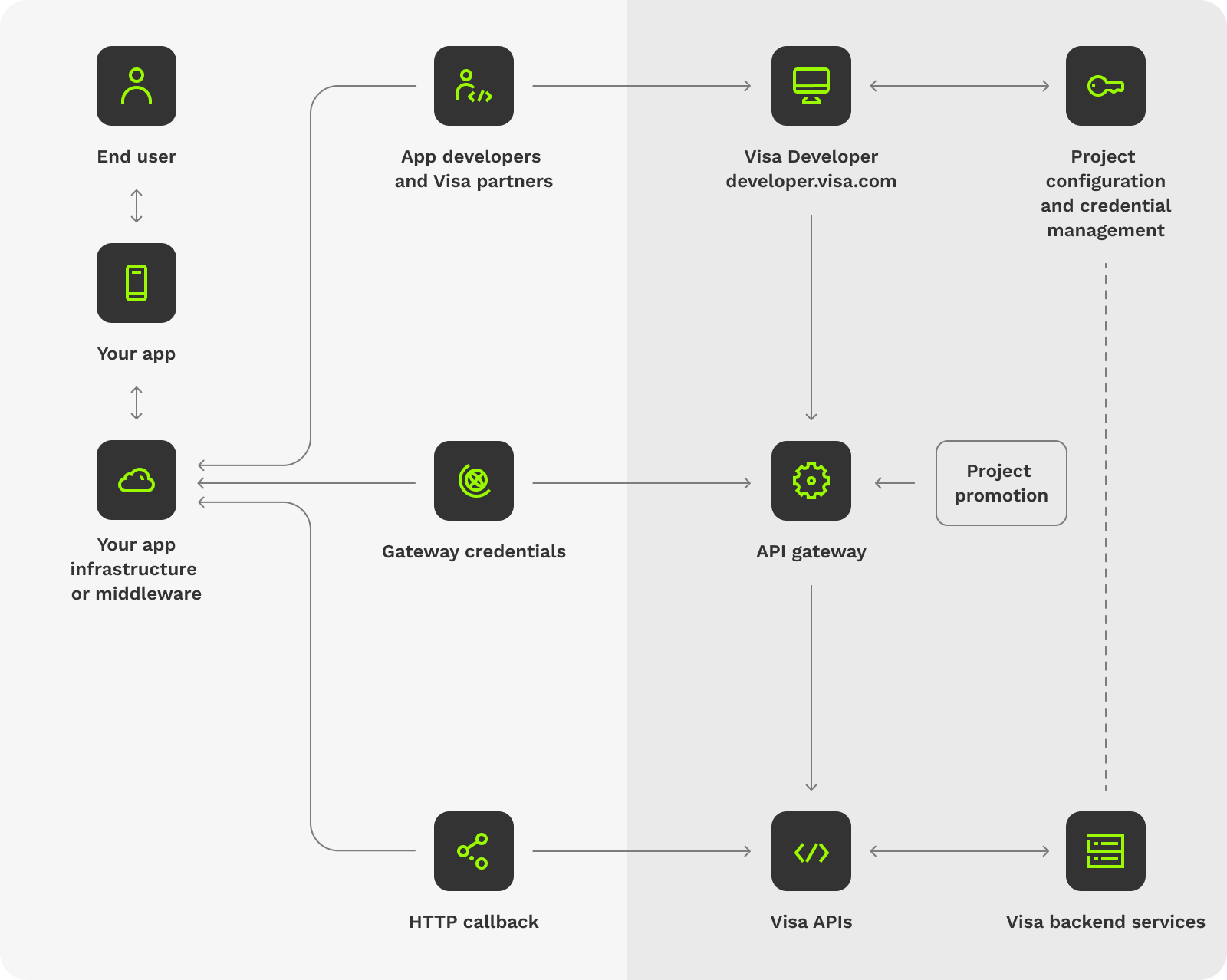
diagram showing how a request moved through Visa Developer Zoom

How to read the request flow

Use the section below to learn what each layer does and what matters to your integration.

3-phone-icon 3-phone-icon

Your app

Where integration begins. Your app can be:


  • A backend service
  • A mobile or web app
  • An internal system


It prepares the request, applies authentication, and handles the response.

4-cloud-icon 4-cloud-icon

Your app infrastructure or middleware (optional)

This represents your environment—anything between your app and the API call. For example:


  • Proxies
  • HTTP clients
  • Networking libraries


No special setup for Visa is required.

5-desktop-icon 5-desktop-icon

Visa Developer

The secure gateway between your app and Visa APIs. It handles:


  • Credential verification
  • Routing
  • Environment management
  • API activation
  • Certificate validation
  • Error filtering


Think of it as the layer that ensures your request is trusted and sent to the right Visa service.

6-key-icon 6-key-icon

Project configuration and credential management

This is what you configure directly in the Visa developer dashboard:


  • Adding APIs to your project
  • Downloading certificates or shared secrets
  • Accessing sample code
  • Managing activation status
  • Preparing for Certification and Production
7-globe-icon 7-globe-icon

Gateway credentials

Authentication happens here. Visa APIs use:


  • Two-Way SSL (mutual TLS)
  • X-Pay-Token (API key and shared secret)


Your Visa Developer project provides everything you need to configure these.


Gateway endpoints

The table below lists Sandbox, Certification, and Production endpoints for each environment.

Environment URL Purpose
Sandbox

https://sandbox.api.visa.com

Development and testing
Certification https://cert.api.visa.com Validate your integration
Production https://api.visa.com Go live after approval

Switching environments? Learn more in the Environment switching and testing guide.

8-settings 8-settings

API gateway

The API gateway is the secure entry point for all API requests to Visa. It sits between your app and Visa APIs and ensures that only trusted, approved requests reach Visa services. The API gateway:


  • Validates Two‑way SSL and X‑Pay‑Token authentication
  • Applies rate limits, usage controls, and pricing rules based on your Visa agreement
  • Routes requests to the appropriate Visa API and environment


Only validated requests are forwarded to Visa APIs for processing.

9-code 9-code

Visa APIs

These are the Visa capabilities your app calls:


  • Payments and disbursements
  • Tokenization and credential services
  • Risk and fraud insights
  • Identity and verification
  • Data and analytics


Visa processes your request and returns a structured response to use in your app.

10-code-stack 10-code-stack

Visa backend services

These are the Visa systems that process the requests behind the scenes:


  • Payment processing and transaction decisioning services
  • Token lifecycle and credential management services
  • Risk scoring and fraud detection services
  • Identity resolution and verification services
  • Operational and fulfillment services (for solutions that include provisioning or fulfillment workflows)


Visa processes your request and returns a structured response.

11-connect 11-connect

Callback handling (Webhooks)

Some APIs send asynchronous updates to your application using webhooks (Visa calls these Outbound callbacks). If your API requires this, you’ll configure a callback URL in your project settings.
Visit the Outbound callback configuration guide for more details.

Pricing and usage

Pricing for Visa products is designed to apply at the point where a capability provides value, such as per transaction, per API call, or through a subscription. Because Visa Developer supports a wide range of APIs, SDKs, and use cases across different types of developers and businesses, pricing is determined based on how you plan to use a Visa product rather than a single, fixed model.

The following outlines Visa Developer’s general approach to pricing. Pricing varies by use case and is finalized through an individual review and contract. For pricing specific to your integration, contact your Visa account representative or email [email protected].

12-wrench 12-wrench

Build and test at no cost

Sandbox access is free, allowing you to create a project, explore Visa products, and test implementations without fees, subject to participation requirements for a small number of restricted products.


Certain products may require an additional contract. Pricing may be included in the contract or relayed to the client via Visa Access or through a fee schedule.


Visit the quick start to learn how to get set up in the Sandbox.

13-rocket 13-rocket

Go live with selected Visa Products and contract pricing

Moving to Certification or Production requires acceptance of the terms of use and a contract, which defines pricing based on the selected Visa products and use case and may include a one‑time setup fee for support and required compliance checks. Some Visa products also require a fee schedule, which may need to be reviewed and signed as part of the contracting process.


Visit going live to learn how to move from Sandbox to Certification or Production.


Pricing models

When you go live in Certification or Production, pricing for each Visa product follows one of the models below, depending on the capability and your use case. These models do not apply in Sandbox, which is always free for testing.


Free to use

  • Some Visa products are available to use in Production at no charge, even after you go live.
 

Subscription‑based

  • Some Visa products are available at no additional cost when you have an active subscription for the capability through Visa Access.


Usage‑based

  • Most Visa products are priced based on usage, such as transactions processed, API calls made, alerts sent, or accounts enrolled. Usage‑based pricing may include minimum monthly fees to support operational and continuity costs.

Factors that affect pricing

In addition to the pricing model used for a specific Visa product, other factors may influence your final pricing.

Regional variation

Pricing is tailored by region to support local markets. While the overall pricing framework is consistent globally, regional Visa teams determine pricing details based on market needs and regulations.
For region‑specific pricing details, contact your Visa account representative or email [email protected].

Ready to get started?

Follow the quick start guide to make your first API call today.