X-Pay Token
Learn how to use X‑Pay Token to authenticate requests and protect message integrity.

Overview
Use X‑Pay Token to authenticate requests to Visa APIs using an API key and shared secret. For each API request, you generate a token from the request details and include the token in the request header to verify message integrity.
X‑Pay Token is an API key–shared secret authentication method that uses HMAC SHA‑256. You decrypt the shared secret using a public and private key pair, then use that decrypted value to authenticate each request.
This authentication method works the same way in Sandbox, Certification, and Production environments, using environment‑specific credentials.
This guide explains how to:
- Retrieve your API key and encrypted shared secret
- Generate an RSA key pair to decrypt the shared secret
- Generate an X-Pay Token for an API request
- Test your implementation and confirm successful authentication
Before you begin
Before using X-Pay Token, confirm that:
- You have a Visa Developer account and project, as described in the quick start
- An API key and encrypted shared secret are available for the selected environment you are calling
- OpenSSL is available to generate keys and decrypt the shared secret
- Your application can compute HMAC SHA‑256
Each environment uses its own API key and encrypted shared secret.
Step 1: Add X-Pay Token to your project
- Open your project and select the environment.
- Go to Credentials > X‑Pay Token.
- Select Add X-Pay for Inbound for inbound use case.
- Select Add X-Pay for Outbound for outbound use case.
The X-Pay Token shared secret does not yet appear on the screen. You must generate a public-private key pair and upload the public key so Visa Developer can encrypt the shared secret. Then use the corresponding private key to decrypt the encrypted shared secret before use.
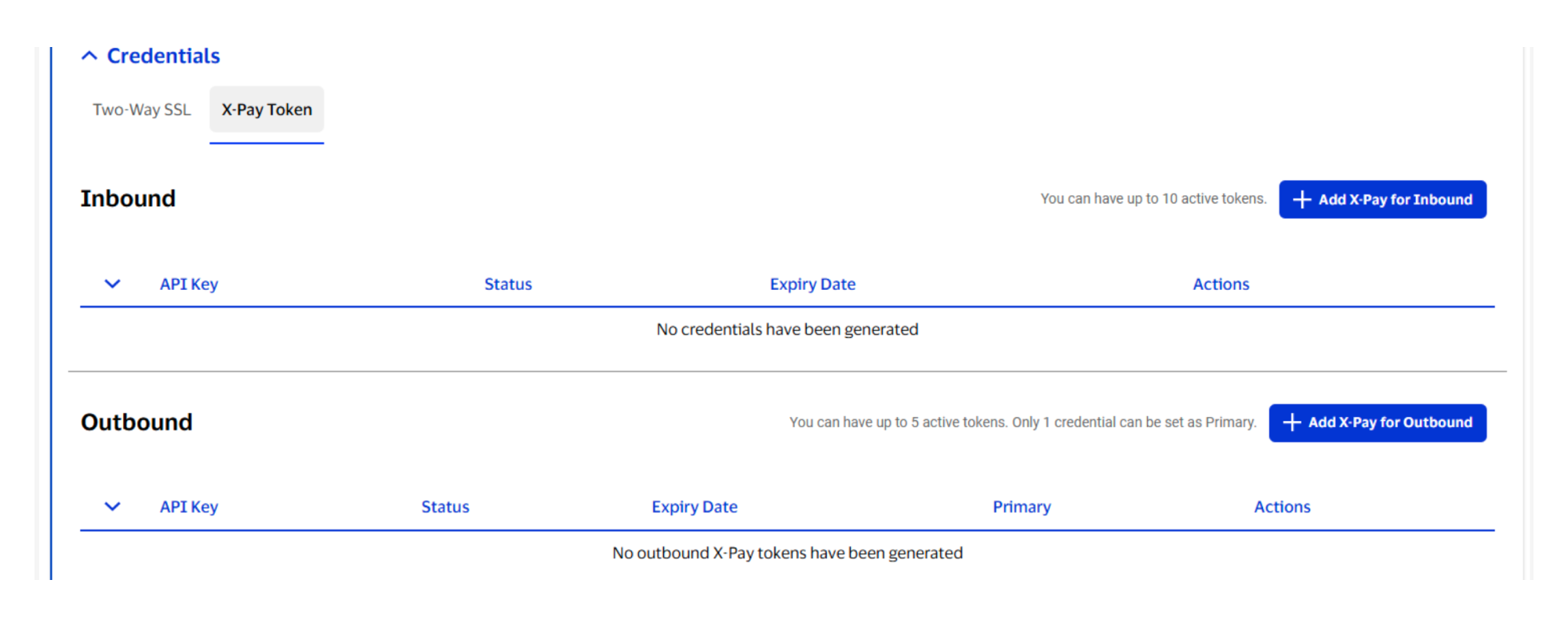
Important: Only a Visa Admin can remove a public key. Select Remove/Update Key to submit a deletion request. Once the key is deleted, you can upload a new public key.
Step 2: Generate keys and decrypt the shared secret
Generate an RSA key pair
1. Generate an RSA 2048-bit key pair.
# generate private key
openssl genpkey -algorithm RSA -out private_key.pem -pkeyopt rsa_keygen_bits:2048

# extract public key
openssl rsa -pubout -in private_key.pem -out public_key.pemFormat and upload the public key
The public key file contains a header, footer, and line breaks. You must copy and upload only the public key value, without the line breaks. You can either manually remove the line breaks or run a command that removes them.
For example:
cat public_key.pem | tr -d '\r\n'2. Copy the command output that is located between the header and footer, as highlighted in the image below.
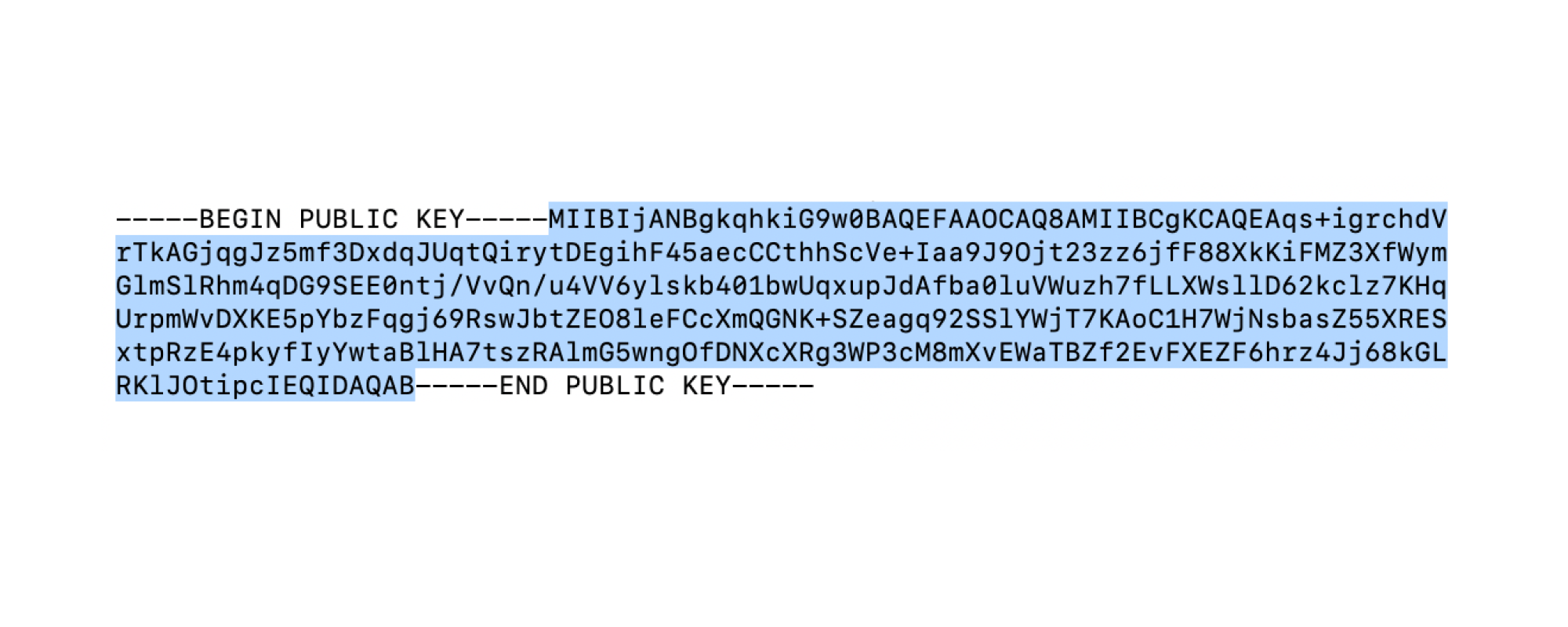
3. Paste this output in Credentials > X‑Pay Token > Public Key, and select Submit.
Visa Developer uses this public key to encrypt the shared secret and then display the encrypted shared secret.
Decrypt the shared secret
- Copy the encrypted shared secret from Credentials > X-Pay Token > Inbound.
- Base64-decode the encrypted value.
cat encryptedsharedsecret.txt | base64 --decode > decoded_data.bin3. Decrypt it using the required Optimal Asymmetric Encryption Padding (OAEP) parameters.
openssl pkeyutl -decrypt -in decoded_data.bin -inkey private_key.pem -pkeyopt rsa_padding_mode:oaep -pkeyopt rsa_oaep_md:sha256 > decrypted_shared_secret.txtStep 3: Generate the X-Pay Token
Each X-Pay Token is generated from the following components in this required order.
| Field | Description |
|---|---|
timestamp |
Current Coordinated Universal Time (UTC) in seconds |
resource_path |
The value to use in the X-Pay Token calculation depends on your project. (See samples below the table.)
|
query_string |
The apikey is a required query parameter (for example, include "apikey=YOUR_API_KEY"). Query parameters must be in lexicographical order. |
request_body |
Raw JSON body, or empty for GET calls |
Build the message string
message = timestamp + resource_path + query_string + request_bodyCompute the token
x-pay-token = "xv2:" + timestamp + ":" + HMAC_SHA256(shared_secret, message)Code samples
These samples show how to generate the X-Pay Token using common programming languages.
import java.math.BigInteger;
import javax.crypto.Mac;
import javax.crypto.spec.SecretKeySpec;
import java.nio.charset.StandardCharsets;
import java.security.SignatureException;


public static String generateXpaytoken(String resourcePath, String queryString, String requestBody, String sharedSecret) throws SignatureException {
    String timestamp = timeStamp();
    String beforeHash = timestamp + resourcePath + queryString + requestBody;
    String hash = hmacSha256Digest(beforeHash, sharedSecret);
    String token = "xv2:" + timestamp + ":" + hash;
    return token;
}

private static String timeStamp() {
        return String.valueOf(System.currentTimeMillis()/ 1000L);
    }

private static String hmacSha256Digest(String data, String sharedSecret)
        throws SignatureException {
    return getDigest("HmacSHA256", sharedSecret, data, true);
}

private static String getDigest(String algorithm, String sharedSecret, String data,  boolean toLower) throws SignatureException {
    try {
        Mac sha256HMAC = Mac.getInstance(algorithm);
        SecretKeySpec secretKey = new SecretKeySpec(sharedSecret.getBytes(StandardCharsets.UTF_8), algorithm);
        sha256HMAC.init(secretKey);

        byte[] hashByte = sha256HMAC.doFinal(data.getBytes(StandardCharsets.UTF_8));
        String hashString = toHex(hashByte);

        return toLower ? hashString.toLowerCase() : hashString;
    } catch (Exception e) {
        throw new SignatureException(e);
    }
}

private static String toHex(byte[] bytes) {
    BigInteger bi = new BigInteger(1, bytes);
    return String.format("%0" + (bytes.length << 1) + "X", bi);
}
private static string getTimestamp() {
long timeStamp = ((long) DateTime.UtcNow.Subtract(new DateTime(1970, 1, 1, 0, 0, 0, DateTimeKind.Utc)).TotalMilliseconds) / 1000;
return timeStamp.ToString();
}
private static string getHash(string data) {
var hashString = new HMACSHA256(Encoding.ASCII.GetBytes(SHARED_SECRET));
var hashbytes = hashString.ComputeHash(Encoding.ASCII.GetBytes(data));
string digest = String.Empty;
foreach (byte b in hashbytes) {
digest += b.ToString("x2");
}
return digest;
}
private static string getXPayToken(string resourcePath, string queryString, string requestBody) {
string timestamp = getTimestamp();
string sourceString = timestamp + resourcePath + queryString + requestBody;
string hash = getHash(sourceString);
string token = "xv2:" + timestamp + ":" + hash;
return token;
}from calendar import timegm
from datetime import datetime
from hashlib import sha256
import hmac
def _get_x_pay_token(shared_secret, resource_path, query_string, body):
timestamp = str(timegm(datetime.utcnow().timetuple()))
pre_hash_string = timestamp + resource_path + query_string + body
hash_string = hmac.new(shared_secret,
msg=pre_hash_string,
digestmod=sha256).hexdigest()
return 'xv2:' + timestamp + ':' + hash_stringvar timestamp = Math.floor(Date.now() / 1000);
var preHashString = timestamp + resourcePath + queryParams + postBody;
var crypto = require('crypto');
var hashString = crypto.createHmac('SHA256', sharedSecret).update(preHashString).digest('hex');
var xPayToken = 'xv2:' + timestamp + ':' + hashString;def get_xpay_token(shared_secret, resource_path, query_string, request_body)
require 'digest'
timestamp = Time.now.getutc.to_i.to_s
hash_input = timestamp + resource_path + query_string + request_body
hash_output = OpenSSL::HMAC.hexdigest(OpenSSL::Digest.new('sha256'), shared_secret, hash_input)
return "xv2:" + timestamp + ":" + hash_output
end$time = time();
$pre_hash_string = $time.$resource_path.$query_string.$body;
$hashtoken = "xv2:".$time.":".hash_hmac('sha256', $pre_hash_string, $secret);Step 4: Include required headers and query parameters
Include the required headers and query parameters in the authenticated request.
- Add the apikey query parameter.
- Add the Content-Type and Accept headers, if required.
- If you do not include the Content-Type header, then application/json is expected.
- If you do not include the Accept header, then the response will be the same content-type as the request.
| Header | Sample values |
|---|---|
Content-Type |
|
Accept |
|
3. Add the X-PAY-TOKEN header.
4. Include any resource-specific request parameters in the request payload before you make a request.
Sample request
GET /vdp/helloworld?apikey=KSKDFJOP934ALSFDJP34 HTTP/1.0
Host: cert.api.visa.com
Accept: application/json
X-PAY-TOKEN: xv2:1455716783:f5d15ed23f825ac6...The request body used to generate the token must exactly match the body sent in the request.
X‑Pay Token authentication succeeds when the token is included in the X‑Pay-Token request header and the API key is included as a query parameter.
Step 5: Test X-Pay Token connectivity
Learn more about testing X‑Pay Token connectivity in the testing guide.
Need help?
Find answers in our FAQs or get support from a Visa Developer expert.