Common use cases
Five representative scenarios show how clients combine Visa Card Eligibility Service (VCES) Web Service and iFrame operations to check eligibility and track redemptions.
Web Service flow – premium discount benefit
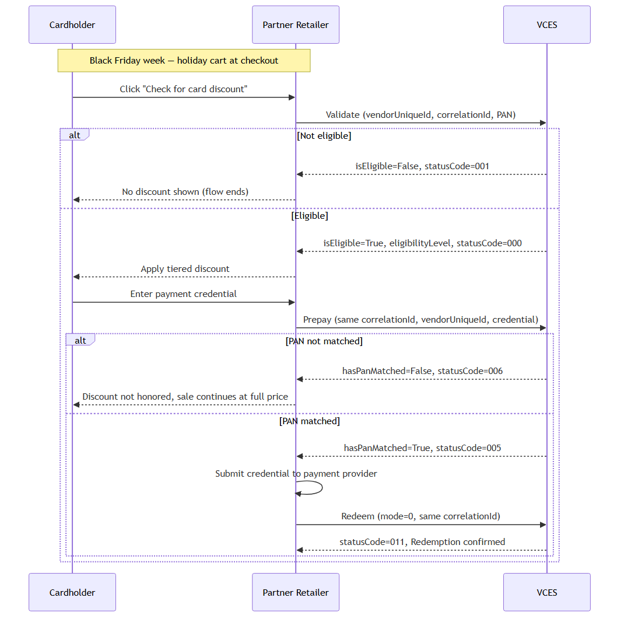
Scenario: It's the last week of November, and a cardholder is checking out on a Partner retailer's website with a cart full of holiday gifts. The retailer runs a checkout benefit that the card's issuer funds: a discount tied to the cardholder's Visa product tier – Signature gets 5% off, Signature Preferred 7%, Infinite 10%, and Infinite Privilege 12%.
Because the retailer is Payment Card Industry Data Security Standard (PCI DSS)-compliant and uses Message Level Encryption (MLE) to protect Primary Account Number (PAN) in transit, it submits the card number directly to Visa Card Eligibility Service (VCES) rather than going through the Visa-hosted iFrame – this is the Web Service flow, using all three core operations: Validate, Prepay, and Redeem.
Flow:
- With the cart ready, the cardholder clicks "Check for card discount" before entering payment. The retailer calls Validate with vendorUniqueId (the discount program's VUID), a correlationId, and the cardholder's permanentAccountNumber.
- VCES evaluates the card's product-type attribute against the program's configured Eligibility Levels.
- Not eligible: statusCode=001, isEligible=False ("Ineligible card for this program"). No discount is shown, and the flow ends – no Prepay or Redeem is called.
- Eligible: statusCode=000, isEligible=True, and eligibilityLevel mapping to the cardholder's discount tier.
- The retailer applies the discount for that tier, and the cardholder proceeds to enter a payment credential at checkout.
- The retailer calls Prepay with the same correlationId and vendorUniqueId, submitting the credential entered at checkout, to confirm it's the one that was validated.
- VCES compares the two credentials.
- Not matched: statusCode=006, hasPanMatched=False. The retailer doesn't honor the discount, but the sale can still go through at full price – the benefit flow ends here.
- Matched: statusCode=005, hasPanMatched=True
- The retailer submits the credential to its payment provider and completes the sale.
- After successful payment, the retailer calls Redeem (mode=0, same correlationId) to notify VCES the discount was consumed. VCES returns statusCode=011 ("Redemption transaction success").
Web Service Flow – Premium Discount Benefit
Web Service flow – reverse redemption for a canceled transaction
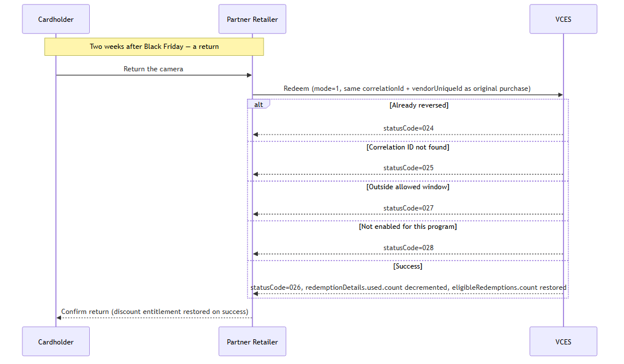
Scenario: Two weeks after Black Friday, the same cardholder from Web Service flow – premium discount benefit returns an item purchased using their tiered discount. That discount benefit is capped at a limited number of uses per year, and the original purchase already consumed one of those uses when the retailer called Redeem. Now that the sale is undone, the retailer needs Visa Card Eligibility Service (VCES) to give the entitlement back – using Redeem again, this time with mode=1 (reverse redemption), reusing the exact correlationId from the original Validate/Redeem cycle.
This case also shows a side of VCES the others don't: the API distinguishes why a reversal can't go through – already reversed, unmatched, outside the allowed window, or not enabled for this program – rather than returning a single generic failure.
Flow:
- Two weeks later, the cardholder returns the item at the retailer; the retailer calls Redeem with mode=1, using the exact correlationId and vendorUniqueId from the original Validate/Redeem cycle in Web Service flow – premium discount benefit.
- VCES checks whether the reversal can be applied.
- Already reversed: statusCode=024 ("Reverse Redemption request for submitted Correlation ID and vendor already exists") – someone already reversed this transaction.
- Correlation ID not found: statusCode=025 ("Reverse Redemption transaction unsuccessfully matched") – the correlationId doesn't match a known redeemed transaction.
- Outside allowed window: statusCode=027 ("Reverse redemption not possible") – the return happened after the program's allowed reversal period.
- Not enabled for this program: statusCode=028 ("Reverse redemption is not set for the selected vendor") – this vendorUniqueId isn't configured to allow reverse redemptions at all.
- Success: statusCode=026 ("Reverse redemption successful") – VCES decrements redemptionDetails.used.count and restores redemptionDetails.eligibleRedemptions.count.
- On success, the retailer confirms the return to the cardholder and notes the discount benefit is available again within its entitlement period. On any failure code, the retailer processes the return as normal, but the discount usage stays consumed, and the retailer follows up with VCES support to resolve it outside the API.
Web Service Flow – Reverse Redemption for a Canceled Transaction
iFrame flow – subscription enrollment and renewal eligibility check
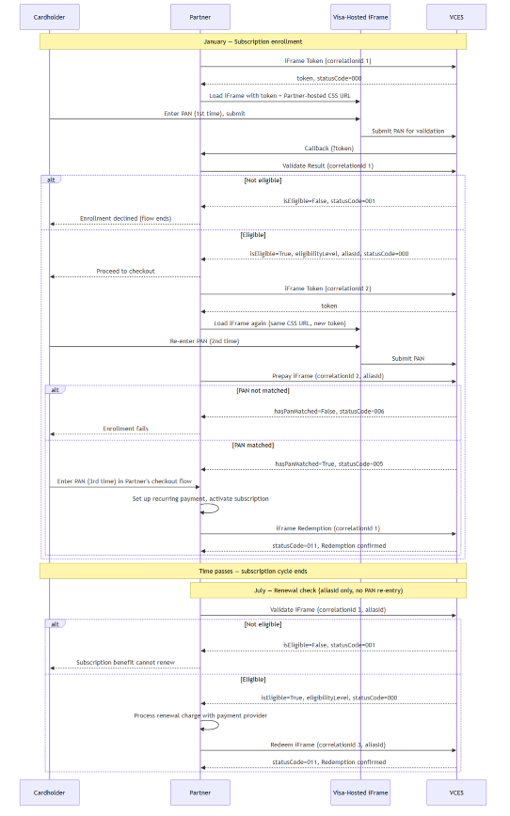
Scenario: In January, a cardholder signs up on a Partner's website for a complimentary identity-protection subscription included with their card. Because the Partner doesn't want Payment Card Industry Data Security Standard (PCI DSS) scope for a raw Primary Account Number (PAN), it uses the Visa-hosted iFrame rather than submitting PAN directly.
Enrollment runs the full multi-touchpoint iFrame flow: iFrame Token, PAN entry in the iFrame, Validate Result, Prepay iFrame, and iFrame Redemption. In July, when the subscription's first renewal period ends, the Partner needs to confirm the card on file is still eligible – but this time, thanks to the aliasId captured in January, nobody has to enter a card number again; the Partner calls Validate iFrame and Redeem iFrame using the stored alias.
Flow:
Phase 1 – January: Enrollment
- The cardholder starts subscription enrollment on the Partner's app; the Partner calls iFrame Token with a correlationId (correlationId 1), getting back a token tied 1:1 to it.
- The Partner loads the Visa-hosted iFrame using that token, styled via a CSS file the Partner hosts and provided to Visa during onboarding.
- The cardholder enters their full 16-digit PAN inside the iFrame (1st PAN entry) to put a card on file for the subscription – this never passes through the Partner's backend.
- Visa Card Eligibility Service (VCES) validates the credential against the program's configured eligibility criteria and sends a callback (?token) to the Partner's callback URL.
- The Partner calls Validate Result (correlationId 1) to retrieve the outcome.
- If not eligible: isEligible=False, statusCode=001. Enrollment ends – the cardholder can't subscribe.
- If eligible: isEligible=True, statusCode=000, eligibilityLevel, and – since this flow depends on it – an aliasId (an optional response attribute the program must be configured to return). This aliasId becomes the Partner's stored reference to the card on file for the life of the subscription.
- The cardholder proceeds to checkout to finish enrollment; the Partner calls iFrame Token again for a new correlationId (correlationId 2) and loads the iFrame a second time with the same CSS URL.
- The cardholder re-enters their PAN in the iFrame (2nd PAN entry) to reconfirm identity for Prepay.
- The Partner calls Prepay iFrame with correlationId 2 and the aliasId from step 5.
- If not matched: hasPanMatched=False, statusCode=006. Enrollment fails.
- If matched: hasPanMatched=True, statusCode=005.
- The cardholder enters their PAN a third time – directly into the Partner's own checkout/payment flow – to set up the recurring payment method with the Partner's payment processor. This entry never goes through VCES.
- The Partner activates the subscription (first billing cycle processed).
- The Partner calls iFrame Redemption, using the same correlationId 1 from Validate Result (not the correlationId 2 from Prepay iFrame), to notify VCES the benefit was consumed. VCES returns statusCode=011.
Phase 2 – July: Renewal eligibility check (no PAN re-entry)
- The subscription's first renewal period ends. The Partner must confirm the card on file is still eligible without asking the cardholder to re-enter their PAN.
- The Partner calls Validate iFrame with a fresh correlationId (correlationId 3), the stored aliasId, and the vendorUniqueId – no PAN or TAN involved at all.
- If not eligible: isEligible=False, statusCode=001 (or a limit-specific code, such as 004 if redemptions for the period are exhausted). Partner does not renew and notifies the cardholder the subscription benefit can't continue on this card.
- If eligible: isEligible=True, statusCode=000, eligibilityLevel.
- The Partner processes the renewal charge with its payment provider using the stored card-on-file reference – entirely outside VCES.
- The Partner calls Redeem iFrame using the same correlationId 3 from this Validate iFrame call and the aliasId, to notify VCES the renewal consumed the entitlement for this cycle. VCES returns statusCode=011.
If a renewal charge is later reversed, the Partner can call Redeem iFrame again with mode=1 for a reverse redemption. See Web Service flow – reverse redemption for a canceled transaction for details.
iFrame Flow – Subscription Enrollment and Renewal Eligibility Check
Web Service flow – spend-gated ticket benefit with guest redemptions
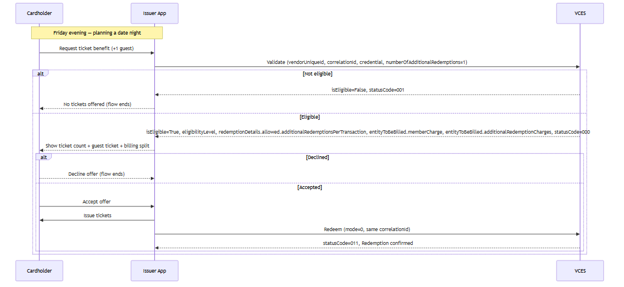
Scenario: It's a Friday evening, and a cardholder opens their issuer's app to see if they can get free movie tickets for a date night. The issuer runs a benefit where the ticket count scales with how much the cardholder has spent that period – no spend gets zero tickets, one ticket for spend up to USD 100, two tickets for spend between USD 100 and USD 500, and three tickets for spend above USD 500 – and if the cardholder wants to bring a date, they can request an extra ticket in the same call. Since this is the issuer's own app, with the card already on file, there is no checkout step and no Prepay – just Validate, a yes or no from the cardholder, and Redeem.
Flow:
- Friday evening, the cardholder opens the app and requests the ticket benefit, asking for one extra ticket for a date. The app calls Validate with vendorUniqueId, a correlationId, the credential on file, and numberOfAdditionalRedemptions=1.
- Visa Card Eligibility Service (VCES) evaluates the card's spend-tier attribute (a Visa Digital Benefits Platform Spend Tier Configuration ID) against the program's configured Eligibility Levels.
- If not eligible: isEligible=False, statusCode=001. No tickets are offered and the flow ends here.
- If eligible: isEligible=True, statusCode=000, and an eligibilityLevel mapping to the cardholder's ticket count – say, two tickets for the USD 100–USD 500 tier. VCES also returns redemptionDetails.allowed.additionalRedemptionsPerTransaction (the configured cap on guest tickets per claim, for example, one) and – only if the program is configured to return it – an entityToBeBilled object with entityToBeBilled.memberCharge ("Issuer," billed for the cardholder's own tickets) and entityToBeBilled.additionalRedemptionCharges (who's billed for the guest ticket, configured per program).
- The app shows the cardholder: "You have 2 tickets, plus 1 for your date" – along with who's billed for each.
- The cardholder reviews the offer, and accepts or declines – no card presentation is needed since the issuer already has the card on file.
- If declined: flow ends here; no Redeem is called.
- If accepted: App proceeds to issue the tickets.
- The app issues the tickets (cardholder's and guest's).
- The app calls Redeem (mode=0, same correlationId) to consume the entitlement against the benefit's redemption limit for its configured tracking period. VCES returns statusCode=011.
Web Service Flow – Spend-Gated Ticket Benefit with Guest Redemptions
Web Service flow – centralized redemption-limit enforcement across touchpoints
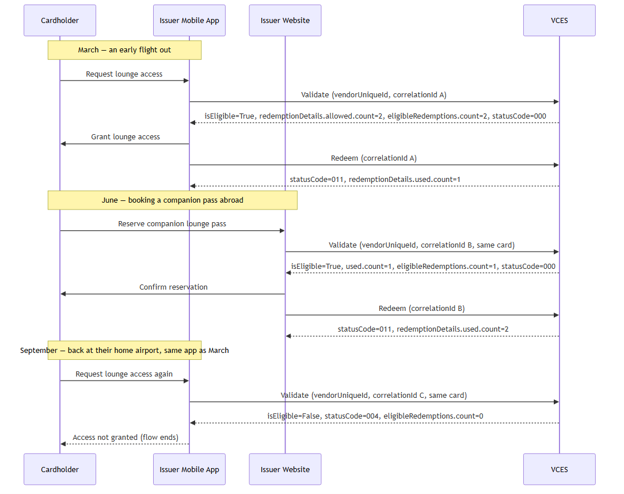
Scenario: A cardholder holds a Visa Infinite card with a benefit they love: two complimentary airport lounge visits per year, provisioned as a benefit program (vendorUniqueId) that both their issuer's mobile app and the issuer's website can check against. Same bank, two completely different engineering teams, two different systems – but only one source of truth for how many visits the cardholder has left, because both touchpoints call the same Visa Card Eligibility Service (VCES) program for the same card.
March – an early flight out. Standing in the terminal before boarding, the cardholder opens the issuer's mobile app and taps "Lounge Access" to see if they can duck into the partner lounge before their flight.
June – booking a trip abroad. Three months later, the cardholder is planning a summer trip and wants to bring a companion into the lounge at their destination.
This time they're not using the app at all – they're on the issuer's website, reserving a companion pass ahead of the trip. The website team built this feature independently of the mobile app team, on a different backend, months apart.
September – a forgotten redemption. The cardholder is at their home airport for a quick layover and opens the mobile app again for lounge access, fully expecting it to work – they've lost count and forgotten about the companion pass used in June. VCES enforces one shared annual limit for that card, not a separate counter per channel.
Flow:
- In March, the cardholder opens the mobile app and requests lounge access; the app calls Validate (vendorUniqueId for the lounge benefit, correlationId A, their card).
- VCES returns isEligible=True, statusCode=000, with redemptionDetails.allowed.count=2, redemptionDetails.allowed.duration={type: "Years", value: "1"}, and redemptionDetails.eligibleRedemptions.count=2 – both annual visits still available.
- The cardholder enters the lounge; the app calls Redeem (correlationId A). VCES returns statusCode=011 and increments redemptionDetails.used.count to 1.
- In June, the cardholder reserves a companion lounge pass through the issuer's website – a different team built this as a separate system entirely. The website calls Validate with its own new correlationId B, for the same vendorUniqueId and card.
- VCES checks the same underlying count – not tracked per touchpoint – and returns isEligible=True, statusCode=000, with redemptionDetails.used.count=1 and redemptionDetails.eligibleRedemptions.count=1, reflecting the app's earlier redemption even though the website never exchanged any data with the mobile app.
- The cardholder and their companion use the lounge; the website calls Redeem (correlationId B). VCES returns statusCode=011, redemptionDetails.used.count=2.
- In September, the cardholder opens the mobile app again at their home airport, expecting lounge access to still work. The app calls Validate with a new correlationId C, for the same vendorUniqueId and card.
- VCES returns isEligible=False, statusCode=004 ("Redemptions limit reached"), with redemptionDetails.eligibleRedemptions.count=0 – the annual limit has been reached, even though this request came from the same app used back in March. No Redeem is called.