Message-Level Encryption (MLE)
Learn how to secure Visa API payloads using Message‑Level Encryption (MLE).

Overview
Message‑Level Encryption (MLE) is a required encryption method for some Visa APIs to protect sensitive request and response payloads. When MLE is used, you encrypt the payload before sending an API request and decrypt the encrypted response returned by Visa.
This guide explains how to:
- Generate an MLE Key ID
- Obtain certificates required for MLE
- Encrypt a request payload and decrypt a response payload
- Test encrypted API calls
Before you begin
Before implementing MLE, confirm that:
- You have a Visa Developer account and a project, as described in the quick start
- The APIs you are integrating with support MLE
- You understand how MLE works and which environments you will be working in
Step 1: Generate an MLE Key ID
MLE uses Key IDs to identify the encryption key pairs associated with your project.
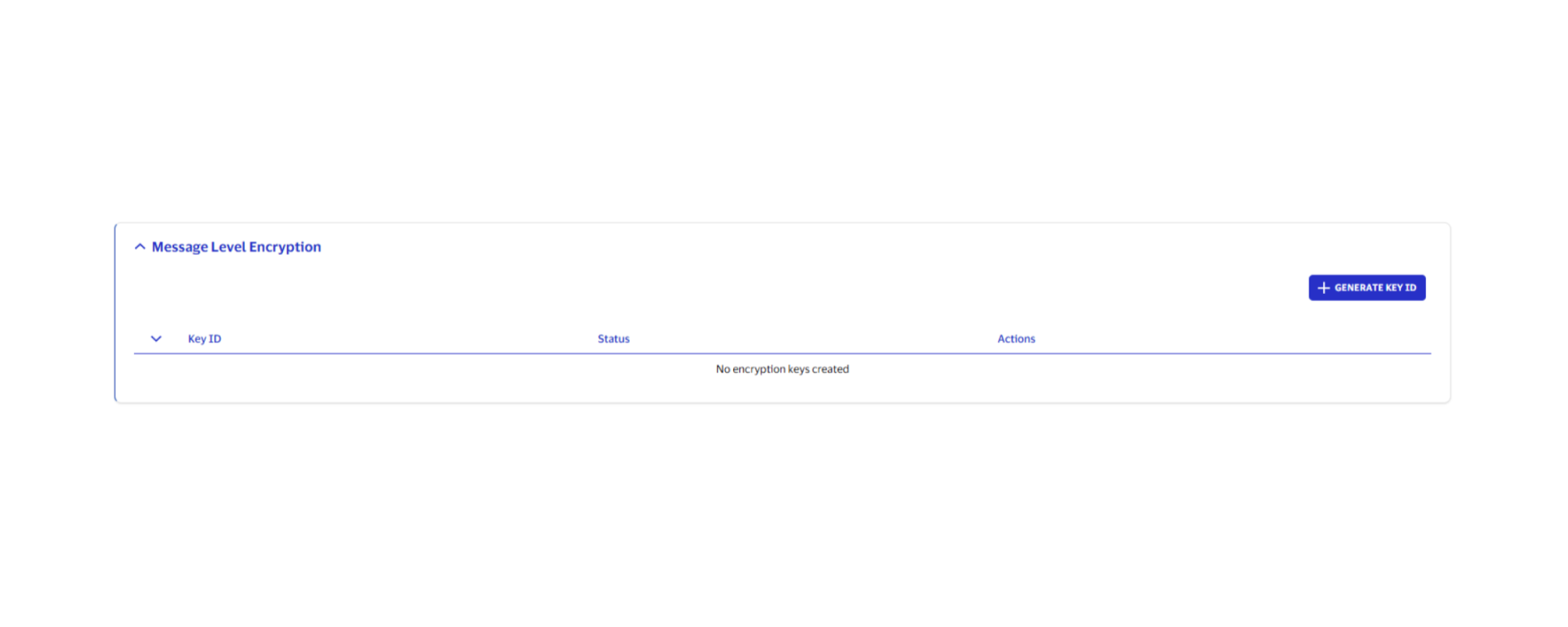
- Open your project and select the environment.
- Go to Message-Level Encryption.
- Select Generate Key ID.
Generating a Key ID does not generate a key. The Key ID is only used as an identifier to associate encryption certificates with your project.
Step 2: Obtain certificates for MLE
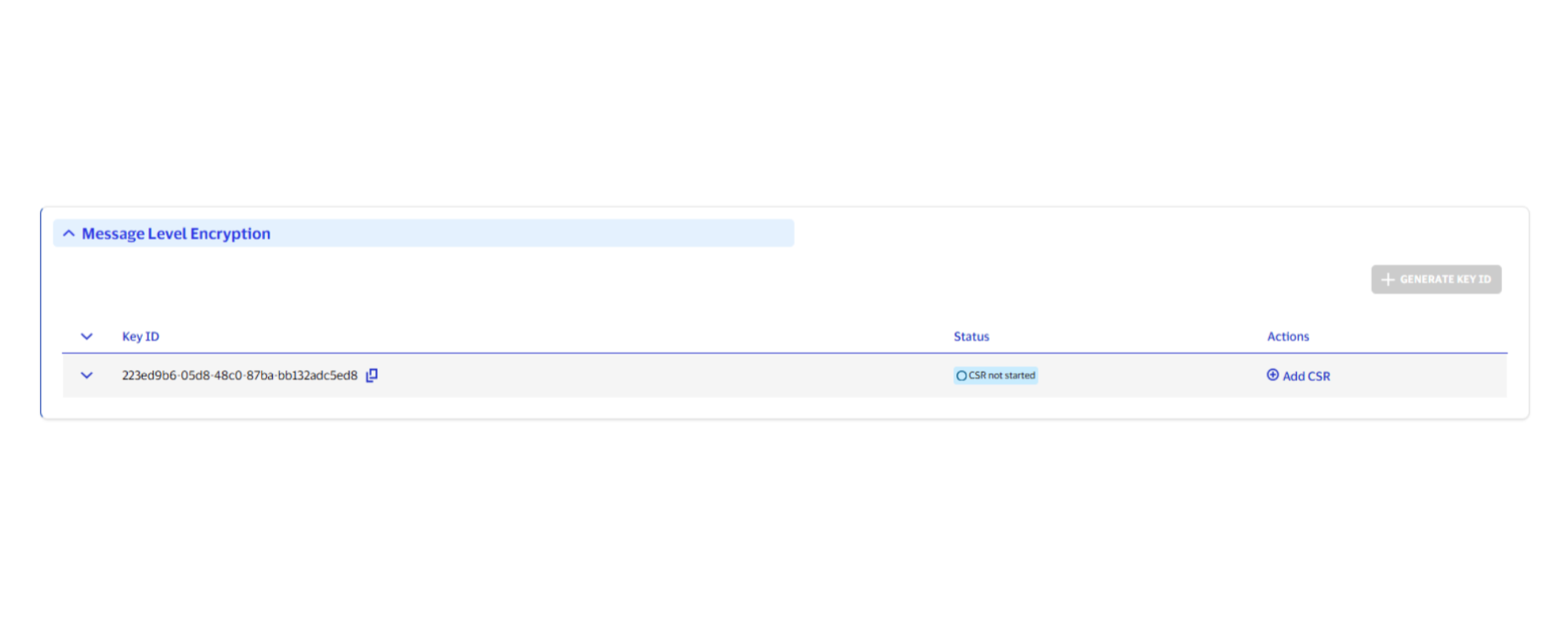
After generating a Key ID, request a certificate for the client side of MLE. Visa automatically generates the server-side MLE certificate.
- For the Key ID, select Add CSR.
- Follow detailed instructions for generating CSRs in each environment in Certificate signing requests (CSRs). Pay attention to the MLE-specific requirements, especially when setting the UID attribute to the MLE Key ID value.
Important: When you generate a CSR you create a private key, which is required to decrypt Visa responses. Visa Developer does not have access to your private keys. If you lose your private key, you must generate a new private key and CSR and obtain a new certificate.
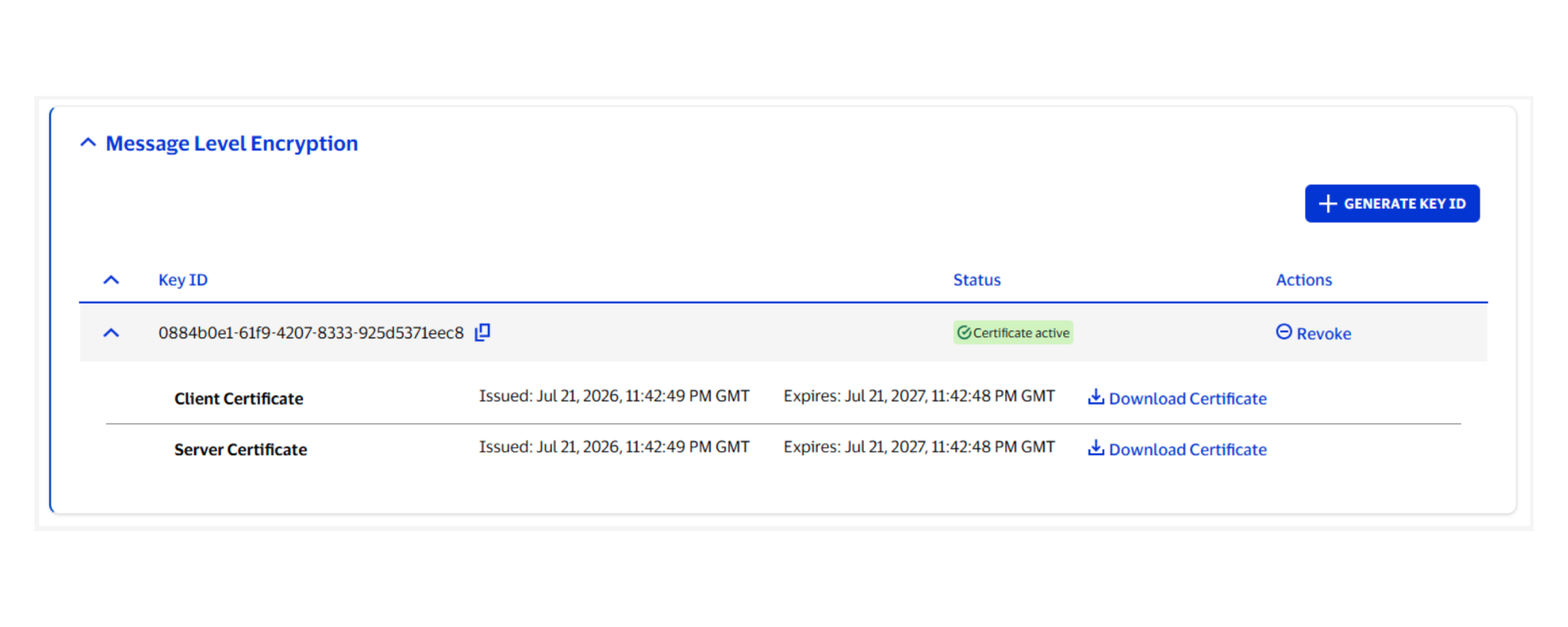
Once your CSR is approved, Visa issues a MLE client certificate and MLE server certificate corresponding to the MLE Key ID.
3. From the environment you are working in, go to Message-Level Encryption to download the certificates. You will use these MLE certificates when encrypting the request payload and decrypting the response payload.
Step 3: Encrypt request payload
Your application must send the MLE request with the required headers and encrypted payload. Refer to the sample code below, which does the following:
- Uses the MLE server certificate (not the MLE client certificate) to encrypt the payload
- Applies the supported algorithms
- Includes the JSON Web Encryption (JWE) header, as described in the JWE header table below
- Serializes the result as a compact JWE string
Important: Add keyId as an additional HTTP request header.
Encrypt request payload (code samples)
These samples show how to encrypt the MLE request payload using common programming languages.
MLE calls with XML payload a new header “cty” is required to be present in JWE payload. For backward compatibility, the default content type is set as “application/json” if the cty is not present.

JWE payload has 5 parts. The first part represents the JWE header.
Currently the fields in JWE header are as follows:
{
  "alg": "RSA-OAEP-256",
  "enc": "A128GCM",
  "iat": current timestamp in milliseconds,
  "kid": "keyId"
}

If the plain text before encryption is “application/XML” the JWE header should be
{
  "alg": "RSA-OAEP-256",
  "enc": "A128GCM",
  "iat": current timestamp in milliseconds,
  "kid": "keyId",
  “cty”: “application/XML”
}


Message Level Encryption is based on JOSE standards and there are many libraries which support/implement the same.
 For Java, the example snippet, uses nimbus-jose-jwt  which can be imported using maven or gradle as follows:

  Maven:

     <dependency>
          <groupId>com.nimbusds</groupId>
          <artifactId>nimbus-jose-jwt</artifactId>
          <version>5.8</version>
    </dependency>

Gradle:

compile group: 'com.nimbusds', name: 'nimbus-jose-jwt', version: '5.8'

We also use bouncy castle for converting PEM file content to private key, bouncy castle can be included by Maven or gradle as follows from Maven repository as follows:

Maven :

    <dependency>
        <groupId>org.bouncycastle</groupId>
        <artifactId>bcpkix-jdk15on</artifactId>
        <version>1.59</version>
    </dependency>

Gradle

compile group: 'org.bouncycastle', name: 'bcpkix-jdk15on', version: '1.59'
The following snippets illustrate MLE encryption using this library:


 class EncryptionUtils {

        private static final String BEGIN_CERT = "-----BEGIN CERTIFICATE-----";
        private static final String END_CERT = "-----END CERTIFICATE-----";
        private static final String BEGIN_RSA_PRIVATE_KEY = "-----BEGIN RSA PRIVATE KEY-----";
        private static final String END_RSA_PRIVATE_KEY = "-----END RSA PRIVATE KEY-----";
        private static final String ENC_DATA = "encData";

        //Make sure you are reading and passing the correct keyId from credentials. This is required and is passed in headers.
        public static String getEncryptedPayload(Object payload, String keyId) throws CertificateException, JOSEException, IOException {

            ObjectMapper mapper = new ObjectMapper();
            mapper.setSerializationInclusion(Include.NON_NULL);
            mapper.setSerializationInclusion(Include.NON_EMPTY);

            String plainText = payload == null ? "" : mapper.writeValueAsString(payload);
            JWEHeader.Builder headerBuilder = new JWEHeader.Builder(JWEAlgorithm.RSA_OAEP_256, EncryptionMethod.A128GCM);

            headerBuilder.keyID(keyId);
            headerBuilder.customParam("iat", System.currentTimeMillis());

            JWEObject jweObject = new JWEObject(headerBuilder.build(), new Payload(plainText));
            jweObject.encrypt(new RSAEncrypter(getRSAPublicKey()));
            return "{\"encData\":\""+jweObject.serialize()+"\"}";
        }

In  the above snippet, JWEHeader, JWEObject and RSAEncrypter come from the library namespace namely com.nimbusds.jose.


The method getRSAPublicKey() converts PEM file content that is downloaded from VDP to RSAPublicKey as shown below:

        /*
        * Converts PEM file content to RSAPublicKey
        */
        private static RSAPublicKey getRSAPublicKey() throws CertificateException, IOException {
            String pemEncodedPublicKey = IOUtils.readFileToString(new File(mleServerPublicCertificatePath), Charset.forName("UTF-8"));
            Base64 base64 = new Base64(
            pemEncodedPublicKey.replaceAll(BEGIN_CERT, "").replaceAll(END_CERT, ""));
            Certificate cf = CertificateFactory.getInstance("X.509")
                .generateCertificate(new ByteArrayInputStream(base64.decode()));
            return (RSAPublicKey) cf.getPublicKey();
        }
    }


Java import statements corresponding to the snippets are also listed below for any cross verification:

    import java.security.KeyFactory;
    import java.security.KeyStore;
    import java.security.NoSuchAlgorithmException;
    import java.security.PrivateKey;
    import java.security.cert.Certificate;
    import java.security.cert.CertificateException;
    import java.security.cert.CertificateFactory;
    import java.security.interfaces.RSAPublicKey;
    import java.security.spec.InvalidKeySpecException;
    import java.security.spec.RSAPrivateKeySpec;
    import org.bouncycastle.asn1.ASN1Integer;
    import org.bouncycastle.asn1.ASN1Sequence;
    import com.nimbusds.jose.*;
    import com.nimbusds.jose.crypto.RSADecrypter;
    import com.nimbusds.jose.crypto.RSAEncrypter;
    import com.nimbusds.jose.util.Base64;
    import com.nimbusds.jose.util.IOUtils;
The library used in the below snippet is node-jose.
node-jose can be installed with npm as follows:
npm install node-jose
Detailed documentation about the library can be found at :https://github.com/cisco/node-jose
The first step is adding keyId in the HTTP headers, the snippet shows how to encrypt/decrypt using the library:
let fs = require('fs');
let nodeJose = require('node-jose');
let request = require('request');
function createEncryptedPayload(payload) {
let payloadString = typeof payload === 'string' ? payload : JSON.stringify(payload);
let keystore = nodeJose.JWK.createKeyStore();
let encProps = {
kid: credentials.encryptionKey,
alg: 'RSA-OAEP-256',
enc: 'A128GCM'
};
let encryptionCert = fs.readFileSync(credentials.mleServerCert);
return keystore.add(encryptionCert, 'pem', encProps)
.then((key) => {
return nodeJose.JWE.createEncrypt({
format: 'compact',
fields: {
'enc': 'A128GCM',
'iat': Date.now()
}
}, key)
.update(payloadString)
.final()
.then((result) => {
return { encData: result };
});
});
}In Python, we can use one of the libraries namely: jwcrypto or python-jose.
Jwcrypto can be installed through pip as follows:
pip install jwcrypto
Detailed documentation for this library can be found at :https://jwcrypto.readthedocs.io/en/latest/#
The following snippet describes, how to do message level encryption and decryption with jwcrypto:
from jwcrypto import jwk, jwe
....
....
Note: The input payload for encrypt method should be a json object
def encrypt(self, payload):
config = Configuration()
payload = json.dumps(payload)
protected_header = {
"alg": "RSA-OAEP-256",
"enc": "A128GCM",
"kid": config.api_key['keyId'],
"iat": int(round(time.time() * 1000))
}
jwetoken = jwe.JWE(payload.encode('utf-8'),
recipient=self.loadPem(config.encryption_public_key_path),
protected=protected_header)
encryptedPayload = jwetoken.serialize(compact=True)
return json.dumps({"encData": encryptedPayload})
def loadPem(self, filePath):
with open(filePath, "rb") as pemfile:
return jwk.JWK.from_pem(pemfile.read())Encryption Process pseudo code
Get Plain Text Payload
Construct JOSE Header Object using Algorithms RSA_OAEP_256 & A128GCM
Set the Key ID to the kid parameter in JOSE Header
Add a custom parameter with name "iat" to the JOSEHeader. Set the value of iat as current timestamp in milliseconds
Construct JWE Object
Set the JOSE header and plain text payload to JWE Object
Set the MLE Public Key a.k.a Server Encryption Certificate to JWE Object
Encrypt the JWE Object using the MLE Public Key
Return the Encrypted String in this JSON format --> "{\"encData\":\""+<<encryptedstring>>+"\"}";
*/
using System;
using System.IO;
using System.Net;
using System.Text;
using System.Security.Cryptography.X509Certificates;
using System.Security.Cryptography;
using System.Collections.Generic;
using System.Diagnostics;
using System.Linq;
using Jose;
using Org.BouncyCastle.OpenSsl;
using Newtonsoft.Json;
using Org.BouncyCastle.Security;
using Org.BouncyCastle.Crypto;
using Org.BouncyCastle.Crypto.Parameters;
using Newtonsoft.Json.Linq;
namespace Vdp
{
class Program
{
public static string visaUrl = "https://Sandbox.api.visa.com/";
public static string userId = "<YOUR USER ID HERE>";
public static string password = "<YOUR PASSWORD HERE>";
public static string cert = "<ABSOLUTE PATH TO .P12 CERTIFICATE HERE>";
public static string certPassword = "<PASSPHRASE FOR P12 CERTIFICATE HERE>";
//For MLE
public static string keyId = "<YOUR MLE KID HERE>";
public static string mleClientPrivateKey = "<YOUR MLE PRIVATE KEY PATH>";
public static string mleServerPublicCertificate = "<YOUR MLE SERVER CERTIFICATE HERE>";
static void Main(string[] args)
{
Program p = new Program();
Console.WriteLine("MLE OCT Test");
string decryptedPayload = p.PushFundsTransactions();
Console.WriteLine("Decrypted OCT Response\n" + decryptedPayload);
var responseObj = JObject.Parse(decryptedPayload) as JToken;
var aquiringBin = "408999";
var transactionIdentifier = responseObj["transactionIdentifier"].ToString();
var queryResponse= p.Query(aquiringBin, transactionIdentifier);
Console.WriteLine("Transaction Query Response:\n" + queryResponse);
}
private void LogRequest(string url, string requestBody)
{
Console.WriteLine(url);
Console.WriteLine(requestBody);
}
private void LogResponse(string info, HttpWebResponse response)
{
Debug.WriteLine(info);
Console.WriteLine("Response Status: \n" + response.StatusCode);
Console.WriteLine("Response Headers: \n" + response.Headers.ToString());
Console.WriteLine("Response Body: \n" + GetResponseBody(response));
}
private string GetResponseBody(HttpWebResponse response)
{
string responseBody = "";
using (var reader = new StreamReader(response.GetResponseStream(), ASCIIEncoding.ASCII))
{
responseBody = reader.ReadToEnd();
}
return responseBody;
}
//Correlation Id ( ex-correlation-id ) is an optional header while making an API call. You can skip passing the header while calling the API's.
private string GetCorrelationId()
{
const string chars = "ABCDEFGHIJKLMNOPQRSTUVWXYZ0123456789";
var random = new Random();
return new string(Enumerable.Repeat(chars, 12).Select(s => s[random.Next(s.Length)]).ToArray()) + "_SC";
}
private string GetBasicAuthHeader(string userId, string password)
{
string authString = userId + ":" + password;
var authStringBytes = Encoding.UTF8.GetBytes(authString);
string authHeaderString = Convert.ToBase64String(authStringBytes);
return "Basic " + authHeaderString;
}
public string DoMutualAuthCall(string path, string method, string testInfo, string requestBodyString, Dictionary<string, string> headers = null)
{
string requestURL = visaUrl + path;
string certificatePath = cert;
string certificatePassword = certPassword;
string statusCode = "";
string responseBody = "";
LogRequest(requestURL, requestBodyString);
// Create the POST request object
HttpWebRequest request = WebRequest.Create(requestURL) as HttpWebRequest;
request.Method = method;
if (method.Equals("POST") || method.Equals("PUT"))
{
request.ContentType = "application/json";
request.Accept = "application/json";
// Load the body for the post request
var requestStringBytes = Encoding.UTF8.GetBytes(requestBodyString);
request.GetRequestStream().Write(requestStringBytes, 0, requestStringBytes.Length);
}
if (headers != null)
{
foreach (KeyValuePair<string, string> header in headers)
{
request.Headers[header.Key] = header.Value;
}
}
// Add headers
request.Headers["Authorization"] = GetBasicAuthHeader(userId, password);
request.Headers["ex-correlation-id"] = GetCorrelationId();
request.Headers["keyId"] = keyId;
// Add certificate
var certificate = new X509Certificate2(certificatePath, certificatePassword);
request.ClientCertificates.Add(certificate);
try
{
// Make the call
using (HttpWebResponse response = request.GetResponse() as HttpWebResponse)
{
responseBody = GetResponseBody(response);
LogResponse(testInfo, response);
statusCode = response.StatusCode.ToString();
}
}
catch (WebException e)
{
Console.WriteLine(e.ToString());
if (e.Response is HttpWebResponse)
{
HttpWebResponse response = (HttpWebResponse)e.Response;
responseBody = GetResponseBody(response);
LogResponse(testInfo, response);
statusCode = response.StatusCode.ToString();
}
}
return responseBody;
}
public string PushFundsTransactions()
{
string localTransactionDateTime = DateTime.Now.ToString("yyyy-MM-dd'T'HH:mm:ss");
string requestBody = "{ \"acquirerCountryCode\": \"840\", \"acquiringBin\": \"408999\", \"amount\": \"124.05\", \"businessApplicationId\": \"AA\", \"cardAcceptor\": { \"address\": { \"country\": \"USA\", \"county\": \"San Mateo\", \"state\": \"CA\", \"zipCode\": \"94404\" }, \"idCode\": \"CA-IDCode-77765\", \"name\": \"Visa Inc. USA-Foster City\", \"terminalId\": \"TID-9999\" }, \"localTransactionDateTime\": \"" + localTransactionDateTime + "\", \"merchantCategoryCode\": \"6012\", \"pointOfServiceData\": { \"motoECIIndicator\": \"0\", \"panEntryMode\": \"90\", \"posConditionCode\": \"00\" }, \"recipientName\": \"rohan\", \"recipientPrimaryAccountNumber\": \"4957030420210462\", \"retrievalReferenceNumber\": \"412770451018\", \"senderAccountNumber\": \"4957030420210454\", \"senderAddress\": \"901 Metro Center Blvd\", \"senderCity\": \"Foster City\", \"senderCountryCode\": \"124\", \"senderName\": \"Mohammed Qasim\", \"senderReference\": \"\", \"senderStateCode\": \"CA\", \"sourceOfFundsCode\": \"05\", \"systemsTraceAuditNumber\": \"451018\", \"transactionCurrencyCode\": \"USD\", \"transactionIdentifier\": \"381228649430015\" }";
string requestURL = "visadirect/fundstransfer/v1/pushfundstransactions";
return GetDecryptedPayload(DoMutualAuthCall(requestURL, "POST", "OCT With MLE", getEncryptedPayload(requestBody), null));
}
public string Query(string acquiringBin, string transactionIdentifier)
{
var queryString = "?acquiringBIN=" + acquiringBin + "&transactionIdentifier=" + transactionIdentifier;
var requestUrl = "visadirect/v1/transactionquery" + queryString;
return GetDecryptedPayload(DoMutualAuthCall(requestUrl, "GET", "Transaction Query With MLE", null, null));
}
private static string GetTimestamp()
{
long timeStamp = ((long)DateTime.UtcNow.Subtract(new DateTime(1970, 1, 1, 0, 0, 0, DateTimeKind.Utc)).TotalMilliseconds) / 1000;
return timeStamp.ToString();
}
private String getEncryptedPayload(String requestBody)
{
RSA clientCertificate = new X509Certificate2(mleServerPublicCertificate).GetRSAPublicKey();
DateTime now = DateTime.UtcNow;
long unixTimeMilliseconds = new DateTimeOffset(now).ToUnixTimeMilliseconds();
IDictionary<string, object> extraHeaders = new Dictionary<string, object>{
{"kid", keyId},{"iat",unixTimeMilliseconds}
};
string token = JWT.Encode(requestBody, clientCertificate, JweAlgorithm.RSA_OAEP_256, JweEncryption.A128GCM, null, extraHeaders);
return "{\"encData\":\"" + token + "\"}";
}
private static RSA ImportPrivateKey(string privateKeyFile)
{
var pemValue = System.Text.Encoding.Default.GetString(File.ReadAllBytes(privateKeyFile));
var pr = new PemReader(new StringReader(pemValue));
var keyPair = (AsymmetricCipherKeyPair)pr.ReadObject();
var rsaParams = DotNetUtilities.ToRSAParameters((RsaPrivateCrtKeyParameters)keyPair.Private);
var rsa = RSA.Create();
rsa.ImportParameters(rsaParams);
return rsa;
}
}
public class EncryptedPayload
{
public string encData { get; set; }
}
}JWE header
This table describes how fields in the JWE header are used in the encryption sample code.
| Field | Usage |
|---|---|
| alg | Algorithm used to encrypt the content encryption key (CEK). Must be RSA-OAEP-256. |
| enc | Algorithm used to encrypt the payload (A128GCM or A256GCM). |
| kid | The Key ID associated with the encryption certificates. |
| iat | Issued-at timestamp, in milliseconds (this field is valid for two minutes). |
| cty | Content type (required only for XML payloads).
|
Step 4: Decrypt response payload
After the API returns the encrypted response, use the MLE client private key associated with the Key ID to decrypt the response payload.
Important: If the private key does not match the MLE client certificate used for encryption, decryption will fail.
Decrypt response payload (code samples)
These samples show how to decrypt the MLE response payload using common programming languages.
static class EncryptionUtils {

        private static final String BEGIN_CERT = "-----BEGIN CERTIFICATE-----";
        private static final String END_CERT = "-----END CERTIFICATE-----";
        private static final String BEGIN_RSA_PRIVATE_KEY = "-----BEGIN RSA PRIVATE KEY-----";
        private static final String END_RSA_PRIVATE_KEY = "-----END RSA PRIVATE KEY-----";
        private static final String ENC_DATA = "encData";

       public static <T> T getDecryptedPayload(EncryptedResponse encryptedPayload, Class<T> returnType)  {
            String response = encryptedPayload.getEncData();
            T decryptedResponse = null;
            try {
                JWEObject jweObject = JWEObject.parse(response);
               //If you have used passphrase while generating the csr make sure you use the same while getting the private key. Otherwise decryption will fail.
                jweObject.decrypt(new RSADecrypter(getRSAPrivateKey()));
                response = jweObject.getPayload().toString();
                ObjectMapper mapper = new ObjectMapper();
                decryptedResponse = mapper.readValue(response, returnType);
            } catch (Exception e) {
                e.printStackTrace();
            }
            return decryptedResponse;
        }

        /*
        * Converts PEM file content to RSAPrivateKey
        */
        private static PrivateKey getRSAPrivateKey() throws IOException, NoSuchAlgorithmException, InvalidKeySpecException {
            //If you have used passphrase while generating the csr make sure you the same while reading the private key. Otherwise decryption will fail.
            String pemEncodedKey = IOUtils.readFileToString(new File(mleClientPrivateKeyPath), Charset.forName("UTF-8"));
            Base64 base64 = new Base64(pemEncodedKey.replaceAll(BEGIN_RSA_PRIVATE_KEY, "").replaceAll(END_RSA_PRIVATE_KEY, ""));
            ASN1Sequence primitive = (ASN1Sequence) ASN1Sequence.fromByteArray(base64.decode());
            Enumeration<?> e = primitive.getObjects();
            BigInteger v = ((ASN1Integer) e.nextElement()).getValue();
            int version = v.intValue();
            if (version != 0 && version != 1) {
                throw new IllegalArgumentException("wrong version for RSA private key");
            }
            BigInteger modulus = ((ASN1Integer) e.nextElement()).getValue();
            ((ASN1Integer) e.nextElement()).getValue();
            BigInteger privateExponent = ((ASN1Integer) e.nextElement()).getValue();
            ((ASN1Integer) e.nextElement()).getValue();
            ((ASN1Integer) e.nextElement()).getValue();
            ((ASN1Integer) e.nextElement()).getValue();
            ((ASN1Integer) e.nextElement()).getValue();
            ((ASN1Integer) e.nextElement()).getValue();
            RSAPrivateKeySpec privateKeySpec = new RSAPrivateKeySpec(modulus, privateExponent);
            KeyFactory keyFactory = KeyFactory.getInstance("RSA");
            return (PrivateKey) keyFactory.generatePrivate(privateKeySpec);
        }
    }


Java import statements corresponding to the snippets are also listed below for any cross verification:

    import java.security.KeyFactory;
    import java.security.KeyStore;
    import java.security.NoSuchAlgorithmException;
    import java.security.PrivateKey;
    import java.security.cert.Certificate;
    import java.security.cert.CertificateException;
    import java.security.cert.CertificateFactory;
    import java.security.interfaces.RSAPublicKey;
    import java.security.spec.InvalidKeySpecException;
    import java.security.spec.RSAPrivateKeySpec;
    import org.bouncycastle.asn1.ASN1Integer;
    import org.bouncycastle.asn1.ASN1Sequence;
    import com.nimbusds.jose.*;
    import com.nimbusds.jose.crypto.RSADecrypter;
    import com.nimbusds.jose.crypto.RSAEncrypter;
    import com.nimbusds.jose.util.Base64;
    import com.nimbusds.jose.util.IOUtils;
let fs = require('fs');
let nodeJose = require('node-jose');
let request = require('request');
function fetchDecryptedPayload(encryptedPayloadString) {
let encryptedPayload = typeof encryptedPayloadString == 'string' ? JSON.parse(encryptedPayloadString) : encryptedPayloadString;
let keystore = nodeJose.JWK.createKeyStore();
let decProps = {
kid: credentials.encryptionKey,
alg: 'RSA-OAEP-256',
enc: 'A128GCM'
};
let decryptionKey = fs.readFileSync(credentials.mleKey);
return keystore.add(decryptionKey, 'pem', decProps)
.then((key) => {
return nodeJose.JWE.createDecrypt(key)
.decrypt(encryptedPayload.encData)
.then((result) => {
return result;
});
});
}from jwcrypto import jwk, jwe
....
....
def decrypt(self, encPayload):
if type(encPayload) is str:
payload = json.loads(encPayload)
if payload.get('encData', False):
config = Configuration()
jwetoken = jwe.JWE()
jwetoken.deserialize(payload["encData"], key=self.loadPem(config.decryption_private_key_path))
return json.dumps(json.loads(jwetoken.payload))
return encPayload
def loadPem(self, filePath):
with open(filePath, "rb") as pemfile:
return jwk.JWK.from_pem(pemfile.read())using System;
using System.IO;
using System.Net;
using System.Text;
using System.Security.Cryptography.X509Certificates;
using System.Security.Cryptography;
using System.Collections.Generic;
using System.Diagnostics;
using System.Linq;
using Jose;
using Org.BouncyCastle.OpenSsl;
using Newtonsoft.Json;
using Org.BouncyCastle.Security;
using Org.BouncyCastle.Crypto;
using Org.BouncyCastle.Crypto.Parameters;
using Newtonsoft.Json.Linq;
namespace Vdp
{
class Program
{
public static string visaUrl = "https://Sandbox.api.visa.com/";
public static string userId = "<YOUR USER ID HERE>";
public static string password = "<YOUR PASSWORD HERE>";
public static string cert = "<ABSOLUTE PATH TO .P12 CERTIFICATE HERE>";
public static string certPassword = "<PASSPHRASE FOR P12 CERTIFICATE HERE>";
//For MLE
public static string keyId = "<YOUR MLE KID HERE>";
public static string mleClientPrivateKey = "<YOUR MLE PRIVATE KEY PATH>";
public static string mleServerPublicCertificate = "<YOUR MLE SERVER CERTIFICATE HERE>";
static void Main(string[] args)
{
Program p = new Program();
Console.WriteLine("MLE OCT Test");
string decryptedPayload = p.PushFundsTransactions();
Console.WriteLine("Decrypted OCT Response\n" + decryptedPayload);
var responseObj = JObject.Parse(decryptedPayload) as JToken;
var aquiringBin = "408999";
var transactionIdentifier = responseObj["transactionIdentifier"].ToString();
var queryResponse= p.Query(aquiringBin, transactionIdentifier);
Console.WriteLine("Transaction Query Response:\n" + queryResponse);
}
private void LogRequest(string url, string requestBody)
{
Console.WriteLine(url);
Console.WriteLine(requestBody);
}
private void LogResponse(string info, HttpWebResponse response)
{
Debug.WriteLine(info);
Console.WriteLine("Response Status: \n" + response.StatusCode);
Console.WriteLine("Response Headers: \n" + response.Headers.ToString());
Console.WriteLine("Response Body: \n" + GetResponseBody(response));
}
private string GetResponseBody(HttpWebResponse response)
{
string responseBody = "";
using (var reader = new StreamReader(response.GetResponseStream(), ASCIIEncoding.ASCII))
{
responseBody = reader.ReadToEnd();
}
return responseBody;
}
//Correlation Id ( ex-correlation-id ) is an optional header while making an API call. You can skip passing the header while calling the API's.
private string GetCorrelationId()
{
const string chars = "ABCDEFGHIJKLMNOPQRSTUVWXYZ0123456789";
var random = new Random();
return new string(Enumerable.Repeat(chars, 12).Select(s => s[random.Next(s.Length)]).ToArray()) + "_SC";
}
private string GetBasicAuthHeader(string userId, string password)
{
string authString = userId + ":" + password;
var authStringBytes = Encoding.UTF8.GetBytes(authString);
string authHeaderString = Convert.ToBase64String(authStringBytes);
return "Basic " + authHeaderString;
}
public string DoMutualAuthCall(string path, string method, string testInfo, string requestBodyString, Dictionary<string, string> headers = null)
{
string requestURL = visaUrl + path;
string certificatePath = cert;
string certificatePassword = certPassword;
string statusCode = "";
string responseBody = "";
LogRequest(requestURL, requestBodyString);
// Create the POST request object
HttpWebRequest request = WebRequest.Create(requestURL) as HttpWebRequest;
request.Method = method;
if (method.Equals("POST") || method.Equals("PUT"))
{
request.ContentType = "application/json";
request.Accept = "application/json";
// Load the body for the post request
var requestStringBytes = Encoding.UTF8.GetBytes(requestBodyString);
request.GetRequestStream().Write(requestStringBytes, 0, requestStringBytes.Length);
}
if (headers != null)
{
foreach (KeyValuePair<string, string> header in headers)
{
request.Headers[header.Key] = header.Value;
}
}
// Add headers
request.Headers["Authorization"] = GetBasicAuthHeader(userId, password);
request.Headers["ex-correlation-id"] = GetCorrelationId();
request.Headers["keyId"] = keyId;
// Add certificate
var certificate = new X509Certificate2(certificatePath, certificatePassword);
request.ClientCertificates.Add(certificate);
try
{
// Make the call
using (HttpWebResponse response = request.GetResponse() as HttpWebResponse)
{
responseBody = GetResponseBody(response);
LogResponse(testInfo, response);
statusCode = response.StatusCode.ToString();
}
}
catch (WebException e)
{
Console.WriteLine(e.ToString());
if (e.Response is HttpWebResponse)
{
HttpWebResponse response = (HttpWebResponse)e.Response;
responseBody = GetResponseBody(response);
LogResponse(testInfo, response);
statusCode = response.StatusCode.ToString();
}
}
return responseBody;
}
public string PushFundsTransactions()
{
string localTransactionDateTime = DateTime.Now.ToString("yyyy-MM-dd'T'HH:mm:ss");
string requestBody = "{ \"acquirerCountryCode\": \"840\", \"acquiringBin\": \"408999\", \"amount\": \"124.05\", \"businessApplicationId\": \"AA\", \"cardAcceptor\": { \"address\": { \"country\": \"USA\", \"county\": \"San Mateo\", \"state\": \"CA\", \"zipCode\": \"94404\" }, \"idCode\": \"CA-IDCode-77765\", \"name\": \"Visa Inc. USA-Foster City\", \"terminalId\": \"TID-9999\" }, \"localTransactionDateTime\": \"" + localTransactionDateTime + "\", \"merchantCategoryCode\": \"6012\", \"pointOfServiceData\": { \"motoECIIndicator\": \"0\", \"panEntryMode\": \"90\", \"posConditionCode\": \"00\" }, \"recipientName\": \"rohan\", \"recipientPrimaryAccountNumber\": \"4957030420210462\", \"retrievalReferenceNumber\": \"412770451018\", \"senderAccountNumber\": \"4957030420210454\", \"senderAddress\": \"901 Metro Center Blvd\", \"senderCity\": \"Foster City\", \"senderCountryCode\": \"124\", \"senderName\": \"Mohammed Qasim\", \"senderReference\": \"\", \"senderStateCode\": \"CA\", \"sourceOfFundsCode\": \"05\", \"systemsTraceAuditNumber\": \"451018\", \"transactionCurrencyCode\": \"USD\", \"transactionIdentifier\": \"381228649430015\" }";
string requestURL = "visadirect/fundstransfer/v1/pushfundstransactions";
return GetDecryptedPayload(DoMutualAuthCall(requestURL, "POST", "OCT With MLE", getEncryptedPayload(requestBody), null));
}
public string Query(string acquiringBin, string transactionIdentifier)
{
var queryString = "?acquiringBIN=" + acquiringBin + "&transactionIdentifier=" + transactionIdentifier;
var requestUrl = "visadirect/v1/transactionquery" + queryString;
return GetDecryptedPayload(DoMutualAuthCall(requestUrl, "GET", "Transaction Query With MLE", null, null));
}
private static string GetTimestamp()
{
long timeStamp = ((long)DateTime.UtcNow.Subtract(new DateTime(1970, 1, 1, 0, 0, 0, DateTimeKind.Utc)).TotalMilliseconds) / 1000;
return timeStamp.ToString();
}
private String getEncryptedPayload(String requestBody)
{
RSA clientCertificate = new X509Certificate2(mleServerPublicCertificate).GetRSAPublicKey();
DateTime now = DateTime.UtcNow;
long unixTimeMilliseconds = new DateTimeOffset(now).ToUnixTimeMilliseconds();
IDictionary<string, object> extraHeaders = new Dictionary<string, object>{
{"kid", keyId},{"iat",unixTimeMilliseconds}
};
string token = JWT.Encode(requestBody, clientCertificate, JweAlgorithm.RSA_OAEP_256, JweEncryption.A128GCM, null, extraHeaders);
return "{\"encData\":\"" + token + "\"}";
}
private static String GetDecryptedPayload(String encryptedPayload)
{
var jsonPayload = JsonConvert.DeserializeObject<EncryptedPayload>(encryptedPayload);
return JWT.Decode(jsonPayload.encData, ImportPrivateKey(mleClientPrivateKey));
}
private static RSA ImportPrivateKey(string privateKeyFile)
{
var pemValue = System.Text.Encoding.Default.GetString(File.ReadAllBytes(privateKeyFile));
var pr = new PemReader(new StringReader(pemValue));
var keyPair = (AsymmetricCipherKeyPair)pr.ReadObject();
var rsaParams = DotNetUtilities.ToRSAParameters((RsaPrivateCrtKeyParameters)keyPair.Private);
var rsa = RSA.Create();
rsa.ImportParameters(rsaParams);
return rsa;
}
}
public class EncryptedPayload
{
public string encData { get; set; }
}
}Step 5: Test MLE API calls
Test MLE API calls in the Sandbox environment before moving to Certification and Production. Learn more about testing MLE API calls in the testing guide.
Need help?
Find answers in our FAQs or get support from a Visa Developer expert.