Account Name Inquiry with VICA
Enroll consumers and payment credentials in Visa products through a single Visa ID and Credential integration.
Account Name Inquiry (ANI) verifies the association between a consumer's name and a payment account. Enrolling consumers into ANI through VICA lets Visa perform name-matching checks during payment processing - confirming that the name on a transaction matches the name on record for the account.
ANI supports a subset of VICA operations and has one defining rule: consumerInformation is required on every ANI request, because the consumer's name is the data being verified.
How it works
- Targeting ANI. Include ACCOUNT_NAME_INQUIRY in the products array, either standalone or combined with other products. See Core Concepts › Request Patterns.
- Consumer information is always required. If consumerInformation is absent from a request that targets ANI, the ANI item returns an error. If consumerInformation is present on an Enroll Payment Instruments request, ANI re-enrolls the consumer as part of that operation.
- CARD only. ANI does not accept BANK_ACCOUNT instruments. billingAddress is required on the card for enrollment.
- Asynchronous processing. Writes return HTTP 202; the outcome arrives via Request Status or a Status Notification.
- No Get Data. Retrieval is unsupported - see Constraints below.
What you can do
ANI supports a small set of operations - select the Account Name Inquiry tab on each recipe. Every ANI request requires consumerInformation, and ANI accepts CARD instruments only.
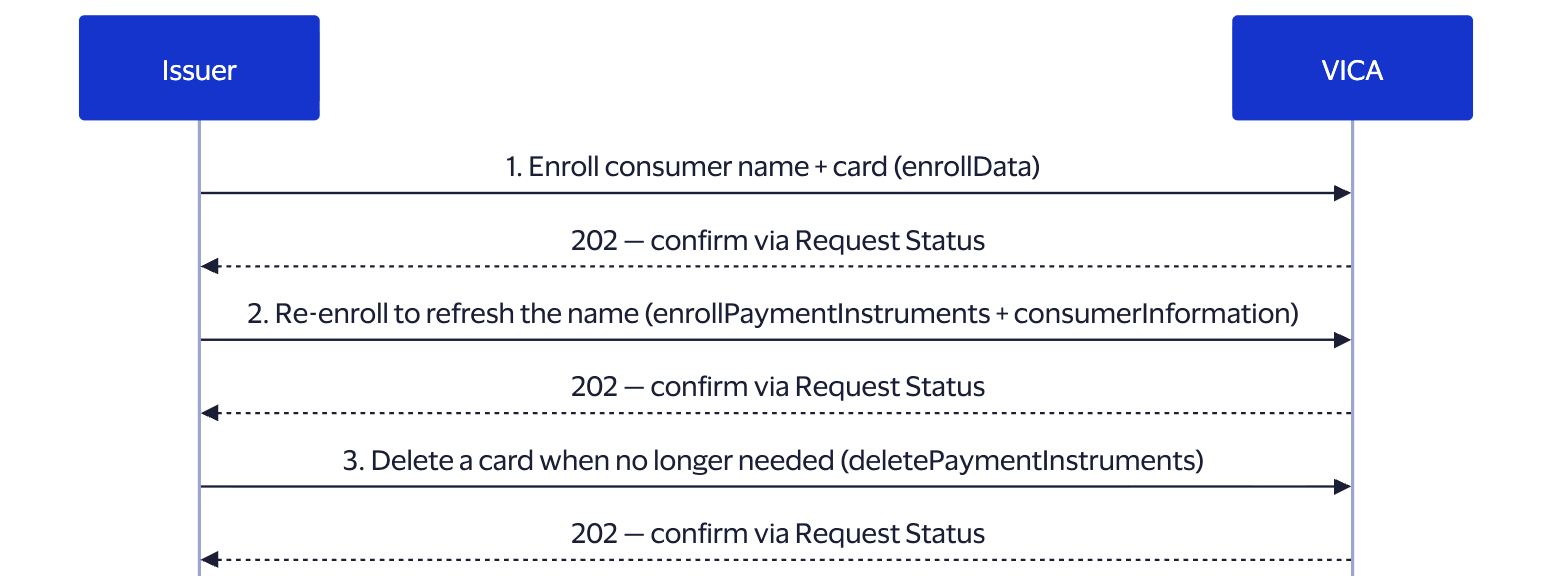
Figure: the typical Account Name Inquiry lifecycle — enroll the consumer's name with a card, re-enroll to refresh the name when it changes (ANI has no Manage Consumer operation), and delete a card when it is no longer needed.
- Enroll a consumer and card (consumerInformation required): How to Enroll Data.
- Enroll into ANI alongside another product in one request: How to Enroll & Manage Multiple Products.
- Remove a card: Delete Payment Instruments.
Note: Manage Consumer, Manage Payment Instrument, Delete Consumer, and Get Data are not supported for ANI (Get Data returns VIDC-1003).
Supported operations
| Operation | Supported | Notes |
|---|---|---|
| Enroll Issuer Data | YES | CARD required; consumerInformation required |
| Enroll Payment Instruments (type=CARD) | YES | If consumerInformation is present, ANI re-enrolls the consumer; if absent, returns an error |
| Enroll Payment Instruments (type=BANK_ACCOUNT or type=NON-VISA-CARD) | NO | Not supported |
| Manage Consumer Information Data | NO | Not supported |
| Manage Payment Instruments Data | NO | Not supported |
| Delete Consumer Information Data | NO | Not supported |
| Delete Payment Instruments Data | YES | CARD only |
| Get Issuer Data | NO | Returns item-level VIDC-1003; other products in the same request are unaffected |
Name Verification at the Heart of ANI
Account Name Inquiry exists to confirm one thing: that the name Visa holds for an account matches the name presented on a transaction. That makes consumerInformation - specifically the consumer's name - the data ANI verifies, which is why it is required on every ANI request and why ANI cannot enroll a standalone card.
- What the name comprises. Enrollment carries the consumer's firstName, lastName, and countryCode alongside the CARD (with billingAddress). See the per-operation samples in How to Enroll Data.
- How it's used. Once enrolled, Visa can perform a name-matching check against the account during payment processing - no further call from you is needed at transaction time.
- Updating the name on record. ANI has no Manage Consumer operation, so you don't edit a name in place. To change it, re-enroll: send an Enroll Payment Instruments request that includes consumerInformation, and ANI re-enrolls the consumer with the updated name as part of that operation. Omitting consumerInformation on that call returns an error.
- Verifying a name across products. Because every VICA product shares one endpoint set, you can include ACCOUNT_NAME_INQUIRY alongside another product in a single request - see How to Enroll & Manage Multiple Products. Each product reports its outcome independently, so an ANI item failing does not block the others.
Product-specific fields and constraints
- consumerInformation is required on every request - ANI cannot enroll a standalone card without it.
- CARD only - BANK_ACCOUNT is not accepted. billingAddress is required on the card.
- No consumer or instrument management. Manage Consumer, Manage Payment Instrument, and Delete Consumer are unsupported.
- Get Data is unsupported. Including ACCOUNT_NAME_INQUIRY in a Get Data request returns item-level VIDC-1003; other products in the request succeed independently and the overall HTTP status remains 200.
- India/RBI card-tokenization fields. See Product-specific fields and constraints (Click to Pay) for isAFAuthentication and isPaymentInstrumentConsent — these apply to any CARD payment instrument, not just Click to Pay.
Related
- Implementation Guides - all ANI operation recipes
- Core Concepts - data model, identity, async model, request patterns
- API Reference - the complete OpenAPI schema (optional deeper dive)
- Errors and Troubleshooting - VIDC- reason codes