Address Verification Service with VICA
Enroll consumers and payment credentials in Visa products through a single Visa ID and Credential integration.
Address Verification Service (AVS) lets issuers register payment instruments and their billing addresses with Visa so that address data can be verified during payment processing. Issuers already familiar with VICA for Click to Pay can add AVS support through the same VICA endpoints - managing consumer and payment-credential information for both products through one unified integration, with no new endpoints to learn.
AVS focuses on the payment instrument and its billingAddress. Many issuers enroll cards into AVS without submitting consumer profile data.
How it works
- Targeting AVS. Include ADDRESS_VERIFICATION_SERVICE in the products array. The products array is required for AVS - the legacy intent pattern targets Click to Pay only. See Core Concepts › Request Patterns.
- No product data attributes. The AVS products entry contains only the productCode; there are no AVS-specific productData attributes at this time.
- billingAddress is central. It is required on every AVS payment-instrument enrollment and update.
- Asynchronous processing. All AVS writes return HTTP 202; the outcome arrives via Request Status or a Status Notification.
- No Get Data. AVS does not support retrieval - see Constraints below.
What you can do
A typical AVS integration follows the lifecycle below - select the Address Verification Service tab on each recipe. AVS centers on the card and its billingAddress; it has no consumer-level operations and no Get Data.
Figure: the typical Address Verification Service lifecycle — enroll a card with its billing address (most commonly without consumer information), update the billing address when it changes, and delete the card when it is no longer needed.
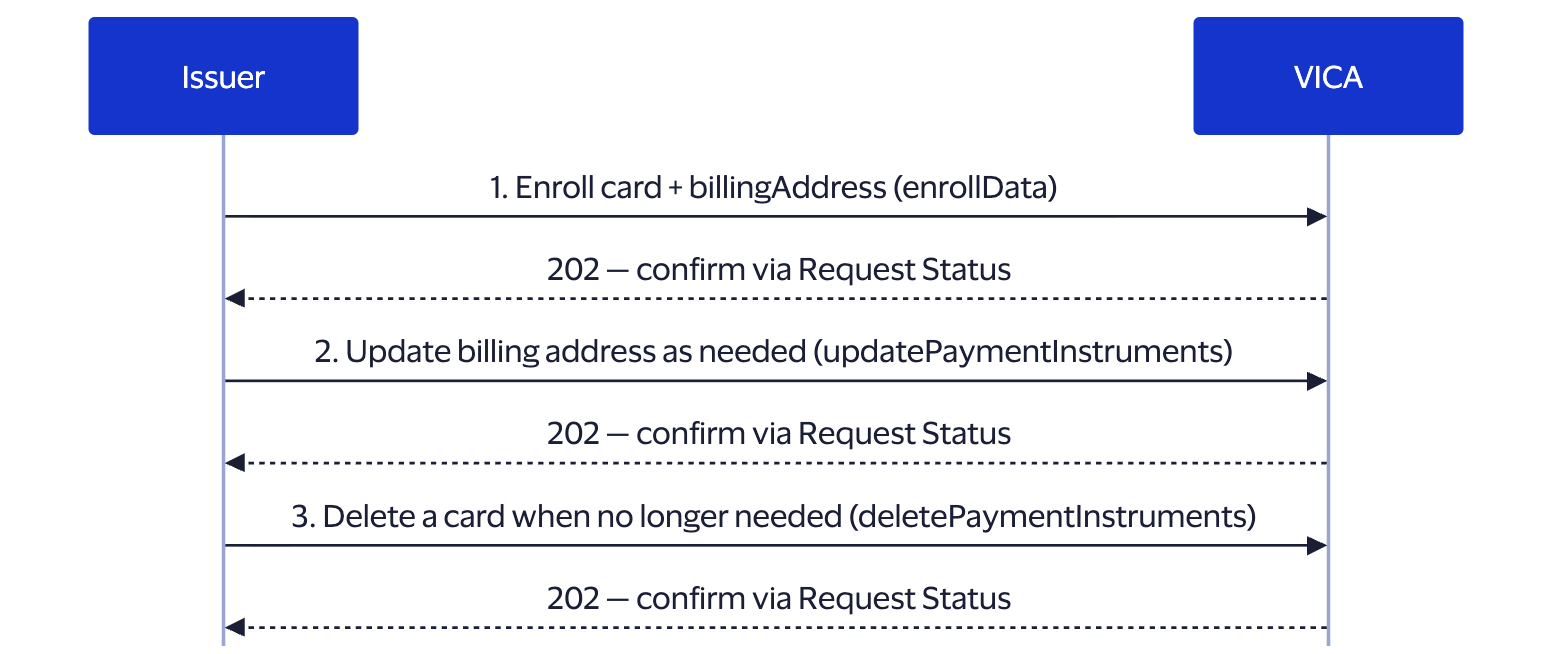
- Enroll a card (with billingAddress; consumerInformation optional): How to Enroll Data. The most common AVS pattern enrolls the card alone, without consumer information.
- Add another card to an existing AVS consumer: Enroll Payment Instruments.
- Update a card's billing address: Manage Payment Instruments. billingAddress is required on every update.
- Remove a card: Delete Payment Instruments.
Supported operations
| Operation | Supported | Notes |
|---|---|---|
| Enroll Issuer Data | YES | consumerInformation optional; billingAddress required on the card |
| Enroll Payment Instruments (type=CARD) (without consumer) | YES | Most common AVS pattern; consumerInformation not required |
| Enroll Payment Instruments (type=BANK_ACCOUNT or type=NON-VISA-CARD) | NO | Not supported |
| Manage Consumer Information Data | NO | Returns HTTP 422 |
| Manage Payment Instruments Data | YES | billingAddress is required on every AVS update |
| Delete Consumer Information Data | NO | Returns HTTP 422 |
| Delete Payment Instruments Data | YES | Individual cards can be removed |
| Get Issuer Data | NO | Returns item-level VIDC-1003; other products in the same request are unaffected |
Working with billing addresses
The billingAddress is the core of every AVS record - it is the data Visa verifies during payment processing.
- Required on enrollment and every update. Each AVS payment-instrument enrollment and each Manage Payment Instruments update must carry a complete billingAddress. Because a Manage update is an overwrite, send the full address, not only the lines that changed.
- CARD only. AVS verifies addresses for cards; BANK_ACCOUNT is not accepted (bank accounts are an ADS capability).
- Targeting a card to update or remove. Manage and Delete identify a card - see How to Delete Payment Instruments for the identifier rules.
Adding AVS to an existing Click to Pay integration
If you already use VICA for Click to Pay, AVS adds no new endpoints. Enroll a consumer into both products in a single request by including both CLICK_TO_PAY and ADDRESS_VERIFICATION_SERVICE in the products array of one How to Enroll Data call. Each product is processed and reports its outcome independently, so one product's failure does not affect the other - see How to Enroll & Manage Multiple Products.
Product-specific fields and constraints
- billingAddress is mandatory for every AVS enrollment and payment-instrument update.
- CARD only: BANK_ACCOUNT is not accepted.
- Consumer-level operations are unsupported. Manage Consumer and Delete Consumer return HTTP 422.
- Get Data is unsupported. Including ADDRESS_VERIFICATION_SERVICE in a Get Data request returns item-level VIDC-1003; any other products in the request are processed normally and the overall HTTP status remains 200.
- India/RBI card-tokenization fields. See Product-specific fields and constraints (Click to Pay) for isAFAuthentication and isPaymentInstrumentConsent — these apply to any CARD payment instrument, not just Click to Pay.
For the complete field list see API Reference; for reason codes see Errors & Troubleshooting.
Related
- Implementation Guides: AVS operation recipes
- Core Concepts: data model, identity, async model, request patterns
- API Reference - the complete OpenAPI schema (optional deeper dive)
- Errors & Troubleshooting - VIDC- reason codes