This API is used by token requestors like financial institutions, central operators, fintech aggregators etc. to provision a token and perform life cycle management operations on it.
| Endpoint | Usage |
|---|---|
| /tokenize | Used to tokenize an account. |
| /requestlifecyclemanagement | Used to perform a state change operation on a Token. |
| /tokenstatusinquiry | Used to enquire status of a token. |
| /updatetokenrestrictions | Used to update restrictions of a token. |
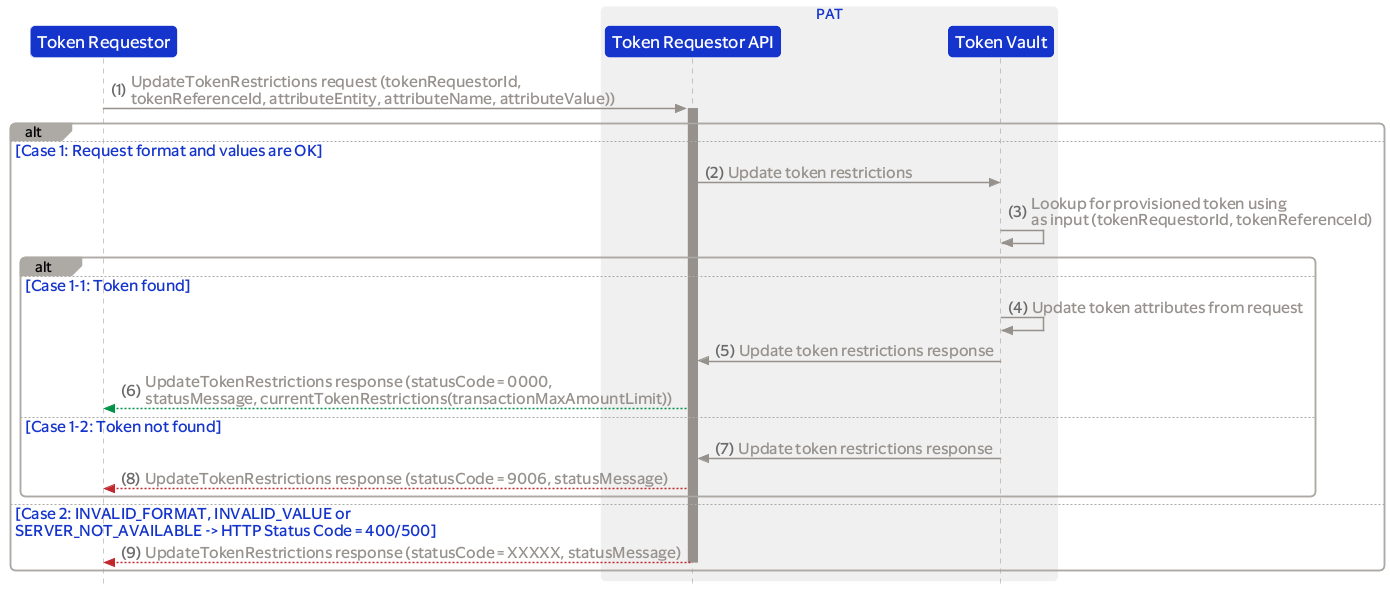
The diagrams below provides an overview of the TR API message flows for Provisioning, Lifecycle Management, Token Status Inquiry and Update Token Restrictions.
Note that when the Token Requestor or Financial Institution state is disabled or closed, all API requests are rejected with statusCode 9136: TOKEN_REQUESTOR_INVALID_STATE or statusCode 9141: FINANCIAL_ INSTITUTION_INVALID_STATE.
Used to request a token for a real account number. Optionally, the following restrictions can be added to the requested token:
The counterparty account number must be included if the real account numbers' financial institution has configured that the counterparty is required.
Also, the transaction currency code and maximum amount limit are validated against the financial institutions' token level restriction configuration.
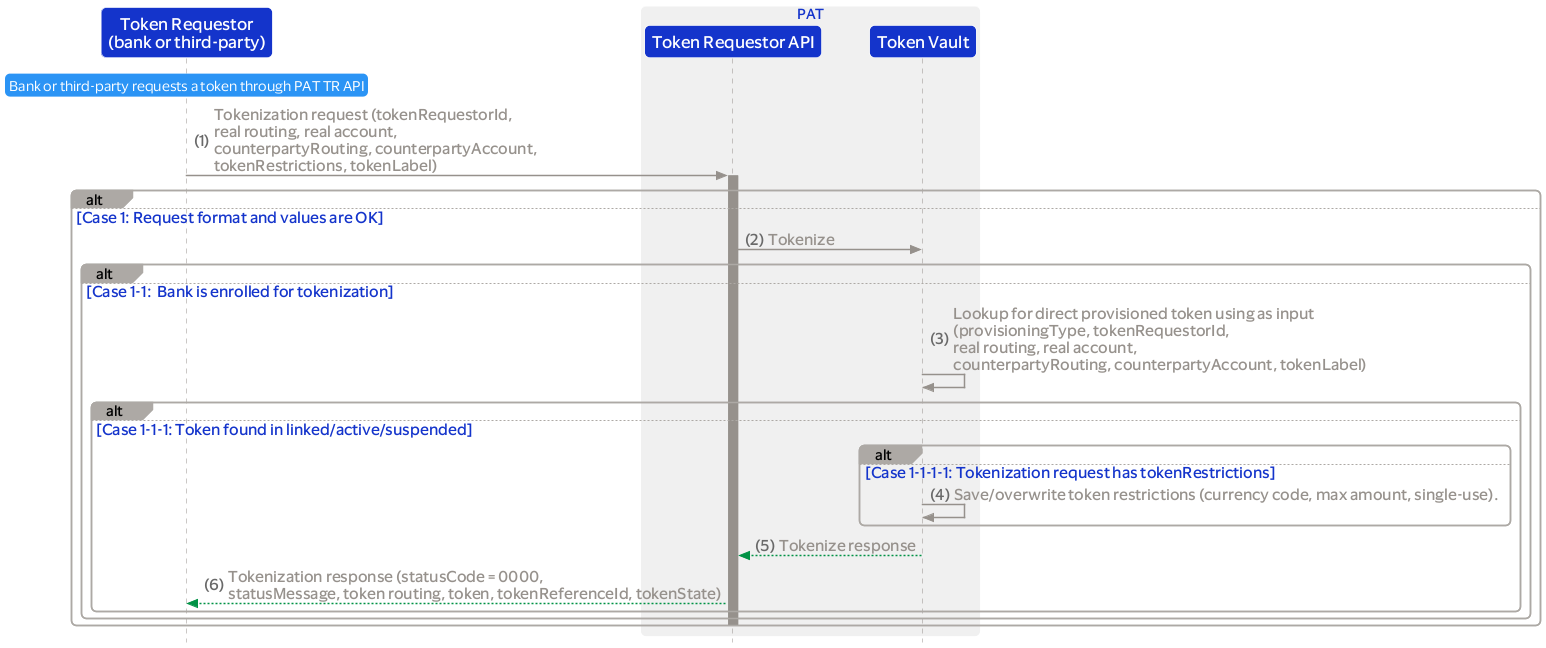
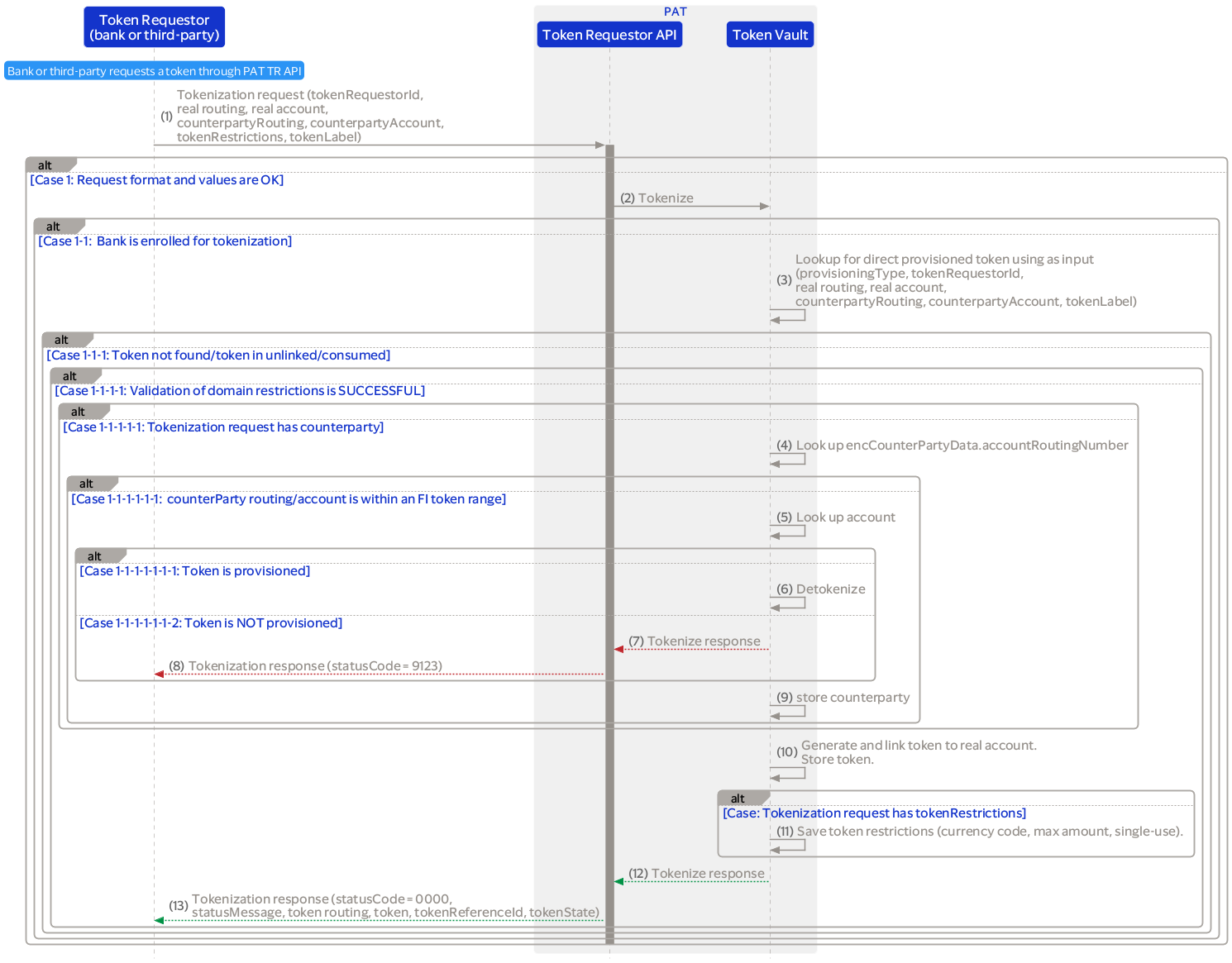
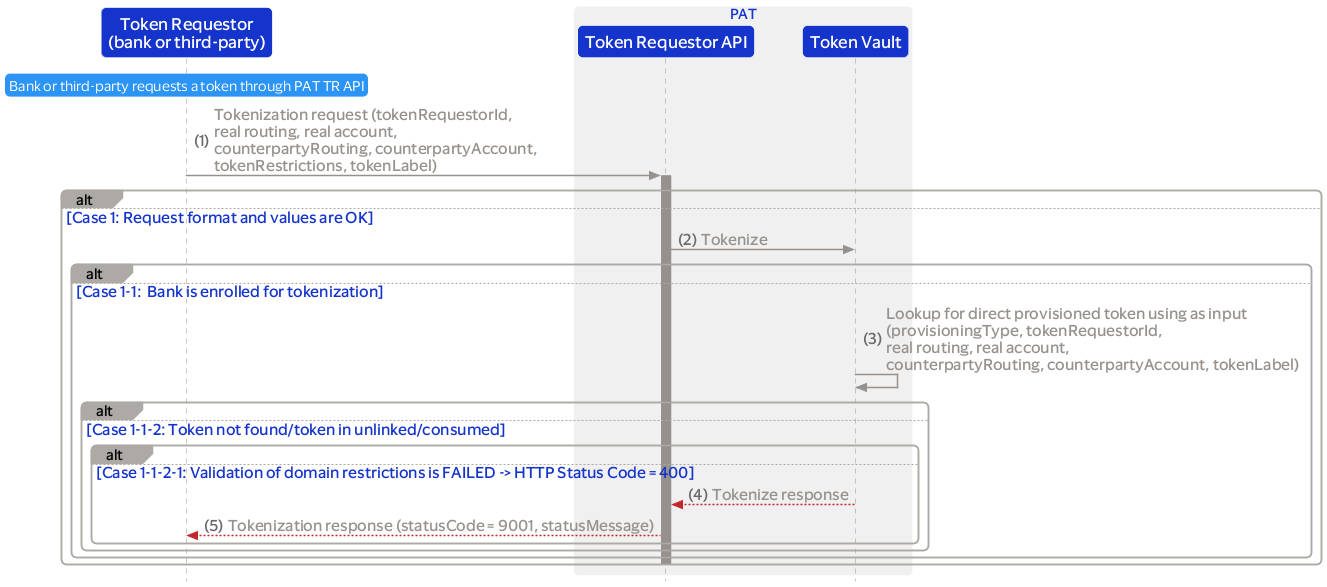
During token provisioning, the request may include optional, configurable token attributes that must align with the supported attributes defined in PAT. When a transaction is validated through the Transaction API, these attributes can be checked against both transaction and token data according to configurable transaction rules. The validation outcome will determine whether the system advises to approve or decline the transaction.
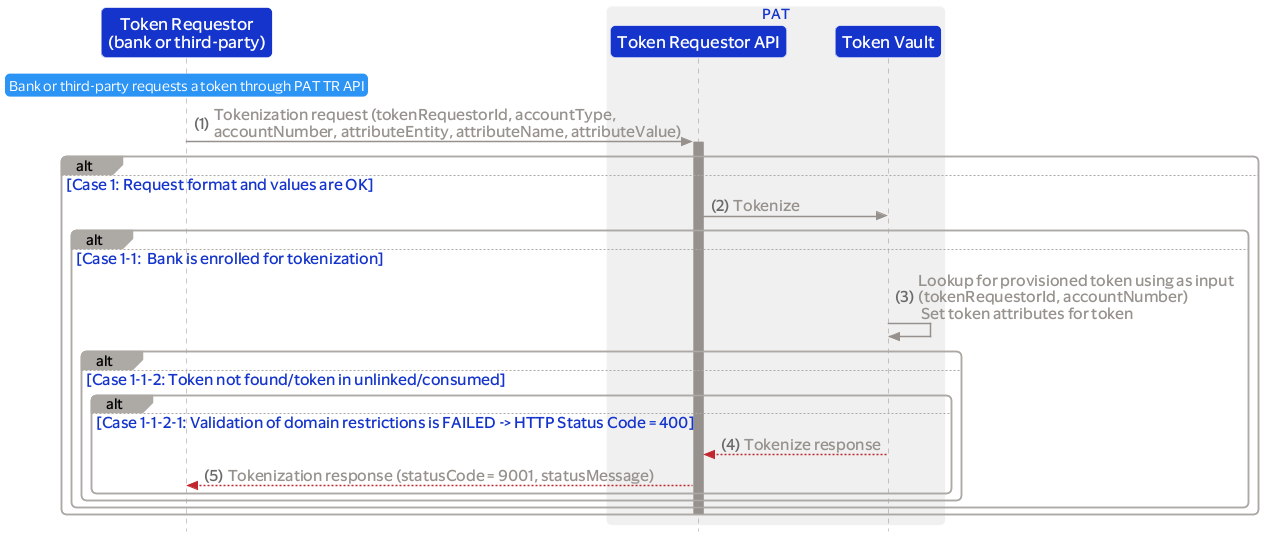
Supported token attributes are:
Lifecycle management operations allow for state changes and management of tokens throughout their lifecycle.
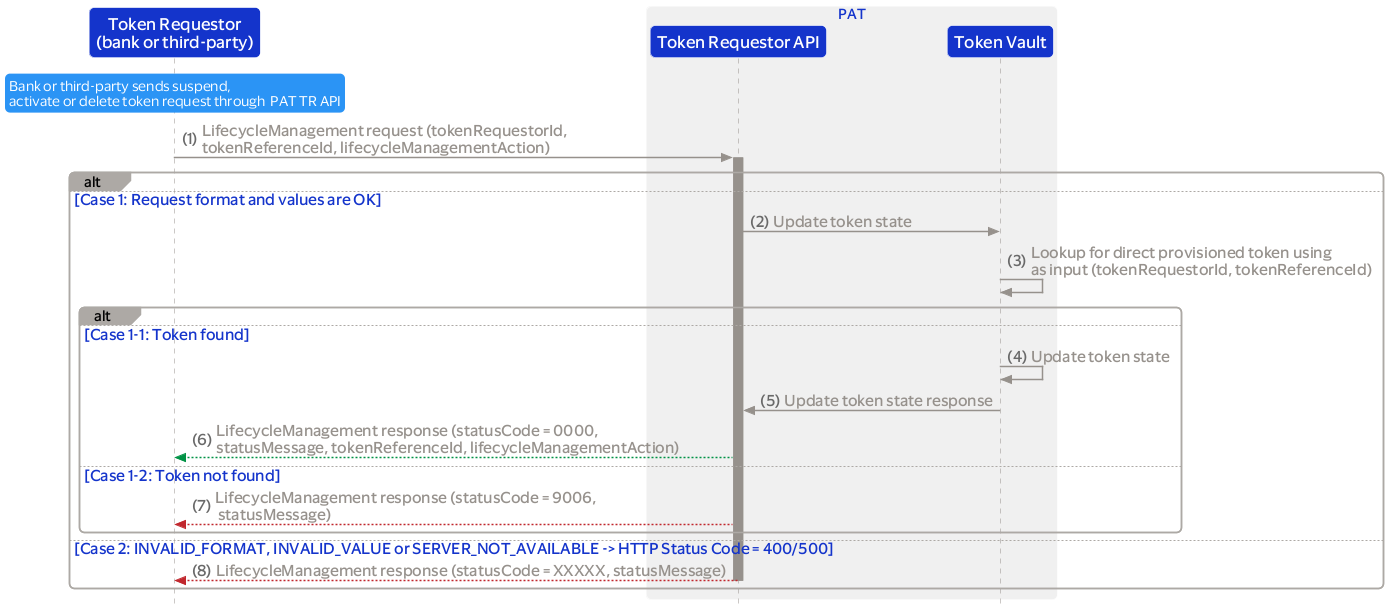
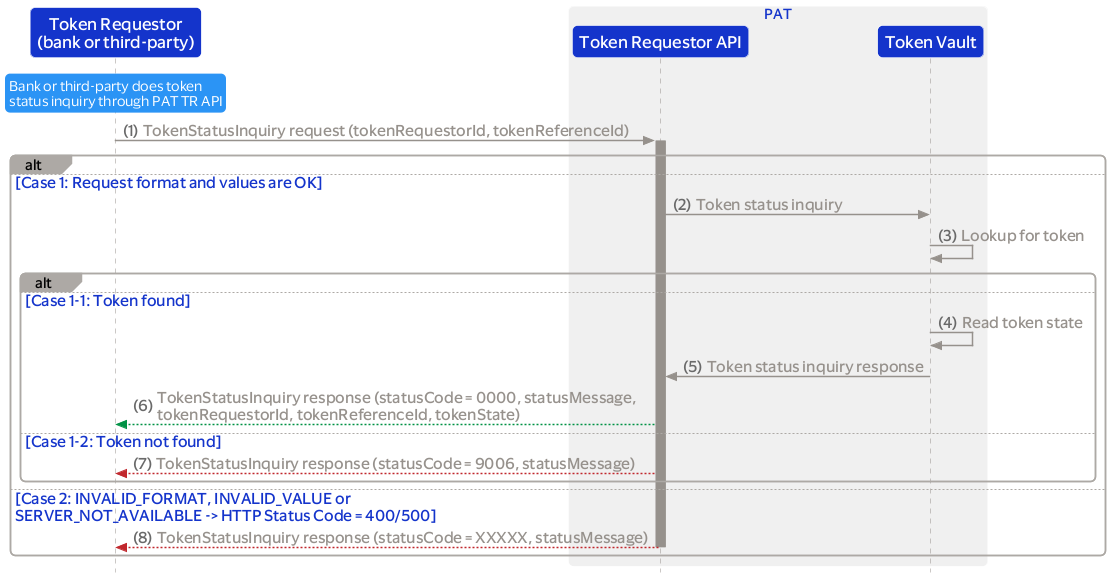
Token requestors can request additional information about the tokens including the token restrictions and attributes.
The following restrictions can be updated:
For the restrictions counterparty (required or not), transaction maximum amount limit and transaction currency code, the financial institution can configure the required values per domain, token range and/or Token Requestor ID (TRID).
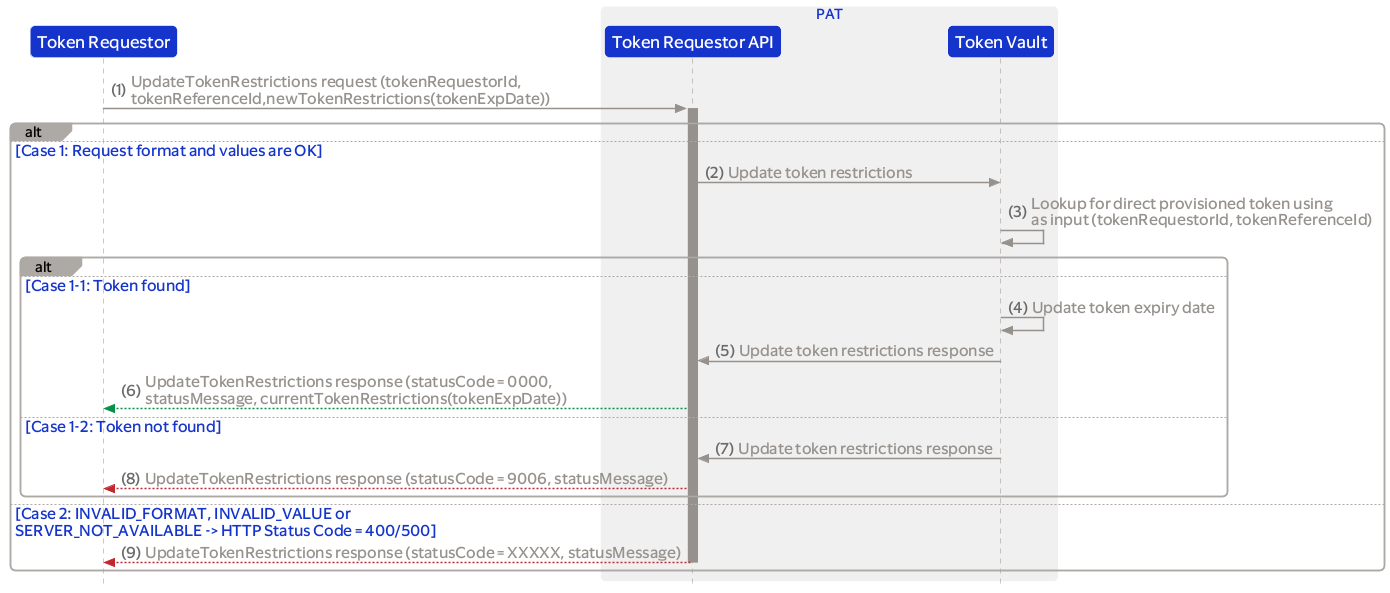
A financial institution (or third-party) can update a token's expiry date (yyMM) with this restriction.
The earliest expiry date value must be equal to the current month plus one. Example: If the request is sent on September 2025, the token expiry date value should be October 2025 or later.
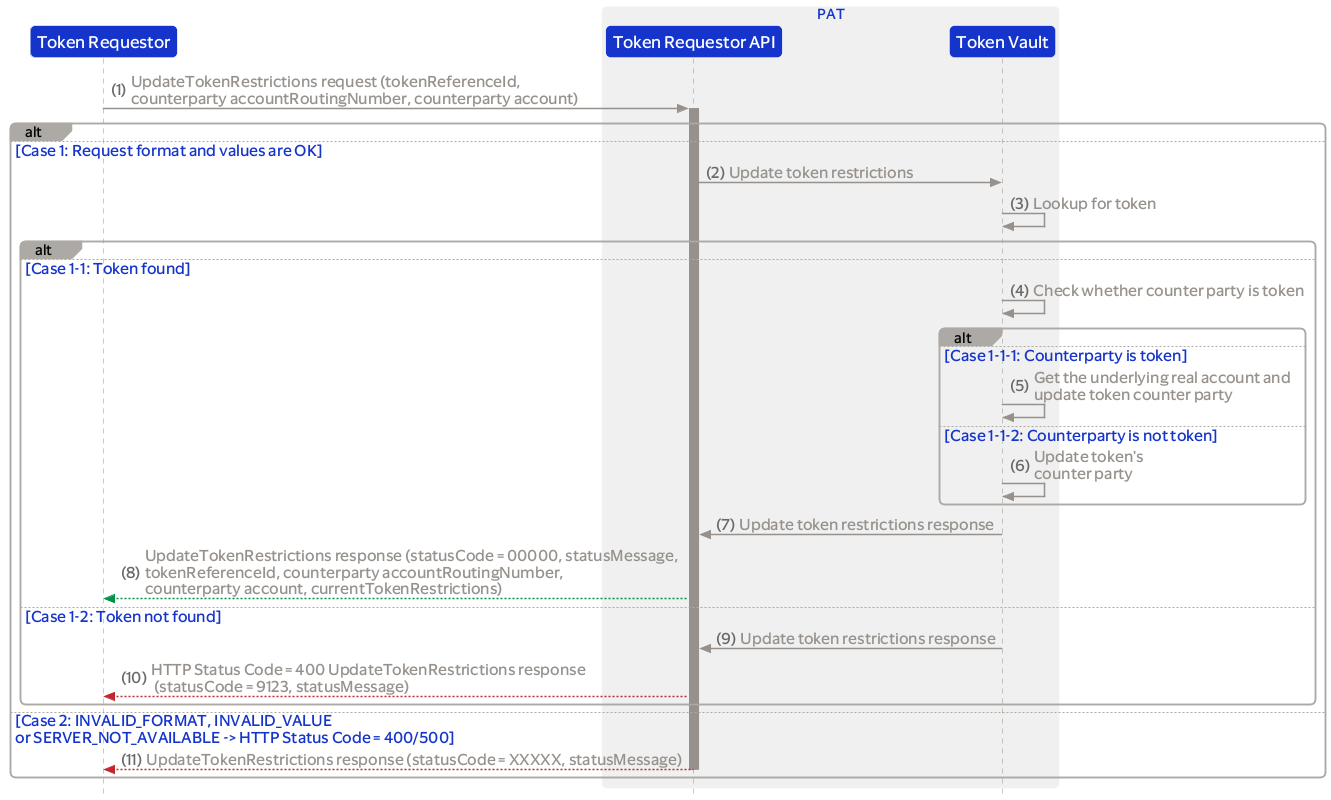
A financial institution (or a third-party) can instruct PAT, through the token requestor interface, to update the tokens' counterparty routing number or real account number with this restriction.
For assigning a counterparty to a token, PAT will apply the following rules if the:
Used by the token requestor to update the multi use of an existing token.
The token becomes a single use token when the multiUseToken is set to false. The token can be used multiple times when set to true.
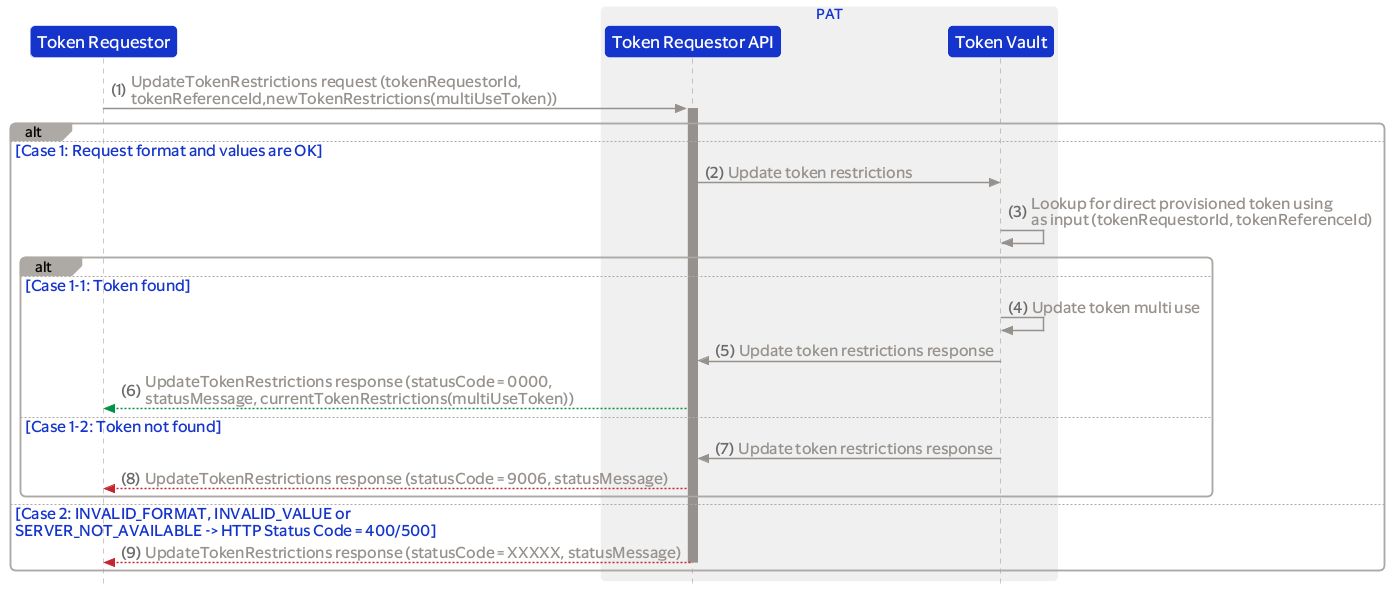
Used by the token requestor to update the transaction maximum amount limit of an existing token.
The maximum amount limit is validated against the token level restrictions configuration of the financial institution that owns the linked account number:

Token requestor can assign one category restriction to the token during provisioning and restriction update. Supported categories are:
This restriction can be validated during a transaction where the category of the originating token is checked against the supported categories of the counterparty account category.
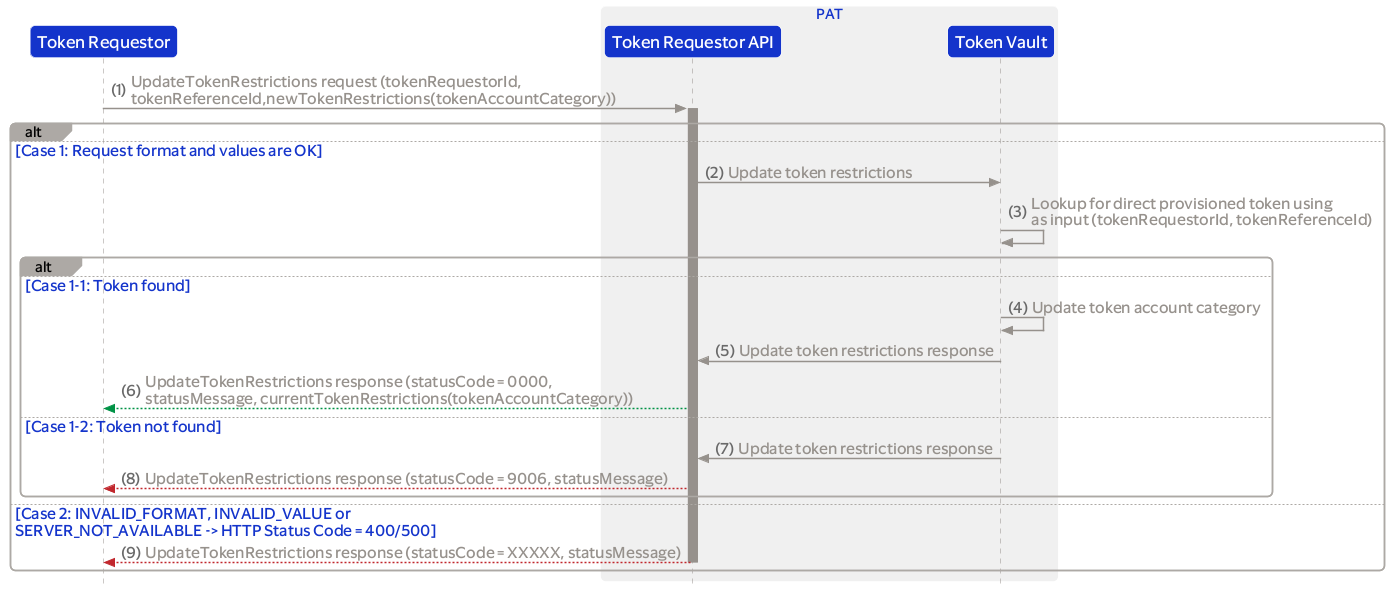
Used by the token requestor to update the transaction currency code of an existing token.
The currency code is validated against the token level restrictions configuration of the financial institution that owns the linked account number.
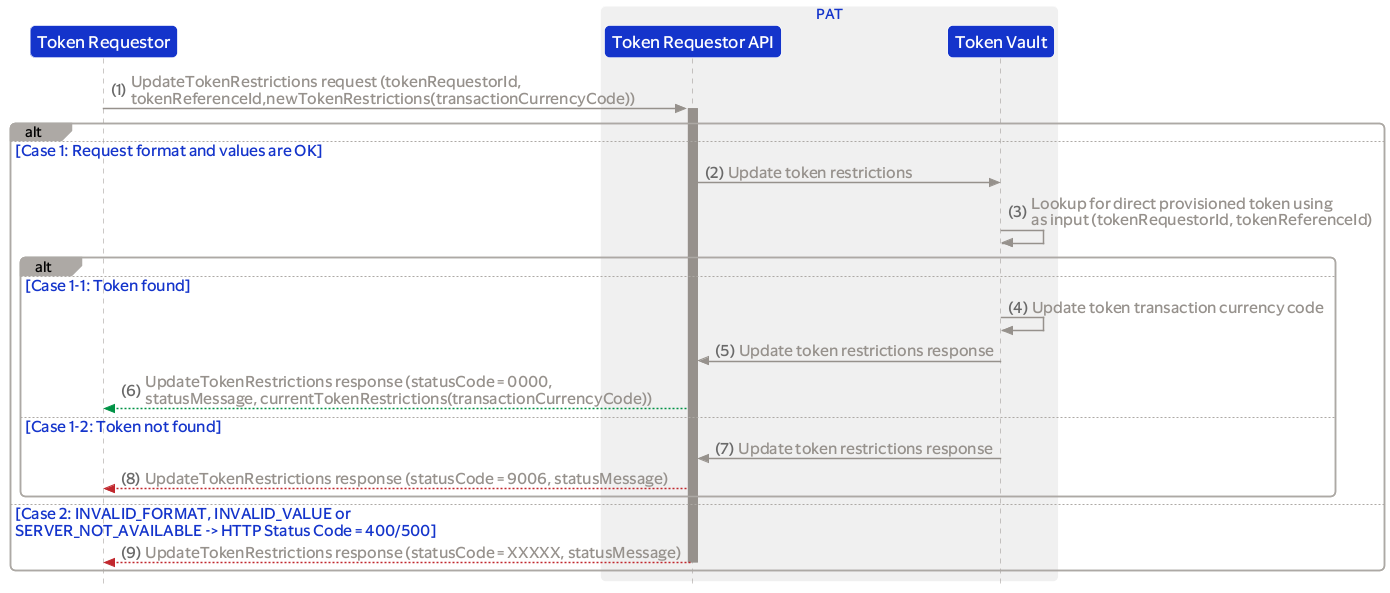
Token requestor can assign one or more category restrictions to the counterparty account of a token during provisioning and restriction update. Supported categories are:
This restriction is used during a transaction where the category of the originating token is checked against the supported categories of the counterparty account category.
For example, when the counterparty account category is 'Consumer, Corporate' and the token category is 'Consumer' then the restriction validation is successful.
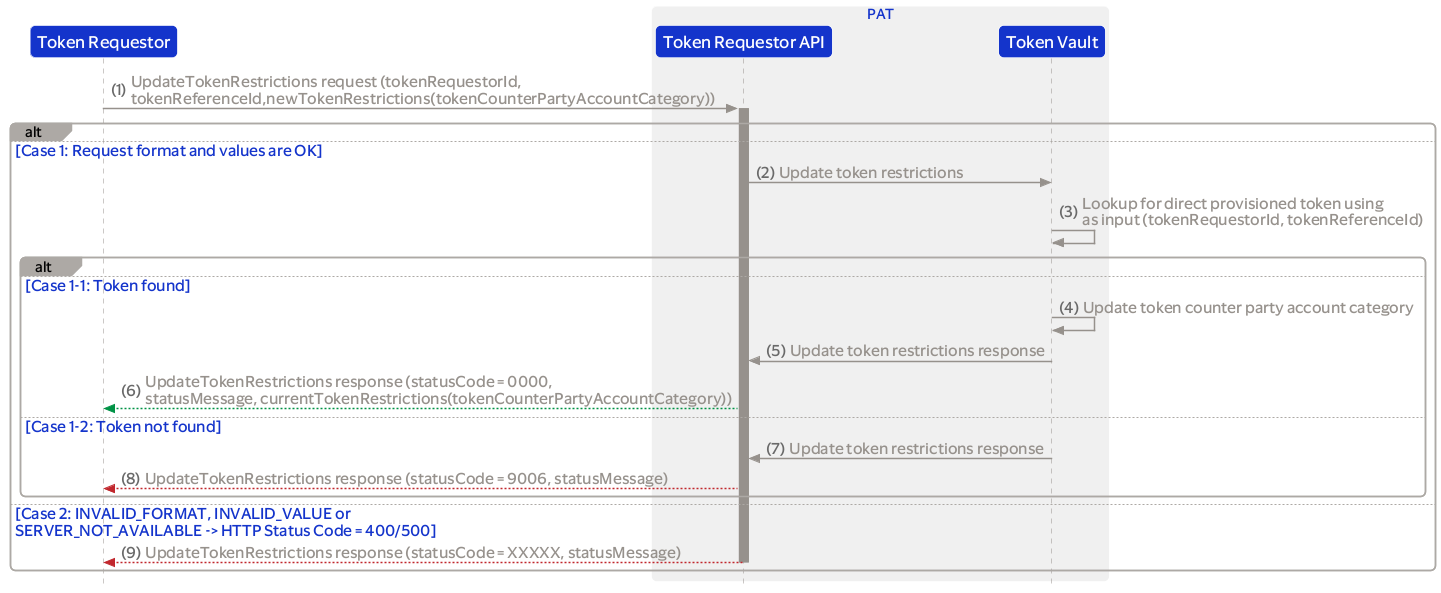
Token requesters can add or update configurable attributes on a already provisioned token. The following token attributes are supported:
This section includes detailed information about the API response fields statusCode and statusMessage.
{
    "messageId": "6fdf4f09-7fbb-48ae-be1e-ac412a2949a7",
    "statusCode": "00000",
    "statusMessage": "Success."
}
    {
    "messageId": "6fdf4f09-7fbb-48ae-be1e-ac412a2949a7",
    "statusCode": "00000",
    "statusMessage": "Success.",
    "encTokens": "..."
}
| HTTP Code | statusCode | statusMessage | Applicable Message |
|---|---|---|---|
| 200 | 0000 | Success | - |
| 400 | 9001 | INVALID_FORMAT; 1. Mandatory data fields are missing 2. The value of fields are not in the required format (length, data type) 3. When the field has a limited list of pre-defined allowed values (ENUM) and the submitted value is not one of them. | - |
| 400 | 9002 | INVALID_VALUE; 1. The request contains a value for a field is used to locate an entity in the server, and the server cannot find the entity (note that other more specific errors might be returned rather than this error code to provide additional information) 2. The web service client making the request is not authorized to make the request. | - |
| 400 | 9104 | TOKEN_INVALID_STATE; The token is not currently in a valid state for this request. | - |
| 400 | 9006 | TOKEN_NOT_FOUND; Every command with tokenReferenceId in its request while token cannot be found in the token vault. | - |
| 500 | 9003 | SERVER_NOT_AVAILABLE; The server is currently under heavy load and cannot handle the request at this time. | - |
| 500 | 9005 | GENERIC_ERROR; An unknown error has occurred. This error is used if the occurred error does not match the defined errors, or when the cause of the error is unknown. | - |
| 403 | 9121 | REQUEST_NOT_ALLOWED; The request was valid, but it is refused action. | - |
| 400 | 9124 | ACCOUNT_TOKENIZATION_NOT_ALLOWED; The provided account is not eligible for tokenization. | - |
| 400 | 9125 | TOKEN_ACCOUNT_ISSUER_MISMATCH; The account belongs to a different financial institution. | - |
| 400 | 9128 | TOKEN_ACCOUNT_REQUESTER_NOT_ALLOWED; Financial Institution token requestors can only manage their own accounts. | - |
| 401 | 9022 | AUTHORIZATION_FAILED; The request has not been applied because it lacks valid authentication credentials for the target resource. | - |
| 400 | 9109 | CRYPTOGRAM_INVALID; The cryptogram was not verified successfully. | - |
| 400 | 9110 | CRYPTOGRAM_EXPIRED; The cryptogram has expired. | - |
| 400 | 9116 | KEYS_NOT_FOUND; Keys cannot be found in KMS. | - |
| 400 | 9117 | CRYPTOGRAPHY_ERROR; Failed to encrypt/decrypt data with keys. | - |
| 400 | 9123 | COUNTERPARTYDATA_NOT_FOUND; The counterpartydata received is unknown. | - |
| 400 | 9127 | FEATURE_NOT_SUPPORTED; The feature is not supported. | - |
| 400 | 9136 | TOKEN_REQUESTOR_INVALID_STATE; The token requestor is currently in a state that does not allow the requested action. | - |
| 400 | 9137 | TRANSACTION_MAX_AMOUNT_LIMIT_INVALID; The system is configured to reject transactionMaxAmountLimit value included in the request. | - |
| 400 | 9138 | COUNTER_PARTY_DATA_REQUIRED; The system is configured to require counterPartyData to be included in the request. | - |
| 400 | 9139 | CURRENCY_INVALID; The system is configured to reject transactionCurrencyCode included in the request. | - |
| 400 | 9141 | FINANCIAL_INSTITUTION_INVALID_STATE; The request cannot be processed because the financial institution state does not allow for it. | - |
| 400 | 9145 | TR_DYNAMIC_TOKEN_ATTRIBUTES_INVALID; Dynamic token attributes are invalid. | - |
| 500 | 9146 | NO_MORE_TOKENS_AVAILABLE; No tokens are available for provisioning. | - |
 Start a Project
 API Overview
 API Reference