Visa In-App Provisioning API enables instant provisioning of digitally issued Visa and Mastercard1 cards into mobile wallets, resulting in increased activation and spending by cardholders. This is accomplished by enrolling cardholders and their cards into In-App Provisioning and generating the encrypted card data payload needed by digital wallets like Apple Pay2, Google Pay3 and Samsung Pay4 for tokenization.
The following use cases represent provisioning opportunities:
In-App Provisioning during Debit Card issuance: A consumer has a debit account relationship with a bank, and the bank wants to offer a debit card to the consumer, or a consumer has some stored value with a Fintech. In both cases, Visa In-App Provisioning can help the bank or the Fintech client offer an instant digital issuance option to their consumers on their app, allowing consumers to create a virtual debit card and add it to their digital wallet instantaneously.
In-App Provisioning during Credit Card issuance: A consumer does not have a relationship with the bank yet, or a consumer has an existing debit account relationship with the bank, and the bank wants to offer a credit card to the consumer, or a Fintech client wants to offer a credit card to a consumer. In all these cases, Visa In-App Provisioning can help the bank or Fintech client offer an instant digital issuance option to their consumers on their app, allowing consumers to create a virtual credit card and add it to their digital wallet instantaneously
In-App Provisioning post issuance: A consumer has an existing debit card or credit card with a bank or Fintech. Visa In-App Provisioning can help the bank or Fintech client offer an option on their app to add this card to their digital wallet instantaneously.
Other use cases may consist of:
Visa In-App Provisioning currently supports Universal Card Enrollment and In-App Provisioning for Apple Pay, Google Pay, and Samsung Pay.
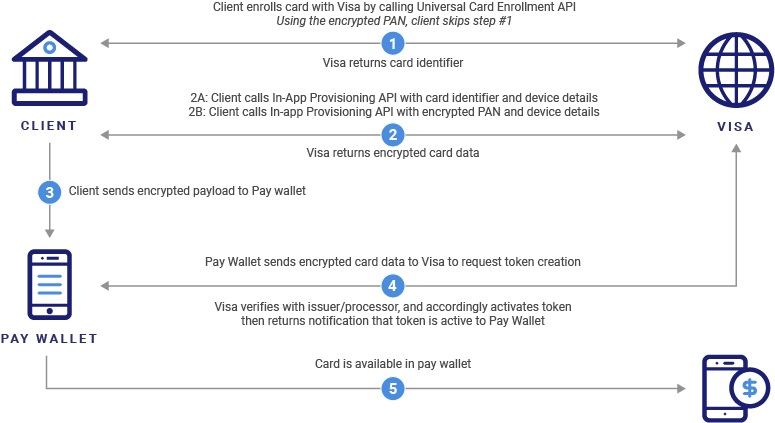
Clients have the option to directly call the Visa In-App Provisioning API using encrypted card data.
The Universal Card Enrollment API enables Visa clients to digitally register accounts with Visa in real-time. Once registered, client developers receive a universal card identifier that can be used interoperably for accessing certain other Visa services, such as Visa In-App Provisioning, without directly handling sensitive PAN data or having to re-register and maintain card data across multiple Visa products in the future.
The In-App Provisioning API enables clients to request encrypted card data using the universal card identifier from the Universal Card Enrollment API. Clients can pass this encrypted card data payload to Apple Pay, Google Pay, or Samsung Pay wallets for tokenization. This token then becomes active in the Pay Wallet and is pushed to the consumer's device.
The Visa In-App Provisioning API now supports Google Unified Push Provisioning, allowing clients to receive a single encrypted payload containing two Opaque Payment Cards (OPCs): one OPC for the Funding PAN (FPAN), which is the user’s actual PAN information that Google can store in the user’s Google Account, and a second OPC for the Device PAN (DPAN), which is the tokenized PAN information that will be provisioned into the user’s device wallet. As a pre-requisite, clients must complete onboarding with Google and ensure their Android App Package Name or Web Provisioning host URL is whitelisted with Google. Additionally, clients need to inform Google that they are partnering with Visa for Google UPP support. For more details, clients can refer to Digital Wallet Prerequisites section in VIAP API Service Description and Client Implementation Guide.
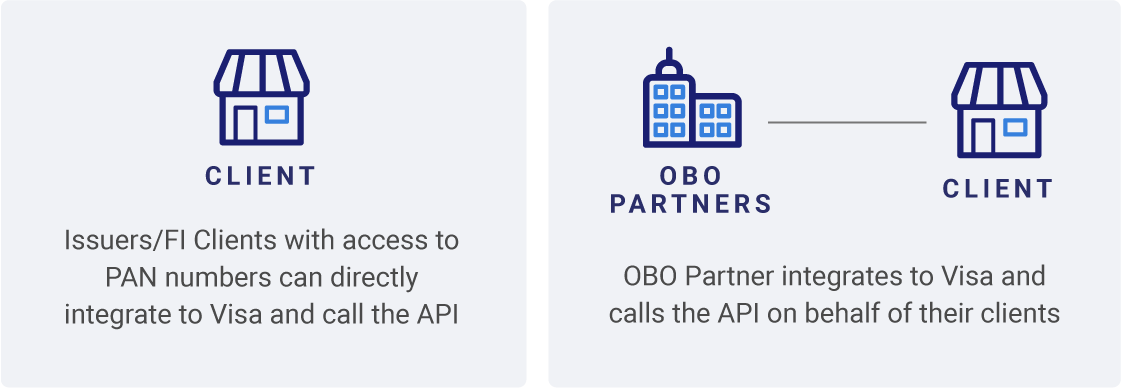
Visa In-App Provisioning can be used by Issuers or authorized Processors, Program managers, Fintechs, Non-bank issuers and Software/Service providers.
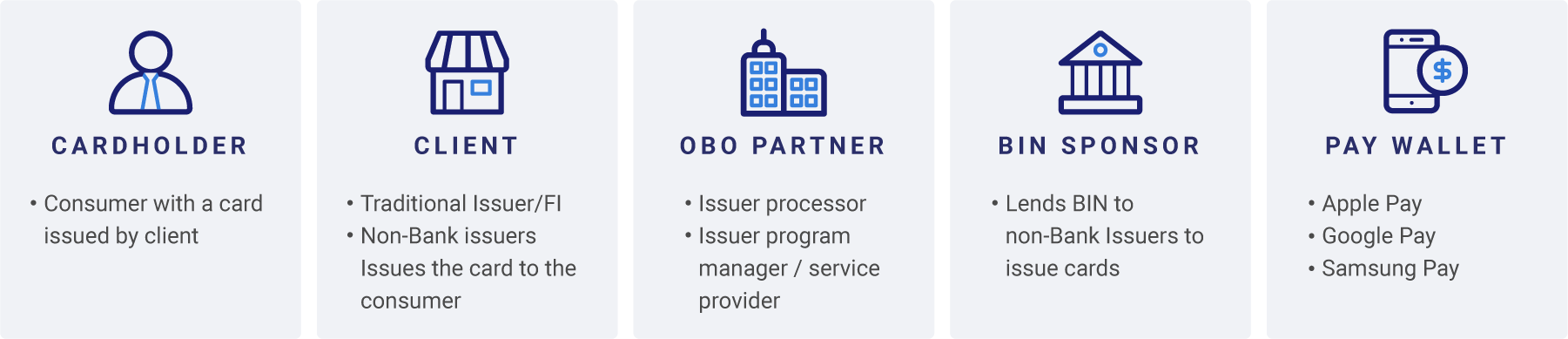
Roles
To get started, refer to the Getting Started section in the Visa Developer Center. Use the API explorer in the "API Reference" section to understand how to use APIs in the Sandbox. Once your project is ready to be promoted to Certification environment or production, complete the details requested in the Project promotion form and enter into the appropriate VDP API Agreement for production use. A Visa implementation manager will set up the data required and promote your project to the requested environment once all requirements are met.
Note: The sandbox environment is designed to provide a general view and guide of the endpoint request and response structure. The data in the sandbox covers a small subset of possible requests. There are systematic environment limitations, and you may not be able to execute all API functionality through the API explorer in sandbox. Please code using the API specifications, including error codes.
Clients need to complete the necessary pre-requisites with each of the digital wallet providers they are looking to enable push provisioning for and the relevant issuer needs to be a participant in the Visa Token System. They need to have a mobile app published in the respective app stores and are able to publish an update. Clients need to make their own assessment on the required steps to be in compliance with the terms of the respective wallet provider and ensure that the latest requirements are satisfied by working directly with the digital wallet providers. For example, Apple may require Apple Pay In-App Provisioning entitlement on the app for distribution and all pay wallets require the 'Add to Wallet' button to meet their standard guidelines.
Each pay wallet offers a unique way to identify if a card has already been tokenized on that pay wallet on the device through the pay wallet's API/SDK integration. Client app should use this service and enable 'Add to Wallet' button only if the card is not tokenized on the device on the pay wallet yet.
 Start a Project
 API Overview
 API Reference