These guides are organized by operation, not by product. Because VICA uses one fixed set of endpoints across all products (see Core Concepts), the request you send to enroll a consumer is the same call whether you target Click to Pay, AVS, ADS, or ANI — only the products array and a few product-specific fields change. Each guide below shows the shared call once, then gives a per-product sample under a tab.
Before you start: complete First Steps (credentials, Two-Way SSL, X-Pay-Token, MLE, first call) and read Core Concepts (data model, identity, the async processing model, request patterns). For the complete field constraints and full endpoint list, see API Reference.
Issuers must only enroll or update consumer and payment-instrument data for their own customers, and only data they know to be accurate. It is the issuer's responsibility to:
Create a new consumer and one or more payment instruments, and enroll them into one or more products.
POST /enrollData
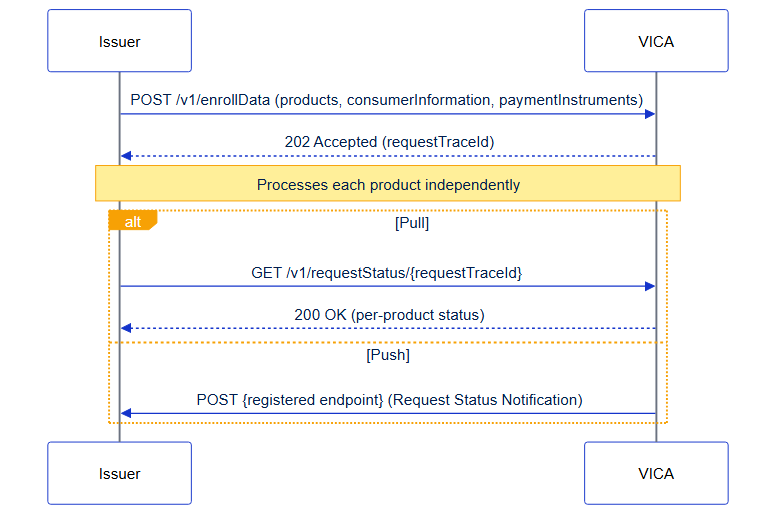
Returns HTTP 202 Accepted. Use the requestTraceId to retrieve the final outcome.
| Product | Supported | Product-specific requirements |
|---|---|---|
| Click to Pay (CLICK_TO_PAY) | YES | consumerInformation required; ≥1 CARD with billingAddress |
| Address Verification Service (ADDRESS_VERIFICATION_SERVICE) | YES | CARD with billingAddress required; consumerInformation optional |
| Alias Directory Service (ALIAS_DIRECTORY_SERVICE) | YES | consumerInformation required; CARD or BANK_ACCOUNT; optional preferredFor |
| Account Name Inquiry (ACCOUNT_NAME_INQUIRY) | YES | consumerInformation and CARD both required; BANK_ACCOUNT not accepted |
To enroll into more than one product in a single call, include multiple entries in the products array — see How to Enroll & Manage Multiple Products.
Figure: Enroll Data is asynchronous — VICA returns 202 Accepted with a requestTraceId, then you confirm the per-product outcome by polling Request Status (pull) or receiving a Status Notification (push)
Request - Click to Pay
{
  "products": [
    { "productCode": "CLICK_TO_PAY" }
  ],
  "consumerInformation": {
    "externalConsumerID": "consumer-abc-001",
    "externalConsumerIDOwnerBID": "10098765",
    "firstName": "Alex",
    "lastName": "Miller",
    "countryCode": "USA",
    "locale": "en_US",
    "emails": ["[email protected]"],
    "phones": ["14155550101"]
  },
  "paymentInstruments": [
    {
      "type": "CARD",
      "accountNumber": "4111111145551140",
      "nameOnCard": "Alex Miller",
      "expirationDate": "2030-01",
      "billingAddress": {
        "addressLine1": "1000 Market Street",
        "city": "San Francisco",
        "state": "CA",
        "postalCode": "94105",
        "country": "USA"
      }
    }
  ]
}
Request — Address Verification Service
consumerInformation is optional; the most common AVS-only pattern enrolls the card alone. billingAddress is required.
{
  "products": [
    { "productCode": "ADDRESS_VERIFICATION_SERVICE" }
  ],
  "paymentInstruments": [
    {
      "type": "CARD",
      "accountNumber": "4111111145551140",
      "nameOnCard": "Alex Miller",
      "expirationDate": "2030-01",
      "billingAddress": {
        "addressLine1": "1000 Market Street",
        "city": "San Francisco",
        "state": "CA",
        "postalCode": "94105",
        "country": "USA"
      }
    }
  ]
}
Request — Alias Directory Service
ADS is the only product that accepts BANK_ACCOUNT instruments and the preferredFor field. This example enrolls a bank account.
{
  "products": [
    { "productCode": "ALIAS_DIRECTORY_SERVICE" }
  ],
  "consumerInformation": {
    "externalConsumerID": "63421837-d597-4f0f-89e4-930c1a7b9e85",
    "externalConsumerIDOwnerBID": "10098765",
    "firstName": "Alex",
    "lastName": "Miller",
    "countryCode": "USA",
    "locale": "en_US",
    "emails": ["[email protected]"],
    "phones": ["16504005555"]
  },
  "paymentInstruments": [
    {
      "type": "BANK_ACCOUNT",
      "accountName": "Alex Miller",
      "accountNumber": "1001001234",
      "accountNumberType": "DEFAULT",
      "accountType": "CHECKING",
      "countryCode": "USA",
      "currencyCode": "USD",
      "bankName": "Bank A",
      "preferredFor": [
        { "type": "RECEIVE" }
      ]
    }
  ]
}
Request — Account Name Inquiry
ANI requires both consumerInformation and a CARD. BANK_ACCOUNT is not accepted.
{
  "products": [
    { "productCode": "ACCOUNT_NAME_INQUIRY" }
  ],
  "consumerInformation": {
    "externalConsumerID": "63421837-d597-4f0f-89e4-930c1a7b9e85",
    "externalConsumerIDOwnerBID": "10098765",
    "firstName": "Alex",
    "lastName": "Miller",
    "countryCode": "USA"
  },
  "paymentInstruments": [
    {
      "type": "CARD",
      "accountNumber": "4111111145551140",
      "nameOnCard": "Alex Miller",
      "expirationDate": "2030-01",
      "billingAddress": {
        "addressLine1": "1000 Market Street",
        "city": "San Francisco",
        "state": "CA",
        "postalCode": "94105",
        "country": "USA"
      }
    }
  ]
}
Enroll Data acknowledges receipt synchronously, then reports the per-product outcome asynchronously.
Response — 202 Accepted (acknowledgement)
{
  "requestTraceId": "351562ba-83cf-11ee-b962-0242ac120002"
}
Final outcome — via Request Status or Notification
Retrieve the result with Request Status, or receive it as a Status Notification.
Each product appears as its own item in details[].
Success:
{
  "requestTraceId": "351562ba-83cf-11ee-b962-0242ac120002",
  "status": "COMPLETED",
  "consumerInformation": {
    "externalConsumerID": "63421837-d597-4f0f-89e4-930c1a7b9e85",
    "externalConsumerIDOwnerBID": "10098765"
  },
  "details": [
    {
      "productCode": "CLICK_TO_PAY",
      "status": "SUCCESS"
    }
  ]
}
Per-product failure (validation):
{
  "status": "COMPLETED",
  "consumerInformation": {
    "externalConsumerID": "63421837-d597-4f0f-89e4-930c1a7b9e85",
    "externalConsumerIDOwnerBID": "10098765"
  },
  "details": [
    {
      "productCode": "CLICK_TO_PAY",
      "status": "FAILED",
      "errorDetails": [
        {
          "field": "consumerInformation.locale",
          "reason": "VIDC-1000",
          "message": "The consumerInformation.locale is missing"
        }
      ]
    }
  ]
}
For the meaning of VIDC- codes and how failures surface per operation, see Errors and Troubleshooting.
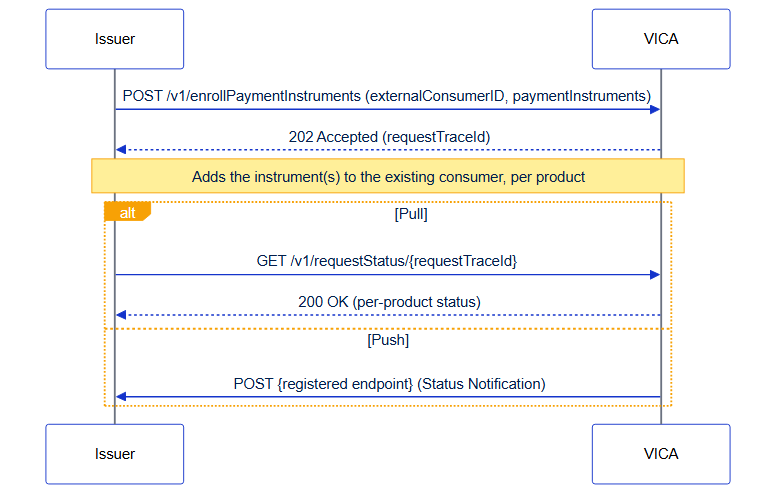
Add one or more payment instruments to a consumer who is already enrolled. The consumer is identified by externalConsumerID — you don't resend the full consumer profile.
POST /enrollPaymentInstruments
Returns HTTP 202 Accepted.
| Product | Supported | Product-specific requirements |
|---|---|---|
| Click to Pay (CLICK_TO_PAY) | YES | CARD + billingAddress; full consumerInformation not required |
| Address Verification Service (ADDRESS_VERIFICATION_SERVICE) | YES | CARD + billingAddress; full consumerInformation not required |
| Alias Directory Service (ALIAS_DIRECTORY_SERVICE) | YES | CARD or BANK_ACCOUNT |
| Account Name Inquiry (ACCOUNT_NAME_INQUIRY) | YES | CARD; if consumerInformation is present ANI re-enrolls the consumer, if absent it returns an error |
Figure: adding a payment instrument is asynchronous — VICA returns 202 Accepted with a
requestTraceId; confirm the per-product outcome via Request Status (pull) or a Status
Notification (push), exactly as for Enroll Data.
Request — Click to Pay / AVS (add a card)
The shape is identical for both; change only the productCode.
{
  "products": [ { "productCode": "CLICK_TO_PAY" } ],
  "consumerInformation": { "externalConsumerID": "consumer-abc-001" },
  "paymentInstruments": [
    {
      "type": "CARD",
      "accountNumber": "4111111145551142",
      "nameOnCard": "Alex Miller",
      "expirationDate": "2031-06",
      "billingAddress": {
        "addressLine1": "1000 Market Street",
        "city": "San Francisco", "state": "CA",
        "postalCode": "94105", "country": "USA"
      }
    }
  ]
}
Request — Alias Directory Service (add a bank account)
{
  "products": [ { "productCode": "ALIAS_DIRECTORY_SERVICE" } ],
  "consumerInformation": { "externalConsumerID": "63421837-d597-4f0f-89e4-930c1a7b9e85" },
  "paymentInstruments": [
    {
      "type": "BANK_ACCOUNT",
      "accountName": "Alex Miller",
      "accountNumber": "1001001234",
      "accountNumberType": "DEFAULT",
      "countryCode": "USA",
      "currencyCode": "USD",
      "bankName": "Bank A",
      "preferredFor": [ { "type": "RECEIVE" } ]
    }
  ]
}
Request — Account Name Inquiry
ANI requires consumerInformation on this call; if present, ANI re-enrolls the consumer as part of the operation.
{
  "products": [ { "productCode": "ACCOUNT_NAME_INQUIRY" } ],
  "consumerInformation": {
    "externalConsumerID": "63421837-d597-4f0f-89e4-930c1a7b9e85",
    "firstName": "Alex", "lastName": "Miller", "countryCode": "USA"
  },
  "paymentInstruments": [
    { "type": "CARD", "accountNumber": "4111111145551140", "nameOnCard": "Alex Miller",
    "expirationDate": "2030-01",
    "billingAddress": { "addressLine1": "1000 Market Street", "city": "San Francisco",
    "state": "CA", "postalCode": "94105", "country": "USA" } }
  ]
}
Returns 202 with a requestTraceId (same shape as Enroll Data); the per-product outcome is reported via Request Status or a Status Notification.
Note: Representative samples. For the complete schema and all field constraints, see API Reference.
After enrollment, you can manage existing records without re-enrollment. Certain attributes, such as phone number in ADS, cannot be modified after creation, and require record deletion and recreation.
Update a consumer's profile fields (such as email or mobile number) after enrollment. No payment instrument is included.
PUT /manageConsumerInformation
Returns HTTP 202 Accepted.
| Product | Supported | Product-specific requirements |
|---|---|---|
| Click to Pay (CLICK_TO_PAY) | YES | Profile fields can be updated after enrollment |
| Address Verification Service (ADDRESS_VERIFICATION_SERVICE) | NO | Not supported |
| Alias Directory Service (ALIAS_DIRECTORY_SERVICE) | PARTIAL | Not supported for Email Address or Mobile Number updates |
| Account Name Inquiry (ACCOUNT_NAME_INQUIRY) | NO | Not supported |
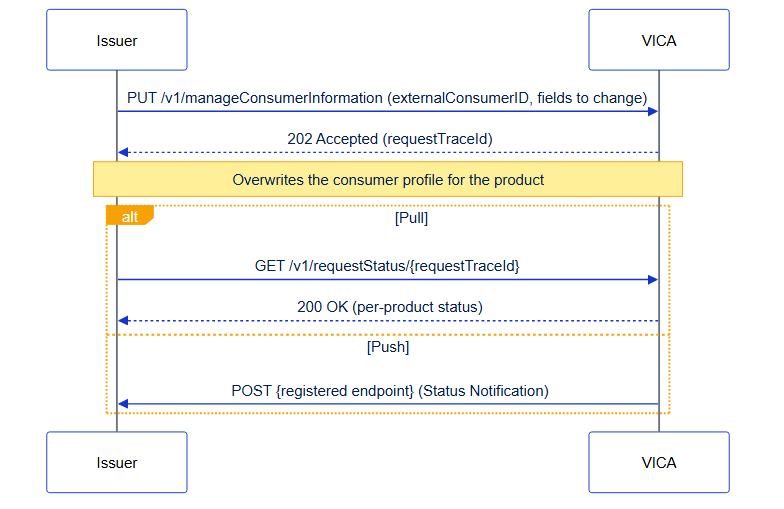
Figure: a consumer-profile update is asynchronous — VICA returns 202 Accepted; confirm the outcome via Request Status (pull) or a Status Notification (push).
Include only the fields to change, alongside the consumer identifier.
{
  "products": [ { "productCode": "CLICK_TO_PAY" } ],
  "consumerInformation": {
    "externalConsumerID": "consumer-abc-001",
    "emailAddress": "[email protected]"
  }
}
Note: Manage Consumer is an overwrite. For Click to Pay, the record is replaced with the data in the request; see Click to Pay with VICA › Behavior when a consumer is disabled for how status interacts with updates.
Returns 202; outcome via Request Status or Status Notification. For the complete schema, see API Reference.
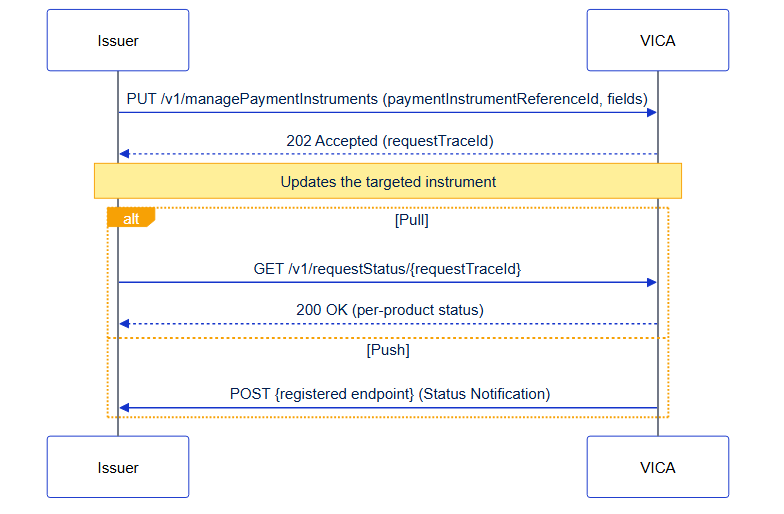
Update payment instrument details — billing address, card details, or (ADS only) preferredFor.
PUT /managePaymentInstruments
Returns HTTP 202 Accepted.
| Product | Supported | Product-specific requirements |
|---|---|---|
| Click to Pay (CLICK_TO_PAY) | YES | expirationDate cannot be updated (VIDC-2008) |
| Address Verification Service (ADDRESS_VERIFICATION_SERVICE) | YES | billingAddress is required on every update |
| Alias Directory Service (ALIAS_DIRECTORY_SERVICE) | YES | Supports preferredFor updates on CARD and BANK_ACCOUNT |
| Account Name Inquiry (ACCOUNT_NAME_INQUIRY) | NO | Not supported |
Figure: a payment-instrument update is asynchronous — VICA returns 202 Accepted; confirm the outcome via Request Status (pull) or a Status Notification (push).
Request - Click to Pay / AVS (update billing address)
{
  "products": [ { "productCode": "CLICK_TO_PAY" } ],
  "paymentInstruments": [
    {
      "billingAddress": {
        "addressLine1": "500 New Address Blvd",
        "city": "Austin", "state": "TX",
        "postalCode": "78701", "country": "USA"
      }
    }
  ]
}
Request - Alias Directory Service (update preferred use)
{
  "products": [ { "productCode": "ALIAS_DIRECTORY_SERVICE" } ],
  "paymentInstruments": [
    {
       "preferredFor": [ { "type": "SEND" }, { "type": "RECEIVE" } ]
    }
  ]
}
Returns 202; outcome via Request Status. For the complete schema, see API Reference.
Retrieve a consumer's current enrollment and all associated payment instruments. Synchronous - returns HTTP 200.
POST /getData
| Product | Supported | Product-specific requirements |
|---|---|---|
| Click to Pay (CLICK_TO_PAY) | YES | Returns CARD instruments with tokenDetails where available |
| Address Verification Service (ADDRESS_VERIFICATION_SERVICE) | YES | Returns CARD/BANK_ACCOUNT with preferredFor and preferredTimestamp where set |
| Alias Directory Service (ALIAS_DIRECTORY_SERVICE) | NO | Item-level VIDC-1003 |
| Account Name Inquiry (ACCOUNT_NAME_INQUIRY) | NO | Item-level VIDC-1003 |
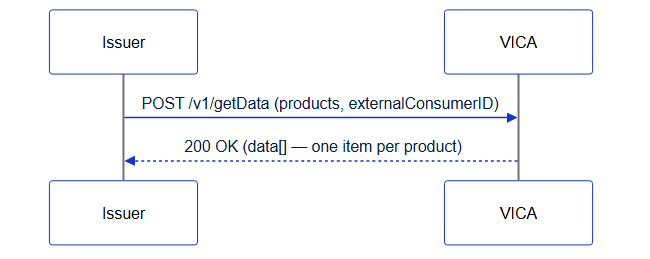
Figure: Get Data is synchronous — VICA returns the enrolled data (or a per-product errorDetails item) in a single 200 OK; there is no Request Status step.
{
  "products": [ { "productCode": "CLICK_TO_PAY" } ],
  "consumerInformation": { "externalConsumerID": "consumer-abc-001" }
}
Returns HTTP 200. Each requested product is a separate item in data[]; each succeeds or fails independently.
{
  "data": [
    {
      "productCode": "CLICK_TO_PAY",
      "consumerInformation": {
        "externalConsumerID": "consumer-abc-001",
        "externalConsumerIDOwnerBID": "10098765",
        "firstName": "Alex", "lastName": "Miller", "countryCode": "USA"
      },
      "paymentInstruments": [
        {
          "type": "CARD",
          "lastFour": "1140",
          "expirationDate": "2030-01",
          "billingAddress": {
            "addressLine1": "1000 Market Street", "city": "San Francisco",
            "state": "CA", "postalCode": "94105", "country": "USA"
          }
        }
      ]
    }
  ]
}
For failed items (timeout, not enrolled, unsupported product) the item carries an errorDetails object instead of data — see Errors & Troubleshooting › Get Data Item-Level Error Codes and Get Data for Multiple Products.
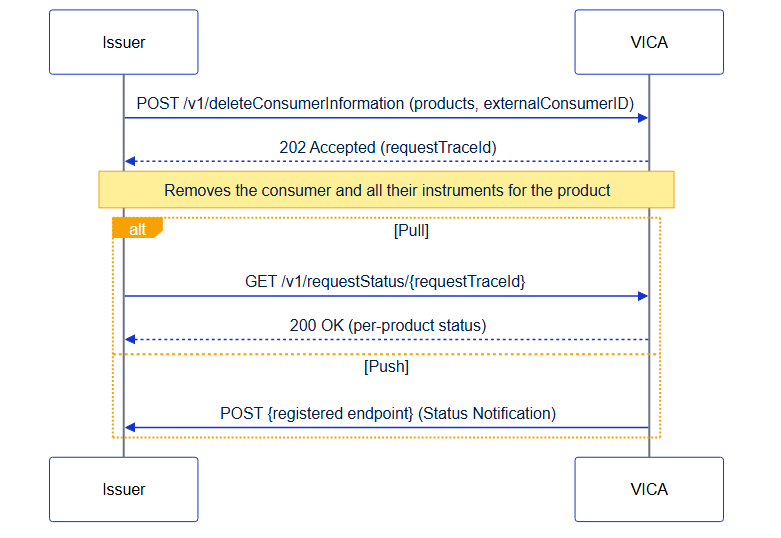
Remove a consumer and all their associated payment instruments for a product.
POST /deleteConsumerInformation
| Product | Supported | Product-specific requirements |
|---|---|---|
| Click to Pay (CLICK_TO_PAY) | YES | Also removes all the consumer's CTP payment instruments |
| Address Verification Service (ADDRESS_VERIFICATION_SERVICE) | YES | Also removes associated instruments |
| Alias Directory Service (ALIAS_DIRECTORY_SERVICE) | NO | Returns HTTP 422 |
| Account Name Inquiry (ACCOUNT_NAME_INQUIRY) | NO | Not supported |
Figure: deleting a consumer is asynchronous — VICA returns 202 Accepted; confirm the outcome via Request Status (pull) or a Status Notification (push).
{
  "products": [ { "productCode": "CLICK_TO_PAY" } ],
  "consumerInformation": { "externalConsumerID": "consumer-abc-001" }
}
Returns 202; outcome via Request Status. For the complete schema, see API Reference.
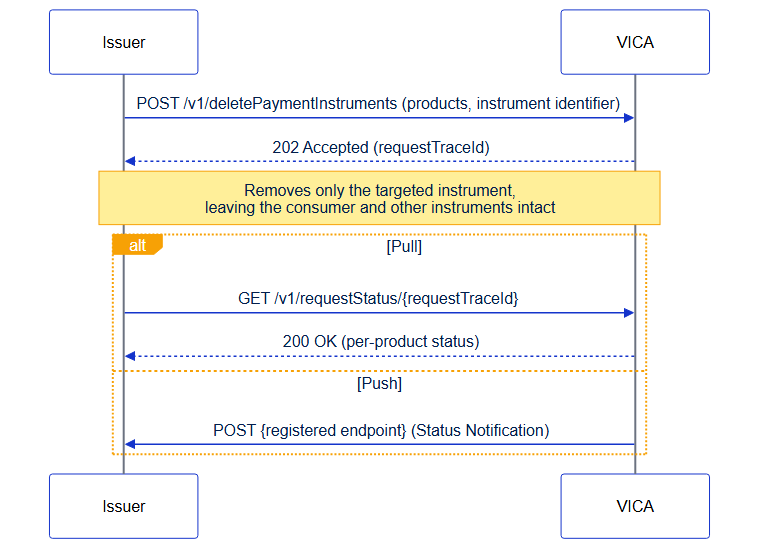
Remove a single payment instrument. The consumer record and other instruments are unaffected. Supported by all products.
POST /deletePaymentInstruments
Returns HTTP 202 Accepted.
Figure: deleting a payment instrument is asynchronous — VICA returns 202 Accepted; confirm the outcome via Request Status (pull) or a Status Notification (push).
Request — Account Name Inquiry (by account number)
{
  "products": [ { "productCode": "ACCOUNT_NAME_INQUIRY" } ],
  "consumerInformation": { "externalConsumerID": "63421837-d597-4f0f-89e4-930c1a7b9e85" },
  "paymentInstruments": [
    { "type": "CARD", "accountNumber": "4111111145551140" }
  ]
}
Returns 202; outcome via Request Status. For the complete schema, see API Reference.
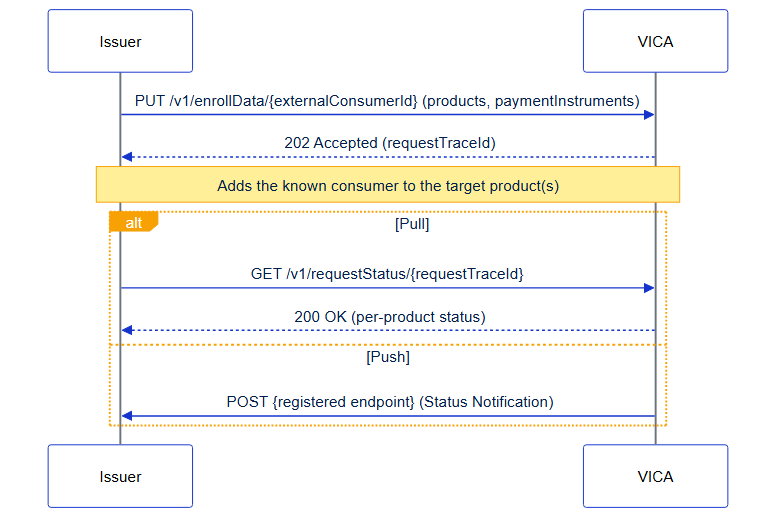
When a consumer is already enrolled in one product (for example, Click to Pay), add them to another product without resubmitting full consumer information. The consumer is identified by path parameter; the body carries the target product(s) and a payment instrument.
PUT /enrollData/{externalConsumerId}
Returns HTTP 202 Accepted.
Figure: enrolling a known consumer into another product is asynchronous - VICA returns 202 Accepted; confirm the outcome via Request Status (pull) or a Status Notification (push).
{
  "products": [ { "productCode": "ALIAS_DIRECTORY_SERVICE" } ],
  "paymentInstruments": [
    {
      "type": "CARD",
      "accountNumber": "4111111145551140",
      "nameOnCard": "Alex Miller",
      "expirationDate": "2030-01",
      "billingAddress": {
        "addressLine1": "1000 Market Street", "city": "San Francisco",
        "state": "CA", "postalCode": "94105", "country": "USA"
      }
    }
  ]
}
The products array can include more than one product to add the consumer to several at once.
Returns 202; outcome via Request Status. For the complete schema, see API Reference.
When both the consumer and a specific payment instrument are already known by their reference identifiers, add that pair to additional product(s) without resubmitting payment-instrument details.
PUT /enrollData/{externalConsumerId}/paymentInstruments/{paymentInstrumentReferenceId}
Returns HTTP 202 Accepted.
| Parameter | Description |
|---|---|
| externalConsumerId | The issuer-provided consumer identifier (UUID format) |
| paymentInstrumentReferenceId | The Visa-assigned reference ID for the instrument (max 32 characters), from Get Data |
Figure: enrolling a known consumer + instrument into another product is asynchronous — VICA returns 202 Accepted; confirm the outcome via Request Status (pull) or a Status Notification (push).
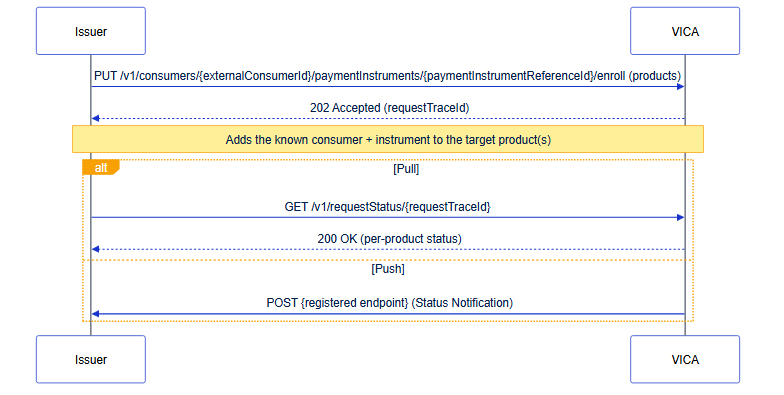
The body contains only the products array; both the consumer and instrument are identified by path parameters.
{
  "products": [ { "productCode": "ALIAS_DIRECTORY_SERVICE" } ]
}
Returns 202; outcome via Request Status. For the complete schema, see API Reference.
Retrieve the outcome of an asynchronous request. Synchronous - returns HTTP 200. The requestTraceId is valid for 7 days from receipt.
GET /requestStatus/{requestTraceId}
Figure: Request Status is synchronous — a single 200 OK returns the overall status and a per-product details[] array (items may be SUCCESS, FAILED, or IN_PROGRESS). The requestTraceId is valid for 7 days.
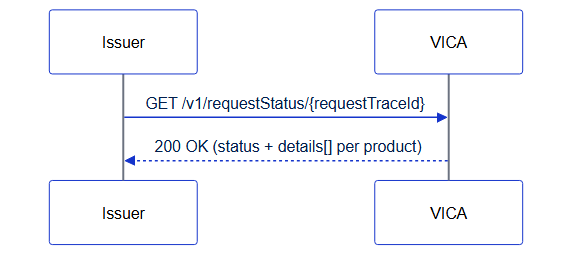
The top-level status reflects overall processing; the details[] array carries one item per product. A product-keyed item reports failures in a structured errorDetails object.
{
  "status": "COMPLETED",
  "consumerInformation": {
    "externalConsumerID": "63421837-d597-4f0f-89e4-930c1a7b9e85",
    "externalConsumerIDOwnerBID": "10098765"
  },
  "details": [
    {
      "productCode": "CLICK_TO_PAY",
      "status": "FAILED",
      "errorDetails": [
        {
          "field": "consumerInformation.locale",
          "reason": "VIDC-1000",
          "message": "The consumerInformation.locale is missing"
        }
      ]
    }
  ]
}
A product-keyed item may report IN_PROGRESS if still processing. For reason-code meanings, see Errors and Troubleshooting. How items are keyed (intent vs productCode) depends on the Request pattern.
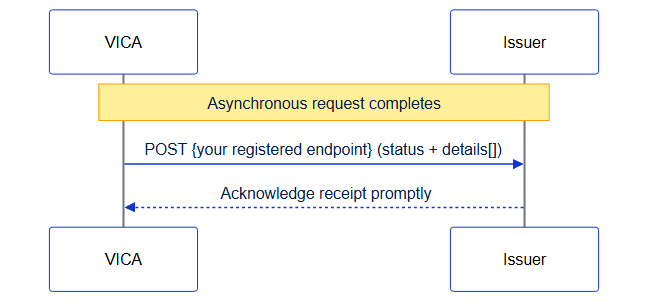
Instead of polling Request Status, you can have Visa push the outcome to an endpoint you host. Visa calls your registered endpoint when an asynchronous request completes.
POST /{your registered endpoint}
Register the endpoint in Visa Developer Platform (VDP). You must secure and operate the receiver — see Authentication & Security › Securing Outbound Notification Endpoints. Notifications are sent only after processing completes, so every details[] item is terminal (SUCCESS/FAILED).
Figure: with notifications the direction is reversed —
Visa is the caller, pushing the completed outcome to the endpoint
you host. Acknowledge receipt promptly and process asynchronously.
The success-response contract is pending confirmation — see
{
  "requestTraceId": "351562ba-83cf-11ee-b962-0242ac120002",
  "status": "COMPLETED",
  "consumerInformation": {
    "externalConsumerID": "63421837-d597-4f0f-89e4-930c1a7b9e85",
    "externalConsumerIDOwnerBID": "10098765"
  },
  "details": [
    {
      "productCode": "CLICK_TO_PAY",
      "status": "SUCCESS"
    }
  ]
}
Acknowledge receipt promptly and process asynchronously; de-duplicate on requestTraceId. For the authoritative payload schema, see API Reference.
When a consumer initiates a Click to Pay self-enrollment and you are enabled for Issuer Offered Click to Pay (IoC), Visa calls your registered endpoint so you can be notified of the consumer's intent to enroll into Click to Pay. The endpoint is configured in VDP and mapped to account ranges in Visa Digital Configuration Service (VDCS) by Visa Client Configuration Management (CCM).
POST /{your registered endpoint}
Secure and operate this receiver endpoint yourself — see Authentication and Security.
{
  "accountNumber": "4111111145551140",
  "firstName": "Alex",
  "lastName": "Miller",
  "email": "[email protected]",
  "phone": "16504005555"
}
Target several products in one request; each is processed independently, and a failure in one does not affect the others. Up to four products can be included.
See Core Concepts › Request Patterns for the intent / products / intent + products decision and the response-keying rules. New integrations should use products.
Figure: a multi-product request returns one 202; each product is processed independently and reports its own outcome as a separate item in details[].
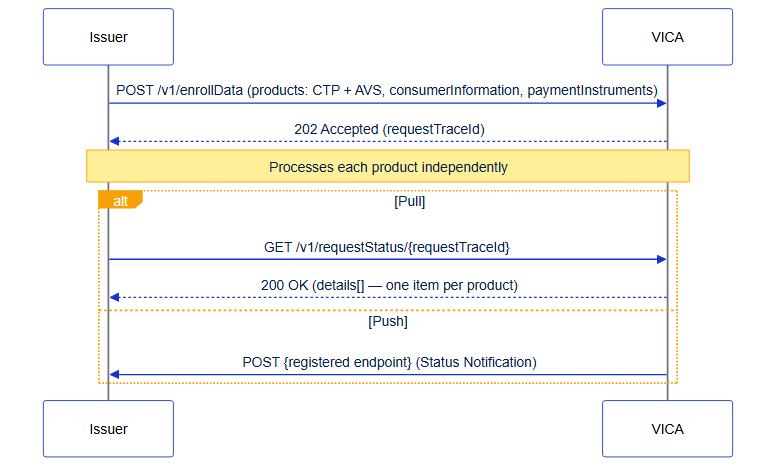
A single Enroll Data call enrolls the consumer and card into both products. Each product reports its own outcome.
{
  "products": [
    { "productCode": "CLICK_TO_PAY" },
    { "productCode": "ADDRESS_VERIFICATION_SERVICE" }
  ],
  "consumerInformation": {
    "externalConsumerID": "a1b2c3d4-e5f6-7890-abcd-ef1234567890",
    "externalConsumerIDOwnerBID": "10098765",
    "firstName": "Sarah", "lastName": "Johnson", "countryCode": "USA",
    "locale": "en_US",
    "emails": ["[email protected]"], "phones": ["13105551234"]
  },
  "paymentInstruments": [
    {
      "type": "CARD", "accountNumber": "4111111145551142", "nameOnCard": "Sarah Johnson",
      "expirationDate": "2031-06",
      "billingAddress": { "addressLine1": "750 Oak Avenue", "city": "Los Angeles",
        "state": "CA", "postalCode": "90001", "country": "USA" }
    }
  ]
}
Returns 202. Inspect the details[] array in Request Status / Notification for the per-product outcome.
Get Data can retrieve several products in one call. It always returns HTTP 200; each product is a separate data[] item that succeeds or fails independently. Get Data is supported for CTP and ADS; AVS and ANI return item-level VIDC-1003.
Sample response — one product succeeds, one unsupported
{
  "data": [
    {
      "productCode": "CLICK_TO_PAY",
      "consumerInformation": { "externalConsumerID": "consumer-abc-001" },
      "paymentInstruments": [ { "type": "CARD", "lastFour": "1140" } ]
    },
    {
      "productCode": "ADDRESS_VERIFICATION_SERVICE",
      "errorDetails": {
        "reason": "VIDC-1003",
        "message": "GET_DATA operation is not supported for this product"
      }
    }
  ]
}
The full set of multi-product scenarios (both succeed, partial failure/timeout VIDC-1002, consumer-not-found VIDC-1001, all fail, and intent-keyed variants) is enumerated in Errors & Troubleshooting › Error Handling for Multi-Product Requests. For the authoritative schema, see API Reference.
 Start a Project
 API Overview
 API Reference