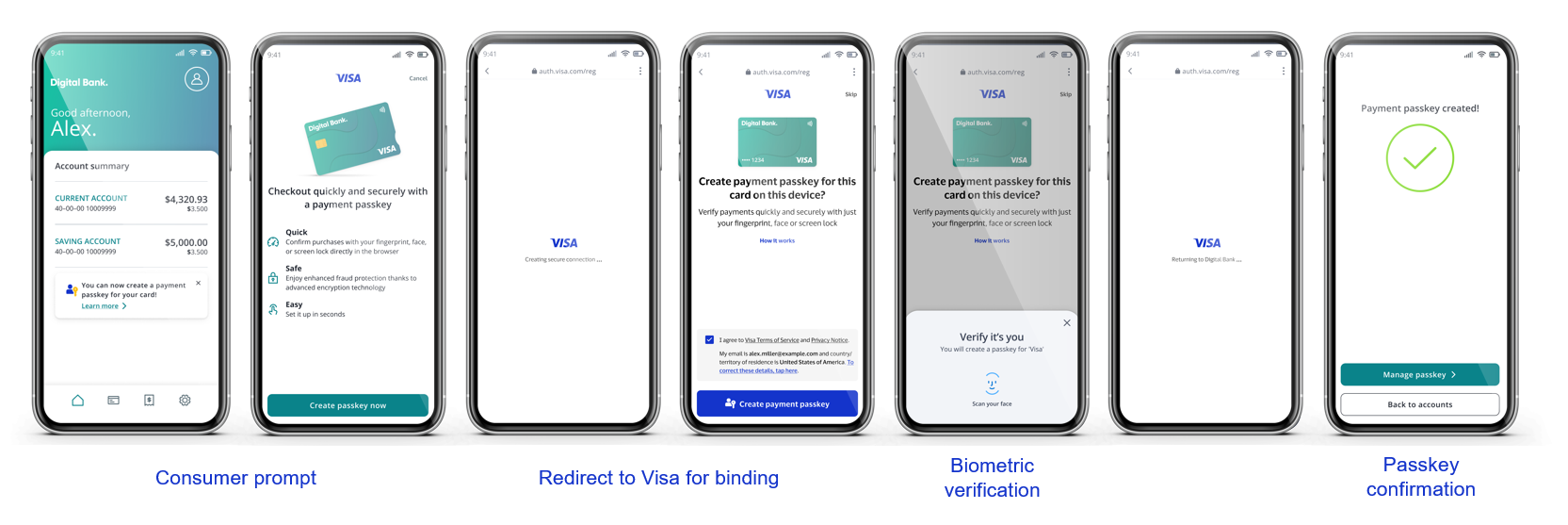
Visa Payment Passkey for Issuers

Visa Payment Passkey (VPP) enables issuers to securely offer enrollment and management of Visa Payment Passkeys directly through their own digital channels, enhancing security and user experience while eliminating the need for separate cardholder verification during registration.

It is a method for verifying payments by enabling device-based authentication across all participating merchants and Visa card-not-present acceptance solutions. Built on industry-leading FIDO (Fast Identity Online) protocols, it utilizes public key cryptography to enhance security. Unlike traditional passwords, Visa Payment Passkey employs unique keys for each PAN, making it highly resistant to phishing attacks, interception, and theft. The private key is securely stored on the cardholder’s device and never transmitted over the network, ensuring that malicious websites cannot access it. During verification, only the previously registered device enrolled in Visa Payment Passkey can be used, referencing the unique keys created during enrollment to provide an additional layer of security.

Issuers can allow cardholders to enroll and manage their passkeys conveniently within the issuer’s domain to maintain strong cardholder relationships. The cardholder’s login to the issuer domain (e.g., website or mobile banking app) will account for cardholder verification prior to passkey creation. At the time of enrollment, this verification is then authenticated when the passkey is subsequently used for device authentication, driving confidence in approval decisions.


Issuer API Suite

Visa Payment Passkey is a suite of APIs for Visa partners and Integrators. These are included within the Visa ID & Credential product to streamline onboarding and connect issuers with an array of API products under one project. 

The Visa Payment Passkey API suite includes the following:

  1. Scope API - Defines the scope of a session based on provided payment credentials.
  2. Create Passkey API – Generate registration URL that can be used to redirect cardholders for Visa Payment Passkey enrollment.
  3. Search for Passkeys API – Retrieve a list of all passkeys for a given set of payment credentials.
  4. Delete Passkey API – Delete an individual passkey or delete all passkeys for a given payment credential in response to user request or issuer led reason (i.e. account closure, fraud detected etc). The type of deletion is dictated by the payload request.
  5. Update Passkey Device Name API – Update “nickname” of device associated with passkey for ease of recognition by cardholder.

Note: Additional client-side integration is required to enable E2E Visa Payment Passkey functionality.

Getting Started

  1. To access the Visa Payment Passkey (VPP) APIs, clients must agree to adhere to the VPP Product Terms. 
  2. There are two initial components of connecting with the VPP platform in addition to onboarding to VDC to enable E2E VPP functionality. Please coordinate with your Integration Owner and your regional Visa representative for this step.
    • Onboarding to the VPP Platform - The VPP Integration Support team will aid in this step. During this process, the VPP Integration Support team will create an APN and vendorUniqueId for the Integrator. This APN acts as the unique identifier that will be used in subsequent steps to establish connections and ensure proper routing. 
    • Provisioning with VPP - The VPP Integration Support team will set provisioning metadata for VDC integration testing with VPP for test VDC client.
  3. To access VPP APIs, developers need to register, and then log in to, Visa Developer Center (VDC) to obtain required credentials in the form of API keys and other cryptographic key material. See the Visa Developer Center Quick Start Guide for further details on access.
    • In the sandbox, VPP APIs can be used by any developer with registration and acceptance of VDC Terms and Conditions; however, only participating Visa partners will be able to use these APIs in production. In the event of any conflict between this specification and the VDC Agreement, the VDC Agreement shall govern and control.
  4. Clients will onboard to VDC through Visa ID & Credential during project creation. Reach out to [email protected] to request VPP APIs to be unrestricted along with your BID. Visa Developer Customer Support will aim to respond to your request in 24-48 hours. 
  5. Once the appropriate credentials have been created, a registered user is logged into VDC, and VPP APIs have been unrestricted, a new project can be created to add the VPP APIs. Refer to Create a Project video for more details.
  6. Additional details are available in the Visa Developer Quick Start Guide including documentation on Authenticating the APIsCertificate ExpirationOutbound Configuration and Message Encryption.
  7. Once you have created your project and added the appropriate VPP APIs, you can Develop and Test your Project.
  8. Contact your Visa representative for further details.


Issuer Visa Payment Passkey User Experience

Enrollment via Issuer App

Life Cycle Management via Issuer App