Getting started with Visa Direct
Visa Direct for Card programs require the Originator to be either a licensed Visa Acquirer or a Third -Party Originator sponsored by a licensed Visa Acquirer.¹ The Originator is the entity that initiates a Visa Direct transaction.
Before launching a program, the Originator must ensure that all stages of the transaction processing are fully implemented and effectively managed, including transaction submission, financial settlement, dispute management, and reporting. While the APIs support certain aspects of transaction processing, particularly financial transaction submission. The Originator remains responsible for ensuring end to end support of the complete transaction lifecycle.
An Originator may proceed to production only upon demonstrating full end-to-end accountability for all transaction processing components.
What is Visa Direct for Card?
Visa Direct for Card is part of the Visa Direct portfolio of money movement solutions.
Visa Direct for Card offers Pull (Account Funding Transaction (AFT)) and Push (Original Credit Transactions (OCT)) APIs over the VisaNet platform, using card credentials to route payments to linked bank accounts, supporting domestic and cross‑border transfers with fast authorization, real‑time settlement, and global reach.
Visa Direct for Card is used for:
- AFTs / Pull Funds Transaction: Using Visa card credentials, funds are pulled from the bank account linked to the card to fund another account belonging to the user (“me to me”), or to funds can be requested from a Sender (“me to you”). Like a purchase transaction, the AFT debits the cardholder’s bank account (that is linked to the Visa card). AFT’s can be used for domestic, or cross-border transactions.
- OCTs / Push Funds Transaction: Funds are pushed to the bank account linked to a Recipient’s account using the Visa card credentials.
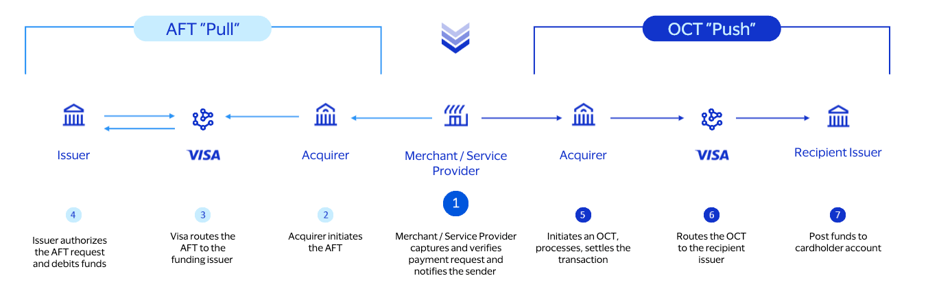
Note: Actual fund availability varies by receiving financial institution, receiving account type, region, and whether the transaction is domestic or cross-border. For country level information, contact your Visa representative.
Who Can Use it?
Visa Direct for Card is available globally.
See the Visa Direct for Card (AFT & OCT) Service Guide for eligible Visa card account types and market specific restrictions.
To view availability of all products, see the Availability Matrix.
Why Use it?
Visa Direct for Card can help your business provide fast, convenient, and secure digital payment experiences to enhance existing offerings or provide new classes of domestic and cross-border payment services. Supported use cases include:
Pull funds (AFTs):
- Loading or topping up a prepaid card account (me-to-me)
- Funding a person-to-person (P2P) money transfer
- Moving funds from one account to another account
- Funding certain types of digital wallets
- Credit card bill payment
Push funds (OCTs):
- Money transfer, person-to-person (P2P)
- Businesses disbursing funds (B2C)
- Merchant settlement (marketplace seller earnings)
- Gig worker earnings
- Content creator earnings
- Gaming/gambling payout
- Loyalty and offers payouts
- Insurance claim payouts
- Sending funds to a prepaid card account
See the Visa Direct for Card (AFT & OCT) Service Guide for detailed use case examples.
Implementation Overview
All Visa Direct for Card projects undergo a review and approval process at Visa. Approval to move a project into production requires the ability to support the full transaction lifecycle not just successful API testing.
Contact your Visa representative early in the process to ensure your project meets the criteria permitted for a Visa Direct for Card program.
Complete Forms
To participate in the Visa Direct for Card program, you must complete the required forms including the:
- Program Information Form (PIF)
- Solution Requirements Form (SRF)
Contact your Visa representative for information on obtaining any necessary forms.
For full details on program approval, licensing, registration and required forms, see the Visa Direct for Card (AFT & OCT) Service Guide.
Sandbox Testing
After building your API integration, you can test your implementation in the sandbox environment. The sandbox environment is a simulated environment, where you can verify payload encryption and validate credentials, including API field validation.
All pull (AFT) and push (OCT) transactions must include an Acquiring BIN to enable transaction processing through Visa. Sandbox test credentials (including test Acquiring BINs) can be obtained in your project dashboard.
Certification testing is available once sandbox testing is successfully completed.
Certification Testing
You can perform end-to-end testing of the full transaction lifecycle in the certification environment before going live. Visa’s testing team may attend to administer your certification.
After certification testing is successfully completed, you will receive credentials for production onboarding. Contact [email protected] for details.
Contact Us
For regional support, contact your Visa Direct team:
Related Products
Foreign Exchange Rates
Access Visa's reference FX rates to support currency conversion.
Payment Account Attributes Inquiry
Retrieve key attributes of a payment account to support routing and eligibility checks.
Payment Account Validation
Validate a Visa account before initiating a transaction.
¹ Contact your Visa representative for details on Visa’s licensing requirements.